


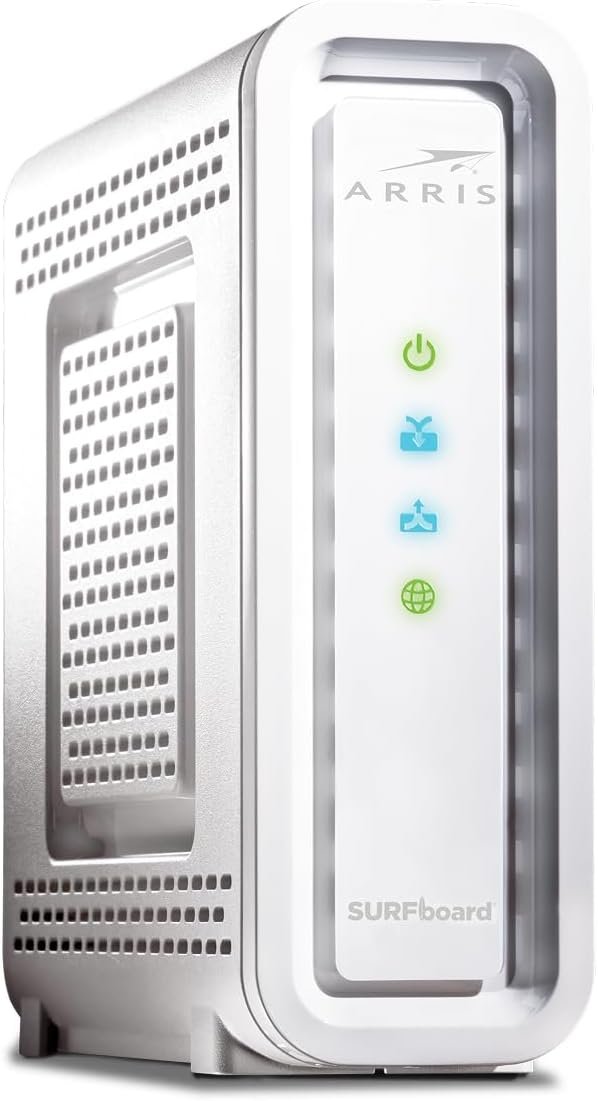
The ARRIS SURFboard SB6190 is a DOCSIS 3.0 cable modem with 32 downstream x 8 upstream bonded channels, making it a perfect addition to your home network. The SB6190 is best for cable internet speed plans up to 800 Mbps.
32 downstream x 8 upstream DOCSIS 3.0 bonded channels
1 Gigabit Ethernet port for connecting to a Wi-Fi router or other device.
Cable internet service required. Does not inlcude Wi-Fi and does not support cable digital voice service.
arris
32×8 Cable Modem

IDISON Multi Charging Cable(2Pack 4FT), 3 in 1 USB Charging Cable for Multiple Devices, Braided Universal Phone Charger Cord with Type-C, Micro USB, IP Port for iPhone17/16/14/Android Phones and More
Original price was: $9.99.$7.19Current price is: $7.19.
-12%


Dennis C –
Harris Surfboard
This was just like my old one, lasted about 5 years, hope to get that again
LockerMan –
Great. value for money
Great. value for money. you don’t need expensive this is max you need
John L. –
For the most part this is a good thing; the hardware cost is reduced and consumers …
The signal to noise ratio on these reviews is unbelievable. I have no possible hope that my review could influence the overall score of this device, but I can tell you that if you are one of the lucky people who happen to stumble upon reading my review, please consider my review in the proper context. Part of my trade is a network engineer, but I do not want to bore anyone with technical details. I will try to explain things in terms that are very straightforward:Many cable modems are built with the same or similar components which are developed by chip manufacturers. This particular modem is built using a chip family made by Intel with the brand name “Puma” which is a low cost chip which integrates a lot of the hardware necessary to build a cable modem onto a single chip. Several manufacturers use these chips to build modems, and different models by the same manufacturer may use different vendors’ chips. For the most part this is a good thing; the hardware cost is reduced and consumers can enjoy a better product with more consistent and reliable performance.Sometimes though this is not the case. Intel Puma chips have several severe problems which have not been addressed, and it is further unclear if the problems are even able to be addressed. The first problem is a security issue which allows anyone on the Internet to block your cable modem from sending or receiving traffic. The second is an issue where in certain common circumstances the cable modem will have problems sending or receiving data in a timely manner.Both of these problems can lead to temporary complete loss of service or can appear to simply be slow or unreliable service. Because people have come to expect that their home Internet service is occasionally slow and unreliable, these fundamental faults are often overlooked as trouble. Likewise certain types of testing which do not provoke the problems reveal a modem which appears to perform admirably in most circumstances, and so many are left with an overall favorable impression.I have no doubt that the people leaving good reviews about this modem are sincere; but I also have no doubt that they have experienced trouble and overlooked problems with their cable modem as problems with their connection or service provider. Sadly, answering the question regarding which alternate product one should purchase is equally difficult because it is highly dependent on your cable provider. It could be that a 24×8 Broadcom modem such as the Netgear CM600 is the best choice, but it could also be that a SB8200 DOCSIS 3.1 modem is the best choice. But there is one thing for sure: the SB6190 is to be avoided.
Godelieve De Keersmaecker –
Very good product
This was the same modem I had owned for years and I have always been satisfied with it, that’s why I ordered the same model now. It is already installed now and working perfectly. I did want to mention that the Xfinity installer had a hard time finding the “code” number and wondered why it was shipped in a plain white box, since it was supposed to be new and was labeled as new. He commented that all the new ones he had seen were always in an original box from the company. Also there was no copy of the 2 year warranty enclosed.
Distiya –
THE BEST!!
Can’t beat ARRIS!!!!
Scott –
Love the new modem!!
I just upgraded from the Motorola SB6141 to the new modem which still works but wanted to be future proof for a few years. DOCSIS 3.1 modems are due to be released this year but at this point not even sure if Comcast can support it in my area. Also said to be much more expensive than the 3.0 versions. Figured for $149 can’t go wrong with it.Now I’ve read through the comments of some issues with Comcast of not getting an IP after the modem is hooked up. For me I was able to successfully activate this modem online without issues. It took awhile for the modem to get the configuration file and firmware updates from Comcast. Then I opened up Firefox to be greeted with Comcast activation page. Then the modem rebooted which is expected to get the final configuration file.After that everything worked perfectly. Same speeds as SB6141 but wanted updated hardware and much better WebGUI. There are a a few things I have noticed with this new modem. I will list those in PROS and CONS:PRO:Same size as the old modem. Can’t complainThey moved the activity light to the back directly onto the network port. Love it. Had to use electrical tape on the old modem because the bright flashing light is too distracting.Much improved WebGUI that it no longer looks like website from the 1990s. Not that it really matters once the modem works you rarely ever see it.CONS:The boot up process takes alot longer than the old modem. I suspect is due to number of channels it has to go through and start bonding them. Once it’s up and running it should stay up without issues.It will run hot. Right now it’s winter in Northern California so it’s pretty cold in my house. Before I disconnected the old modem the heat feels the same as the new one. So it will get hot during the summer same as my old unit. I don’t think it’s going to be an issue but beware to give it plenty of space around the modem to breathe.Not a fan of white case but it works.This is my forth Motorola modem over the years. Had SB4100 all the way up to this new one and none of them gave me a problem. Even though Arris now owns Motorola with Arris label it is still a Motorola to me which is a good thing.I do need to mention for those with IP problems during the initial setup is the the router connected to the modem needs to be set to DHCP on the WAN so Comcast can send special DNS server IPs for the activation. Once that is done and modem reboots it’ll revert back to 75.75.75.75 DNS address. From there you can use Google DNS 8.8.8.8, OpenDNS or even Comcast’s.If you can’t change the router DNS to use DHCP WAN then best just plug your computer directly into the modem until it’s fully activated and updated. Then from then on you can use it normally. Hope this helps to save you some grief.
Pier-Luc –
nice product work with my provider