






Product description

About Buffalo
Buffalo Americas has been a leading provider of easy-to-use technology solutions and acclaimed pre- and -post sales support for over 45 years. We build top-quality storage, networking, and other technology-related solutions that simplify your experience and deliver a solid return on your investment.
Our LinkStation network attached storage (NAS) devices are designed to be an easy-to-use centralized data storage solution and personal cloud so you can back up your important files and securely access and share them from anywhere with an internet connection.
Buffalo data storage solutions showcase security, stability, and simplicity, so you can manage your data with peace of mind.

 Pre-Tested Hard Drives Included
The LinkStation 700 includes pre-tested hard drives for out-of-the-box usability, saving you the time and hassle of sourcing and installing drives.
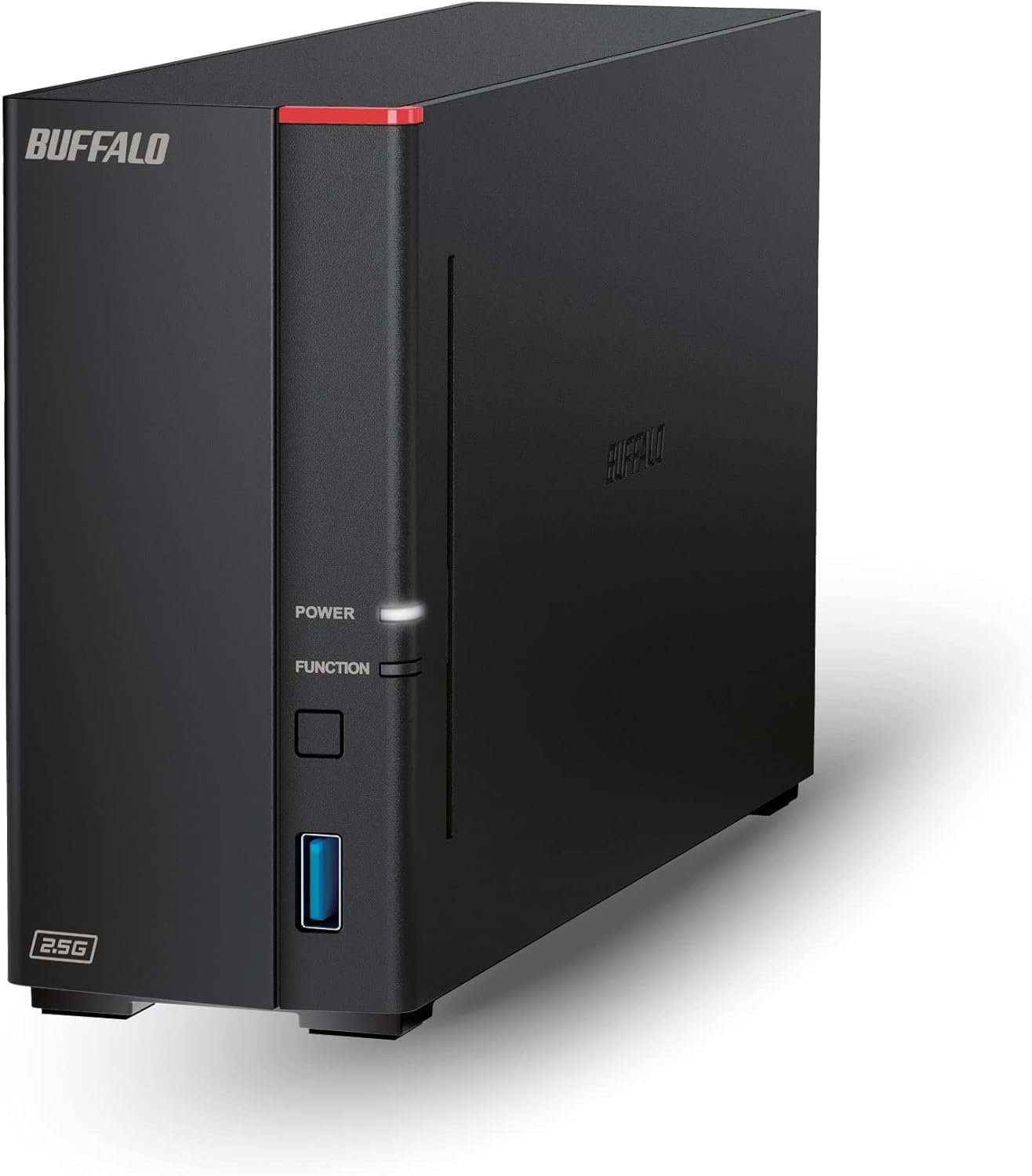
LinkStation 700 Series Network Attached Storage
High-Performance Personal & Hybrid Cloud Storage Solution
The LinkStation 700 is a reliable and easy-to-use network storage solution and personal cloud that is perfect for storing your most important digital data in a central location and accessing it from anywhere.
You can stream data to DLNA devices on your network and enjoy uninterrupted access to terabytes of storage, as well as easily back up multiple PC and Mac computers to the same secure location.

Supports any Windows, macOS, Linux, iOS and Android device.
Easy to use with your smartphone or tablet devices – No computer needed.

Store and stream all of your movies, music, and videos with 2GB of RAM for smooth file operations.
Stream Video / Music / Photos to a TV with ease.

LinkStation 700 is your own personal cloud that you can access from anywhere.
With capacities of up to 16TB, you can easily store, back up, or share all your files without needing to pay any monthly charges.
And if you already use a cloud service such as Dropbox or OneDrive, simply sync it up with the LinkStation as a hybrid cloud.

You can be confident that your data is secure when you store it on the LinkStation 700.
This device features a closed system, which is a strong deterrent to hacking, and uniquely provides SSL encrypted access so you can securely access data on the device.

LinkStation 700 comes with hard drives installed and RAID pre-configured for effortless setup. Just plug into router log in to the NAS and start storing your data.
The native 2.5GbE port enables Multi-Gig Ethernet speeds without needing to purchase additional cabling.

Hard Drives Included
LinkStation 700 ships with pre-tested hard drives included for minimal hassle setup.
Peace of Mind with Buffalo Services
LS700 comes with a 2-year product support and replacement service on all components, including hard drives.
Add to Cart
Add to Cart
Add to Cart
Add to Cart
Customer Reviews
3.9 out of 5 stars 3,141
3.9 out of 5 stars 3,141
3.9 out of 5 stars 3,141
3.9 out of 5 stars 3,141
4.3 out of 5 stars 40
Price
$289.99$289.99 $379.99$379.99 $139.99$139.99 $329.99$329.99
— no data
Use Case
High-performance Fast Home NAS & Private Cloud High-performance Fast Home NAS & Private Cloud Economical Home NAS & Private Cloud Economical Home NAS & Private Cloud Value-focused NAS with professional business features
Number of Drives Included
1 2 1 2 2
Total Capacity Range
2 – 8 TB 4 – 16 TB 2 – 6 TB 4 – 12 TB 4 – 16 TB
Included Drive Type
Standard-grade (CMR) Standard-grade (CMR) Standard-grade (CMR) Standard-grade (CMR) NAS-grade (CMR)
Ethernet Ports
1 x 2.5GbE 1 x 2.5GbE 1 x 1GbE 1 x 1GbE 1 x 2.5GbE, 1 x 1GbE
CPU / RAM
1.3 GHz Hexa-Core / 2 GB 1.3 GHz Hexa-Core / 2 GB 800 MHz Dual Issue / 256 MB 800 MHz Dual Issue / 256 MB 1.4 GHz Quad-Core / 1 GB
RAID Levels
NA 0/1 NA 0/1 0/1
Cloud Backup Support
Yes Yes No No Yes
NovaBACKUP (Buffalo Edition)
5 PC licenses 5 PC licenses 5 PC licenses 5 PC licenses 1 server & 10 PC licenses
Get enhanced features, cloud capabilities, MacOS 26 compatibility, and up to 7x faster performance than LS 200.
Connect the LinkStation to your router and enjoy shared network storage for all your devices. The NAS is compatible with Windows and MacOS 26, and Buffalo’s US-based support is on-hand 24/7 for installation walkthroughs.
Subscription-Free Personal Cloud – Store, back up, and manage all your videos, music, and photos and access them anytime without paying any monthly fees.
Storage Purpose-Built for Data Security – A NAS designed to keep your data safe, the LS700 features a closed system to reduce vulnerabilities from 3rd party apps and SSL encryption for secure file transfers.
Back Up Multiple Computers & Devices – NAS Navigator management utility and PC backup software included. You can set up automated backups of data on your computers.
Securely Share Files With Family & Friends – Configure individual access restrictions for folders to ensure your data remains private and securely share storage space or files with others.
2 TB Total capacity – 1 Drive Bay, HDD included.
Secure and Centralize Your Data – Use the NAS as a central storage and backup location. No more searching through different external drives or cloud accounts.
Cloud Integration – Sync with Dropbox, Azure and OneDrive to create a hybrid cloud for extra data security, cost savings, and flexible scalability.
Quality Devices – Made in Japan and backed by 24/7 US-based support and 2-year warranty, including hard drives.


Caprano –
Works well
Set was easy and smooth. Able to transfer data to device without a problem. The only issue I do have is that my LG TV will not show it. Got a work around for it though. Would recommend
Jungle guy –
Streamlined Data Management
The BUFFALO LinkStation 710 8TB 1-Bay NAS Network Attached Storage is a reliable and efficient solution for individuals and small businesses seeking centralized storage and easy access to their digital content. As someone who values simplicity, reliability, and versatility in data management solutions, I find this NAS to be an excellent choice for streamlining storage and enhancing productivity.First and foremost, the storage capacity of the LinkStation 710 is impressive, offering 8TB of storage space for housing large volumes of files, documents, media, and more. Whether used for personal use or small business applications, this NAS provides ample room for storing and organizing digital content, making it easy to access and share files across multiple devices and platforms.Additionally, the performance of the LinkStation 710 is commendable, thanks to its powerful hardware and efficient software management. The dual-core processor ensures smooth and responsive operation, while the built-in DDR3 memory enhances data transfer speeds and multitasking capabilities. Whether streaming multimedia content, backing up files, or accessing data remotely, this NAS delivers consistent performance with minimal latency.One of the standout features of the LinkStation 710 is its user-friendly interface and intuitive setup process. The web-based administration interface allows for easy configuration and management of the NAS, making it accessible to users of all skill levels. With features like automatic data backup, RAID support, and remote access via mobile apps, BUFFALO has designed a NAS that meets the needs of both novice and experienced users alike.Furthermore, I appreciate the versatility and connectivity options offered by the LinkStation 710. With multiple USB ports and a built-in Gigabit Ethernet port, users can easily expand storage capacity, connect peripherals, and share data with other devices on the network. The ability to integrate with cloud storage services further enhances flexibility and accessibility, allowing users to seamlessly sync and backup data across multiple platforms.In terms of reliability, the LinkStation 710 excels with its robust build quality and data protection features. The durable chassis and fan-less design ensure quiet operation and long-term reliability, while features like RAID support and automatic backup provide peace of mind against data loss. With BUFFALO’s reputation for quality and durability, users can trust the LinkStation 710 to safeguard their valuable digital assets.Overall, I am highly satisfied with the BUFFALO LinkStation 710 8TB NAS Network Attached Storage. Its ample storage capacity, performance, user-friendly interface, versatility, and reliability make it an excellent choice for individuals and small businesses seeking a streamlined and efficient solution for data management.Pros:Ample 8TB storage capacity for housing large volumes of digital contentPowerful hardware and efficient software management for consistent performanceUser-friendly interface and intuitive setup process for easy configuration and managementVersatile connectivity options including USB ports and Gigabit EthernetRobust build quality and data protection features for long-term reliabilityCons:May require some initial setup and configuration for optimal performanceHigher price point compared to basic external hard drives, but worth the investment for the featuresand capabilities offered
Consistent Customer –
has constant intermittent connectivity issues
I gave this a chance because the price was so much better than the Synology NAS since disks were included. I have been trying to get network-attached storage set up so that I can have a location for my Time Machine backups.What I do like about it:- Disks are included which theoretically make things easier (and cheaper)- It has two drive bays and RAID 1 is automatically enabled, which is probably what most people want.- It also has some utilities for working with RAID including RAID scanning.- It has clear instructions for how to turn it on/off without damaging the disks.- The box itself is stylish and not overly largeSetup was a bit worse. The Quick Start guide is sort of like an IKEA instruction booklet – not the greatest but you can figure out what they want you to do. However the user interface was otherwise a little confusing, for example they have two separate iPhone apps in addition to the laptop app, the download page is a bit clunky, there aren’t any downloads for recent Mac versions (you have to go with a several-year-old Mac version), etc. On the whole the software was not confidence-inspiring.But whatever, that didn’t bother me too much – I just wanted to get Time Machine setup. As long as that works, I don’t care about the rest. So I followed the instructions and it seemed like it was working. But then it just cut out and stopped. This happened several times. From Googling I got the idea to ping the NAS to see if it was connected, and sure enough, the problem seems to be that the NAS and the laptop can only connect intermittently.From the record of my pings, I can see that they are connected 5-10% of the time, and disconnected the rest. That’s not a great ratio. The NAS is connected to my WiFi router by Ethernet. My laptop, WiFi router, and NAS are all in the same room. I purchased my WiFi router 2-3 years ago. During the time when my laptop cannot connect to the NAS, I can still browse web pages. That’s particularly confusing because it means that there’s no problem with my laptop’s connection to the WiFi router, and the router and NAS are connected by Ethernet. I’m not sure what I’m missing.Unfortunately this seems to be a common problem with NAS routers, and I don’t really know the solution. My old Apollo had a similar problem I think. However, I think that Buffalo should provide troubleshooting instructions for attempting to address these problems. If they can’t fix this problem, I think they should just stop selling their product.
Bushwacker –
High quality, not the easiest setup
This NAS works well, though the setup guide leaves out some critical details. The issue wasn’t basic setup as much as problems connecting to devices needing backup (the primary reason I bought this product).The solution was using a 3rd party backup solution. I went with Duplicati (easy and open source), but other solutions probably work great too.I don’t agree that this product is ideal for home users, but it’s great for SMBs or tech savvy consumers who don’t trust proprietary cloud dependent solutions.
Rick C. –
Easy to setup
No trouble with setup or updating firmware. I was worried after reading some of the reviews but decided to try it anyway. No worries! I downloaded the software, changed the password, setup a share and am off and running. Speed seems fine so far. I would buy this again!
Retired One –
LinkStation LS210DE19 – 2T byte single drive NASI started using NAS well over 10 years ago. My first NAS (which is still in use is a Buffalo LS-GL284 250 Gbytes) and is around 90%+ full. So then I bought a second Buffalo NAS LS-XLFA8 2T byte unit a few years back but it has become intermittent with an overheating problem causing frequent shutdowns. The files I store on the NAS are not that critical BUT I still wouldn’t like to lose them. Consequently I decided to turf the XLFA8 2T unit and buy a new LinkStation LS210DE19 – 2T byte single drive NAS (and also because it was on sale).As a lot of other reviews state – setup is “not easy” but once set up the NAS does what it’s supposed to do. The instruction sheet that comes with the unit for set-up is less than useless and the CD…. well, it does make a good coffee coaster.I found the “Online Manual” for the NAS to be excellent but at 133 pages in length “ya gotta have patience”. I actually found it a good reference manual after I figured out how to set up the NAS.I set up the NAS using NAS NAVIGATOR2 to find it’s IP address on my LAN and then used the NAS management GUI to perform the setup. After about 6 hours the NAS was up and flying. The area’s I configured on the NAS were the:• Basics – Time, NAS Name, etc• Power management schedule• Local User Names and their privileges• Files folders, their shares and Access Restrictions• Network IP, etc• WebAccess to the NAS (I use an Android phone and the Buffalo WebAccess app)So as can be seen, there are a lot of area’s that I have not set up (RAID / BACKUPS / FTP /DLNA / BitTorrent) and a bunch of other stuff which do not use currently.I did use the NAS “USB Direct Copy” which worked well (good explanation in online manual) and NAS WebAccess on an Android phone was straight forward to set up.File transfer rates on my LAN are about 8-10 megabits /sec. For my type of activity this is OK but others would call this rate very slow. (File transfer rates via WebAccess were/are much faster!!)My final conclusions are that the NAS is a good unit, serves my purpose, is priced OK and I would recommend it to others. Now, if you are new to all of this IP stuff then – “get some help” to set it up.
fernando reyna garcia –
muy bueno
JESUS MORENTE GALLEGO –
El producto tardo mucho pero llego bien. Las instrucciones no venían en español ni en cualquier otro idioma porque eran inexistentes, hubo que buscarse la vida en internet. Después de un mes intentando configurar el dispositivo ME RINDO. La devolución me cuesta un pastón ya que hay que devolverlo a mi cargo por transporte internacional. Me he bajado instrucciones, muy malos tutoriales todos en ingles americano casi incomprensibles para mi.No digo que el producto sea malo puesto que me ha sido imposible configurarlo y usarlo, pero desde luego no es nada fácil de usar.
José Israel Reyes –
Justo lo que esperaba, lo co ecte a mi red de oficina con switc gigabit y es rápido, y el dlna funciona excelente, lo recomiendo, aparte de todo. Es silencioso
khalid m r abbas –
The BUFFALO LinkStation 720 4TB 2-Bay Home Office Private Cloud Data Storage device is truly impressive. It offers a perfect blend of convenience, performance, and reliability, making it an ideal choice for both home and office use.The 4TB storage capacity provides ample space to store all your important files and data securely. The 2-bay design allows for easy expansion and redundancy, ensuring that your data is always protected.One of the standout features of the LinkStation 720 is its private cloud functionality, which allows you to access your files remotely from anywhere in the world. This is perfect for users who are constantly on the go and need to access their files on the fly.Setting up the device is a breeze, thanks to the user-friendly interface. The device also supports multiple RAID modes for added data protection and performance optimization.Overall, the BUFFALO LinkStation 720 4TB 2-Bay Home Office Private Cloud Data Storage device is a top-notch solution for anyone looking for a reliable and versatile storage solution. Highly recommended!