


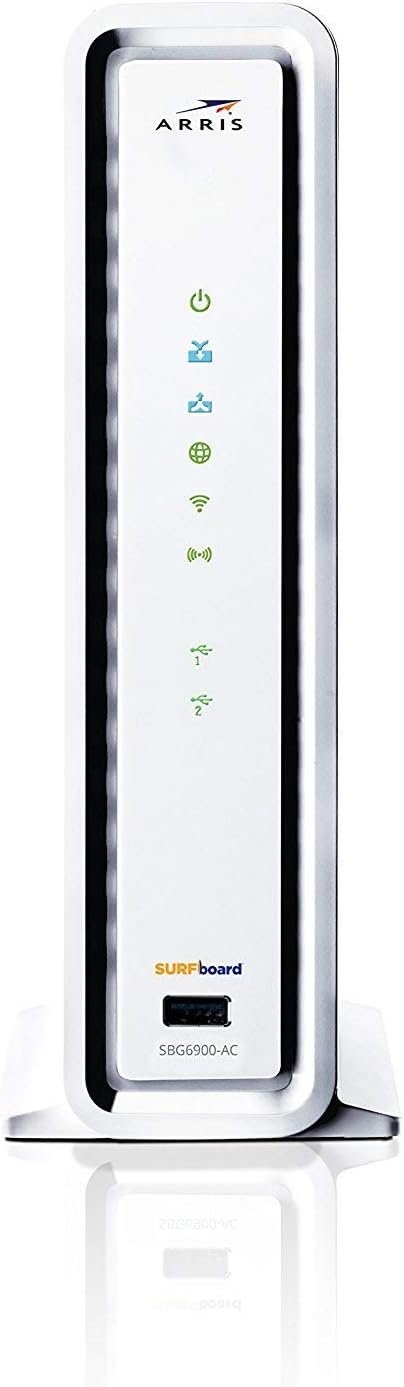
The ARRIS Surfboard SBG6900AC Cable modem & Wi-Fi router is the latest product available from ARRIS. An all-in-one, best-in-class device equipped with a DOCSIS 3. 0 cable Modem with 16 download and 4 upload channels Cable of speeds up to 686Mbps, 802. 11AC 1900 Mbps Wi-Fi dual Band router and 4-Port Gigabit Ethernet ports. Equip your home network with the most advanced modem & router available today to enhance your internet experience!
3 products in 1: 16×4 Cable Modem, AC1900 WiFi Router and Gigabit 4 port Wired Router
Ceritified on Comcast Xfinity, Cox, Spectrum (Charter, Time Warner, Brighthouse Networks), Mediacom and many other US Cable Internet Providers. Requires Internet Service.
Cable Modem is 16 Download and 4 Upload Bonded Channels with Internet Download speeds up 686 Mbps based on your Internet Service Plan. Approved for plans up to 300 Mbps.
Compatible with major U.S. Cable Providers and supports IPv4 and IPv6-the latest Internet standard. Wi-Fi beamforming – max coverage and performance
2 year warranty with US based customer service. Refer to the Quick Start Guide and Installation video.Router is AC1900 dual band WiFi with 4 Gigabit Ethernet ports. Great for streaming HD Videos and gaming.
NOTE: Refer the User Guide before use.

Highwings 8K 10K 4K HDMI Cable 48Gbps 6.6FT/2M, Certified Ultra High Speed HDMI Cable Braided Cord-4K@120Hz 8K@60Hz, DTS:X, HDCP 2.2 & 2.3, HDR 10 Compatible with Roku TV/PS5/HDTV/Blu-ray
Original price was: $7.99.$6.39Current price is: $6.39.
-85%



francisco –
Works well. Bought this for my Xfinity home wi-fi …
Works well. Bought this for my Xfinity home wi-fi so I didn’t have to rent one from them, this is totally worth it, it has a high speed low range setting, and a long range medium speed setting, after 2 months haven’t had one problem. 10/10 would buy again if this one lights on fireI just signed up with Comcast and this modem works great with their service. I initially experienced some difficulty getting my internet to work but eventually figured out that I had to reset my Apple AirPort Time Capsule.As others have commented, the lights on this modem are ridiculously bright and I reluctantly docked it a star because of that. I assume I’ll eventually have to relocate the modem if somebody needs to sleep in the spare bedroom where I keep it.his cable modem offers 32 downstream ‘channels’ and 8 upstream channels. Your download info gets spread over 32 ‘lanes’ and your upload data gets spread over 8. Like lanes in a road, not enough of them coupled with heavy traffic can result in erratic performance and loss of quality of service.You share your local loop / node with other people in your neighborhood, and perhaps other neighborhoods if you live in a rural area. What this means is that your data and everyone else’s is on a single shared medium, split up into these ‘channels’. Your cable company will ‘provision’ or tell your modem which ones to use. 32 is realistically as high as they’re going to go with this technology. Many areas already support 16 or 32. All will go to 32 before too much longer.Most customer owned/retail modems support 4×4 or at best 8×4. That means that you’re cut out of using 28 or 24 download ‘lanes’ and up to 4 upload lanes. The modem doesn’t jump around if your lane gets clogged up, you’re stuck with the ones originally provisioned to the modem when it boots.The technology used has an acronym called “docsis” which handles modem/network management, encoding of your data, and channel handling among other things. Docsis 2.0 is an old end-of-life technology that has minimal management ability, cant use lots of channels and it takes separate resources for the cable company to provide you service, which makes their costs higher, which makes your costs higher. Docsis 3.0 is the current tech and what this modem supports. It allows the cable company to remotely identify problems with your equipment and correct it, and allows them to look at whats happening when you call them. It supports bazoodles of channels and offers excellent speeds and smooth quality of service.Modems are rated for total speed which is based on channels, however this ‘ideal performance’ figure is rarely ever seen even in standard lab conditions, let alone on the 25 year old cable in your house and to the connection at the street. These speeds also presume a completely uncongested network with nobody else using it and the full complement of channels the modem supports. You won’t be getting any of that.Will this make your 50Mb/s connection go faster? I wouldn’t count on it but many people report getting higher than their paid-for rate with a higher channel modem when their area is provisioned for high channel counts. What it’ll do is give you a better shot at always having 50Mb/s and keeping your ‘ping’ times, gaming response times and netflix video quality consistent.The Arris modem is also the stock rental modem most ISP’s use, so they’re familiar with it. You can save a few bucks with different brands, but be prepared for more problems on activation and during problem situations.Many ISP’s have “end of life”d modems with docsis 2.0 and 4/8 download channel modems although they’re allowing retail/owned modems to continue being used, even though it creates problems for them and those customers aren’t getting always getting the most out of their service.Docsis 3.1 will eventually show up next year and offer even better speeds, performance and manageability but these high tier docsis 3.0 modems will continue to remain in service for quite some time, perhaps 4 or even 5 years. When you’re looking at renting a modem for $70-100+ a year, its a no-brainer to buy one. Unless you’re subscribing to extremely high bandwidth services (400+Mb/s) you can get away with an SB6183 for a little less but I’m not sure that’s a favorable economy since you’ll be saving less than a buck a month over the life of the modem.I looked hard at the Netgear CM600 and the SB6183 and decided to go with the 6190. I bought an SB6141 a little over 3 years ago and its still offering me fine service. However my area (which is a little rural on the edge of the suburbs) has been set up for 32/8 channel support and I’m seeing my speeds and quality getting a bit rough especially in the evenings. One of my friends just upped their service to a high tier and got an SB6190, so now I have modem envy.I’m looking forward to the same experience as when I went from a 6121 (4×4) to the 6141 (8×4), which was an immediately measurable and noticeable improvement in consistency and quality of service.This modem, like many others, was a little mature upon its initial release late last year and it takes ISP’s a while to process firmware updates and make them available. So while earlier reviews have had some legitimate complaints, the modem is now pretty solid on Comcast and most other providers.I’ll update the review with some numbers once I have it installed. I thought I’d give the benefit of my research on this to save others time. Frequently modem choices get limited to “but what I have now works” (similar argument made for horses when cars came out) or “but I only have 75Mb/s service and my 5 year old modem will do 120 under ideal conditions” (my steam engine will get my car to 70MPH eventually”). Its a little more involved than that.
Mauro B –
Great router, lots of power, little bulky, nicer if it came in black
Bought it because it was on the list of approved devices for my internet provider. It is performing well and keeps up perfectly with the link speed the ISP is providing (200M/20M down/up). Wi-Fi seems providing a good coverage although I ended up using another AP attached to this one. Web configuration interface is somewhat not well organized and somewhat limited in few aspects (i.e. on the number of entries in the wi-fi MAC address filter) and at point less intuitive (i.e DHCP address reservation) but it lets you get the job done. Great flexibility on configuring the local LAN address space as wanted. One little quirk I noticed that made me reset to factory the router few days after installation thinking I had forgotten the newly set credentials: it seems the login to the configuration interface only authenticates if the request comes from a client that received an address in the LAN DHCP scope of the router. If the client has a static IP within the LAN subnet but outside the DHCP scope, the router invariably fails to authenticate and cannot access the configuration menu. Probably not a problem for most use case scenarios out there although some may need to reduce the DHCP scope and use some static IPs. Just keep this aspect in mind.
M. Nieves –
Great router & modem so far
I’ve only had it connected for a few hours now but notice a difference right away from my Netgear. My Netgear is only a year old and drops the Internet like that’s it’s job! This was easy to connect and set up. I’m new to this name brand so it’s gonna take some getting used to. Can’t figure out how to access my external hdd from my desktop or tv when plugged directly into the usb port. So i just plugged it back into the pc tower where i had already set it up years ago. It would be nice to get it to work through the router though because that doesn’t get powered down…which leads me to why i gave it 4 stars. Where the heck is the power button??? Why on Earth would that not be standard with all routers? All of mine always had a power button. Other than that, everything is working great!
Dao –
Solid Connection and Reliable
My ISP is Comcast and this works excellent with there service. I don’t ever experience lag when gaming and streaming at the same time. However, the speed and lag really depends on what you are paying for. This pretty much pays for itself since I don’t have to worry about paying a monthly equipment rental fee. It’s been extremely reliable and hasn’t failed me yet. I’ve been using it for about 8 months now and always have a solid connection. Setup is easy. It’s literally plug and play. It does get warm but it is running 24/7. The status and notification lights are bright when it’s dark so keep that in mind when deciding where to put the router. I like the fact that the wireless capability is also built in. Not all router comes with wireless capability requiring you to supplement this by purchasing an additional router that can produce a wireless signal. Another feature I like is that the router is dual band. Able to provide a 2.4Ghz and 5Ghz band. This is more important if you live in an apartment but a nice to have. I live in a two story house that is approximately over 2000+ square foot. I’m able to have an internet connection anywhere I go in this area inside and outside. Switch your device to the 2.4Ghz band the further you go away from the router to have the best signal and speed.