




Product description
Real HD 2.5GB/ 10GB Ethernet Network Switch
Add to Cart
Add to Cart
Add to Cart
Add to Cart
Customer Reviews
4.5 out of 5 stars 339
4.5 out of 5 stars 415
4.5 out of 5 stars 54
4.5 out of 5 stars 415
4.5 out of 5 stars 339
4.2 out of 5 stars 37
Price
$34.99$34.99
$39.98$39.98
$132.99$132.99
$236.99$236.99
$232.99$232.99
$179.99$179.99
Ethernet Port
5 x 2.5G Base-T Port
8 x 2.5G Base-T Port
16 x 2.5G Base-T Port
24 x 2.5G Base-T Port
8 x 10G Base-T Port
/
UpLink Port
1 x 10G SFP+
1 x 10G SFP+
2 x 10G SFP+ Port
2 x 10G SFP+ Port
/
10 x 10G SFP+ Port
Web Managaed
No
No
YES
YES
YES
No
Switching Capacity
45Gbps
60Gbps
120Gbps
160Gbps
160Gbps
160Gbps
Installation
Wall Mount & Desktop
Wall Mount & Desktop
Rackmount & Desktop
Rackmount & Desktop
Rackmount & Desktop
Wall Mount & Desktop

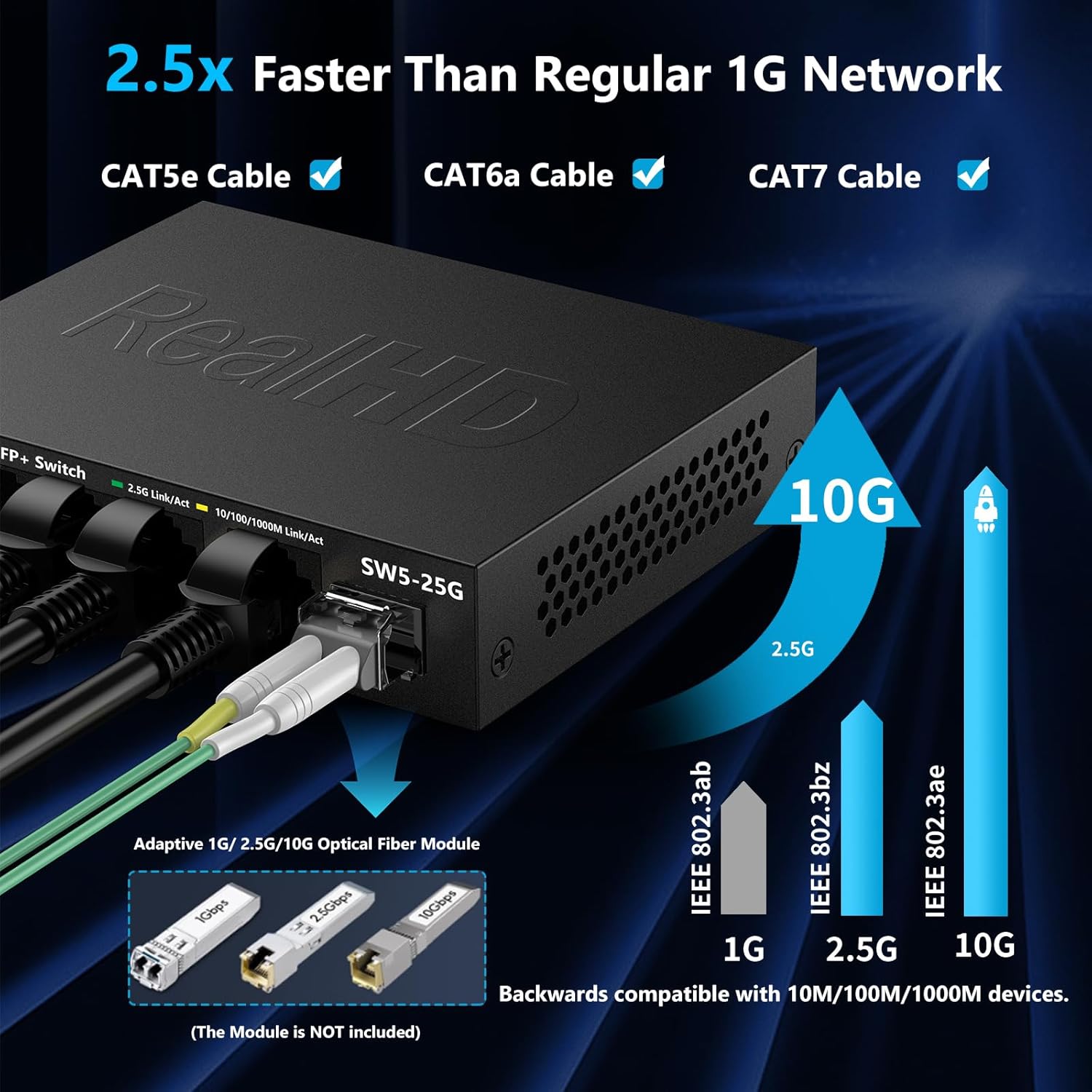
Real HD 2.5 gigabit switch features 5 x 2.5G RJ45 ports and 1x 10G SFP+ port

Providing higher-speed connectivity for your devices, Enjoy a better experience

Easy to setup with no software installation or configuration needed for this ethernet switch

Multi-gigabit switch works with a wide range of ethernet devices

Nice for Small and Home Office
 Metal Housing & Fan-less
  Desktop & Wall-Mounting
【2.5G Super-Fast】This 2.5 gigabit switch features 5 x 2.5G RJ45 ports and 1 x 10G SFP+ port, providing higher-speed connectivity for your devices and allowing you to easily upgrade your network to support the latest 2.5G ethernet standard. NOTE: To get 2.5GB high network speed please use CAT6 or higher level pure copper ethernet cable. Please make sure other network products come with 2.5GB network cards to get whole network 2.5GB speed, otherwise the network speed will be determined by the lowest speed network device.
【Application】The muti-gigabit switch can work with a wide range of ethernet devices, including 4K Video, Laptops with 2.5G Ethernet Adapter, Wifi 6 Router, Wifi 6 AP,2.5G Gaming PC,2.5G NAS computers. To achieve better performance, it’s better to upgrade all your devices to 2.5g to get a better experience.
【Plug and Play】Easy setup with no software installation or configuration needed for this 2.5g ethernet switch.
【Sturdy and Quiet】Compact & sturdy metal housing with 6KV lightning protection design make this 2.5 gigabit network switch safe to use in various environments. The fan-less design quietly integrates with your office environment and featured good heat dissipation, safe to use in temperatures from -20 to 50℃.
【US Local Tech Support】Chicago-based seller, tech support hour 9 am-5 pm CST. Please contact the seller for tech support. This 5 Port Ethernet Switch 2.5G is worth your while!





Jay –
Great 10GBE switch on a budget
I recently built a NAS, and decided it was time to go to 10 GBE on my LAN. I have a Mac Studio, a home-built PC, and a home built NAS, all with 10GBE interfaces. I also have a 1GBE POE switch that powers 8 Raspberry Pis. a work laptop on a docking station, and all of it connects to a router that handles Internet access.First off – I am reviewing the 8 port 10GBE switch. Out of the box, it will work, but may not be set up ideally for your configuration, especially if you want VLANs. If you want VLANs, you will need to have a bit of knowledge to get started – this switch supports them, but the documentation is sparse – be prepared to do some research if you are planning to set them up.I say that from experience, and you can lock yourself out if you do not know what you are doing. Luckily, there is a reset button, and holding it down for a while (20 -30 seconds, I think) will reset the switch to factory settings.Performance has been as expected, and I have not experienced any performance issues so far. I did get CAT 6A cables – I’m not sure you could get 10GB performance out of CAT 5, even with short cable runs.When researching this switch, I saw mention of it being fanless. I would like to state that this is not the case with this switch. I am happy that it has a fan though – I’m not sure I would trust one that is fanless, given that it does produce a little bit of heat. Noise is acceptable to me (it is set up in my bedroom, along with a NAS that is notably louder), but if you are expecting it to be silent, you may be disappointed.Finally, I wanted to talk about the rack mount brackets. I did not put mine in a rack, but I did mount it vertically on a wood surface. The brackets can be attached for a front mount, bottom mount, or top mount configuration. I’m not sure if this was intentional or not, but I took advantage of it to mount the switch out of sight.
Eric Reyes –
My default 2.5G switch at this point
This has turned into my go-to unmanaged 2.5 gigabit switch. I have it in a few different sizes now and I own five of them in total. They all just sit there and do their job without any drama. Plug devices in, link comes up at 2.5G, and that is it. No drops, no weirdness, and no babysitting. For a simple, reliable 2.5G switch, this has been great every time I have used it.
Sub-zero –
Does Exactly What It’s Supposed To
This switch works as intended. Nothing fancy or special about it—it just does the job it’s meant for. Plug it in, connect your cables, and it works without any issues. Solid and reliable for basic network expansion.
Ryann –
Works just like it says
I have this hooked up from my router to make the ethernet ports in each room of my house live. Im getting 1.3-1.5Gbps speeds using this which is what I was getting right off my modem. 5 stars
Preston –
Does the job but not ideal
It does work, and is very cheap. You’re not going to get the absolute maximum possible performance compared to a quality name brand switch that costs twice as much, but if you don’t care about squeezing every last ounce of performance, this switch should do fine.
Motiur –
Works as intended but wall mount holes could be better
Needed a switch for 2.5Gb NAS transfer speeds. This works great. Love how cheap it is.The only thing I didn’t like was that the wall mount holes did not have much clearance for screws/nails with large heads. The heads have to be really flat to fit. I had to visit a hardware store to find something that would fit.
joe –
works perfect
works perfect. easy to setup
Nate –
prepare for a lemon
steer clear. find something that you can go direct to manufacture with incase you have issues after the “amazon return policy time”. i’ve had this switch for about 2 months, and in the last few days i’ve started noticing latency issues so i started checking for connection issues. noticed my download speed, which is normally 2.3gbps, was down to 380mbps but my upload speeds were fine. my first assumption was my isp. so i went to them, cause i noticed this on both my desktop and server which both route through this switch. my isp told me everything was fine, so while chatting with them, i bypassed the switch, and everything was fine and normal, like there were no issues. of course some people will assume that it’s a cable issue. but (2) different cat 6 cables failing at the same time causing the same reduction in download speed only doesn’t make sense, the only thing that makes sense is this switch, dying after the return period. not surprised. guess i’ll have to take my own advice now and find something that i can go direct to manufacture if it encounters issues after amazons “return period” and not try to save $20-30