


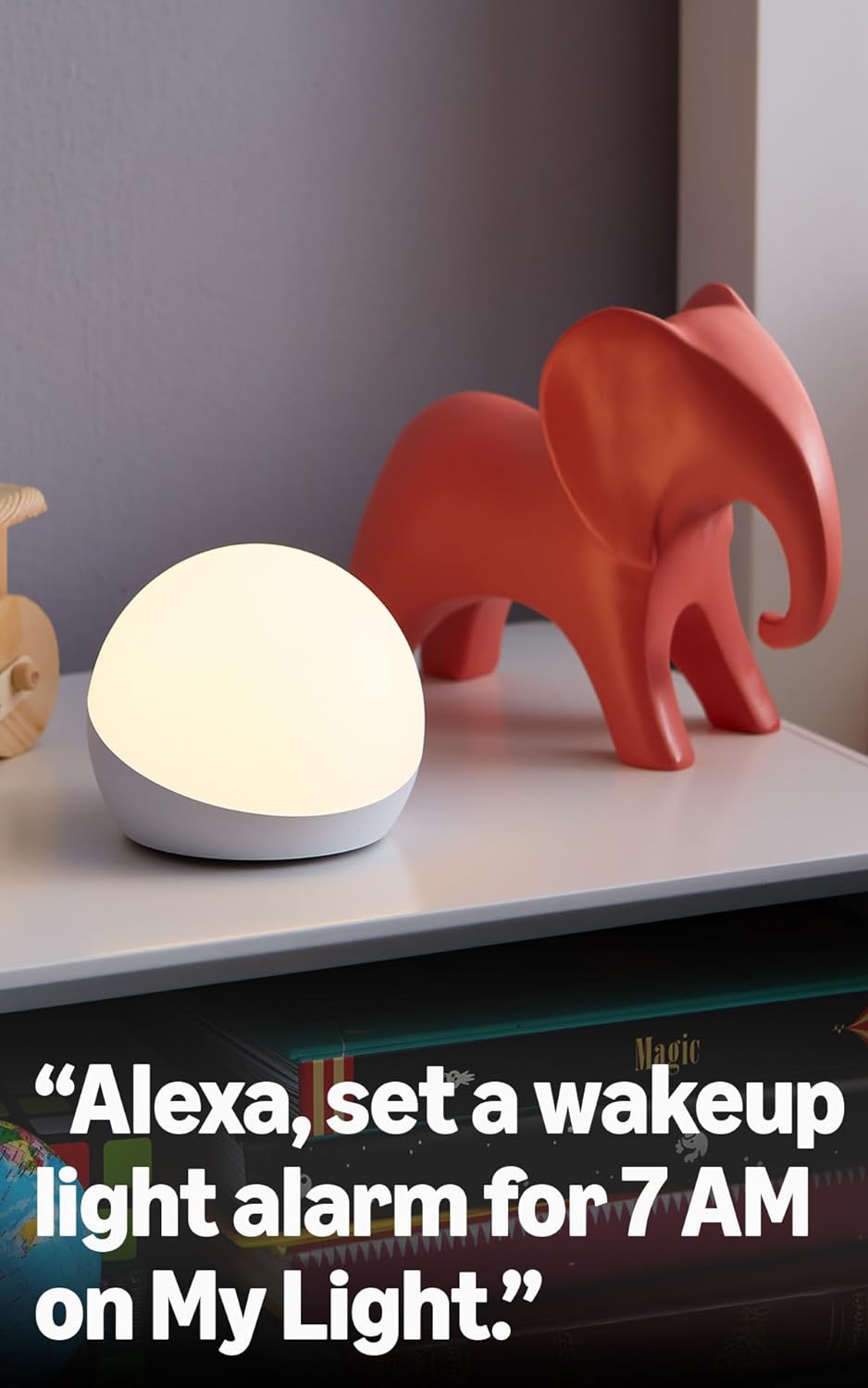

A smart lamp – Pair with any compatible Alexa device to control color and brightness with your voice.
Make routines colorful – Create lighting cues that help with counting down or setting a timer.
Color-changing timer – As the colors of Echo Glow change, get a visual reminder that can help with waking up, cooking, or setting routines.
Create and choose – Add color and lighting while gaming, watching videos or listening to music.
Simple setup – Struggle-free, tinker-free, stress-free. No patience needed—it’s actually simple.
Create your Alexa+ home: With Alexa+, set routines using just your voice, control multiple devices at once, and chat casually to make requests.

Blink Outdoor 4 – Wireless smart security camera, two-year battery, 1080p HD day and infrared night live view, two-way talk – 5 camera system
Original price was: $399.99.$159.99Current price is: $159.99.

RIVA Upgraded Arena Wi-Fi Bluetooth Hi-Fi Speaker, 6 Drivers, 50W, Multiroom Music System, Supports Airplay 2, Chromecast, Spotify, Tidal and More Streaming (White)
Original price was: $149.00.$16.99Current price is: $16.99.
-33%




Jessica Molina –
I love the color
This mind is a good lamp, but I haven’t been able to connect it because I don’t know why it says it doesn’t exist and that it doesn’t exist and I don’t know what to do. The truth is I’ve tried and tried to connect it in different ways than what it says there, to look for it in the app and everything is supposed to be in the app, and it still keeps telling me the same thing that it doesn’t exist and that it can’t find it. I’ve tried to connect it several times, I scan the little thing on the back to scan it and it keeps telling me the same thing. So I don’t know, I’m trying again today, I’m going to try to see if I can connect it, if not, I’m going to have to return it.
Dissastisfied student –
Cool smart lamp
I bought this for myself not realizing it was for children but I still really like it! It’s a low profile little “lamp” that I use in my bedroom at night so that I don’t have to turn on the ceiling light.With the Alexa app you can make this a few different colors— way less than I was hoping for but still pretty nice. Since I bought this for night time lighting I adjust the brightness to about 10% and use the salmon color, it makes the room feel more cozy.Other than that, it’s just a smart light powered by Alexa. If you say “Alexa power on Glow” it powers it on for you. That’s about it.
Naomi S. –
The Perfect Night light
It works perfectly with the Echo Dot for alarms, and the different color options and preset color combinations make it shine above other nightlights as there is a new one for any night of the week, though lately we’ve settled on the regular white color. It’s bright enough to fill the room with warm dim light so you can still see, but low enough to fall asleep to it’s worth the money for sure.
Top Reviewer –
A “hiidden” feature and the truth about using commands and routines.
***HIDDEN FEATURE***What’s the “hidden” feature of the echo glow?The tap function that changes the glow’s color can also respond to the vibrations from a music speaker.If you place the glow next to or on top of a speaker, it will change colors to the beat of the baseline.The more powerful the speaker and the closer to the speaker the glow is placed the more sensitive it will be to the vibrations.***THERE IS NO MUSIC SYNC MODE***The hidden feature described above is the closest thing that glow has to a “music mode”. There’s no other feature available to sync your echo glow to music.It’s strange and disappointing that the glow doesn’t have an included music sync mode seeing as it’s a Wi-Fi enabled device that connects to Alexa speakers.Amazon implies that echo glow is able to respond to music if you give its connected echo speaker device the command “start a dance party” assuming both devices are in the same group. This supposed feature is advertised on the echo glow’s product page.However the echo glow and Amazon echo speakers seemingly no longer support this command that is still being advertised.Instead, if you give this command alexa responds with an advertisement for the echo Barbie theme.Even back when the command did work all it did was set the echo glow into disco mode which does not sync to music and which you can do yourself from the Alex app.Disco mode changes colors VERY quickly, probably faster than the glow would change colors if actually synched to most music.***ROUTINES***You can enable the echo glow’s sunrise function, where the glow slowly gets brighter and brighter over a period of time before the alarm goes off, by setting up a routine for an alarm that includes the glow or by simply commanding “Alexa set an alarm for ___ time with echo glow”.As I understand it if you set up this alarm through the app/routine you can choose the length of the period of time over which the echo glow brightens but if you set up this alarm just through a voice command the default period of time the glow gets brighter over is 15 minutes.It’s worth noting that if you buy an alarm clock that has a sunrise function, such as the one made by Phillips, such an alarm clock can cost more than an echo glow just by itself alone. However, those more expensive Sunrise light alarm clocks typically include a light that gets much brighter than an echo glow can.If you want to set a rainbow timer, another feature advertised on the echo glow’s product page, you simply say, “Alexa set a ___ minute rainbow timer with ___”. Again, be sure to refer to your echo glow by whatever name you’ve given it in the Alexa app.I’m not sure if it’s possible to set routine rainbow timers. I will quote here the only answer I found online claiming that it’s possible:“In the Alexa app, go to your echo glow.Scroll down and select “create a routine.”Tap the + in the upper right to make a new one.Enter the name you want this routine to be called (morning alarm, time to get up, etc).Under “when this happens” you pick “schedule” then enter the time of day then it will ask you what days you want this to happen on.Under “add action” you choose “smart home” then “lights” then your echo glow. Then if you pick mode and set it to color glow, I believe it rotates through the colors like a rainbow”Another review from a parent recounted how they use the option of scheduling glow color changes along with Alexa announcements, through the use of routines, to help their special needs child transition from one activity to another. I personally don’t use my echo glow like that but but it does seem like this device could be uniquely helpful for parents or teachers in this way.There are of course many other routines that you could invent for your echo glow. You could have it turn red if your ring house alarm is activated and then have it turn turn green when you turn the alarm off. You could connect it to a motion detector and have it come on to light up dark hallways.***COMMANDS***Alexa is very picky about responding to commands for the echo glow.For example let’s assume you’ve named your echo glow simply “glow” in the alexa app.If you were then to say to your connected echo speaker “Alexa, echo glow campfire mode” that command would not work because you called it “echo glow” instead of just “glow”.In general If you have changed the name of your echo glow in the Alexa app be sure to refer to it by that name when giving commands.Also, if you gave it a command such as “alexa, make glow campfire mode” or “ alexa, turn glow campfire mode” those commands would not work because you used the words “make” or “turn” and Alexa apparently does not like those action words for commanding the echo glow to switch into a preset color change mode.If instead, you gave the command as “Alexa set glow campfire mode” that command will work, because apparently alexa likes the action word “set” for commanding color change modes.You can also just exclude an action word altogether, and give the command “Alexa glow campfire mode”. This is actually the best way to command the glow to switch into a color change mode.Its almost just the opposite when commanding the glow to switch into a solid state color. You MUST include an action word in your command and the glow will accept “set”, “turn”, or “make”. For example, “alexa ____ glow green” using any of those three action words in the blank space.You would think that a decent AI would be able to figure out your intentions despite the minor variations but Alexa’s infamous inability to figure out simple commands it should reasonably be expected to know continues on with the echo glow.***PRICING***If you’re only use for the glow is as a nightlight or ambient light it’s a little pricey for what it is and you would do well to wait for a prime day discount when you can typically get it for half off.***ADDRESSING POINTS MADE IN OTHER REVIEWS***The dome of the light is plastic and not glass as some other reviewers claimed.Several reviewers complained that the light does not get very bright and wirh most of the colors this is true however the “white” color is significantly brighter than the other colors. At 100% brightness the white color is enough to read by if placed bedside.Many reviewers seemed disappointed that this was not a portable battery operated device. This is a plug in product that uses a USB charging cable however it can operate off of an echo dot battery base if you are willing to purchase that separately.It is true that the glow does not include a speaker and must be controlled through either a connected echo speaker by voice or through the Alexa app and more complex routines can only be set up through the Alexa app.The issues the glow initially had with difficult set ups and wifi connectivity that many earlier reviewers pointed out seem to have been resolved with software updates.I have confirmed that two echo glows cannot be synced together. If you want two glows to be a certain color you will have to command each separately and it will be close to impossible to get two or more glows’ color change modes to sync up.***FINAL WORDS***The echo glow is a fun product that’s probably a little over priced if you buy it at full cost.It makes for a great night light and a halfway decent sunrise alarm. It makes an OK synced music light if you set it right next to or on top of a speaker.People who use the glow as a nightlight should be aware that blue lights at night can disrupt your sleep patterns. So if you or your children are using it as a night light you might want to choose colors with very little blue light in them such as red, orange or gold.It’s very picky with what commands it responds to you so you’ll have to get used to that.Amazon missed a good opportunity by not including a music sync mode with the echo glow.It’s also too bad that you can’t create your own modes for the echo glow and are restricted to choosing from the preset modes included with it.If you were looking for a light to back light a television used for movies or gaming the echo glow is a mediocre choice. It will not change colors along with the images on the screen or to music and the larger your TV is the weaker the glow’s light will be from behind it.For less money than an echo glow, you can get a strip of color changing LED lights with a remote that you can stick along the backside of your television.If you’re willing to spend a little bit more money than that, you can get a product made by GOVEE, which includes a camera that faces your TV and the tv backlights will change in sync to the images on the screen.If you want to spend a lot more money, you can invest in the Phillips Hue sync lights for back lighting TVs.
gaston –
Recomendado para bares
Excelente, la compre para mi bar de 2500 metros cuadrados y es excelente
magda chavez –
Great for kids
It’s so cute but I bought by mistake but my grandkids love it