


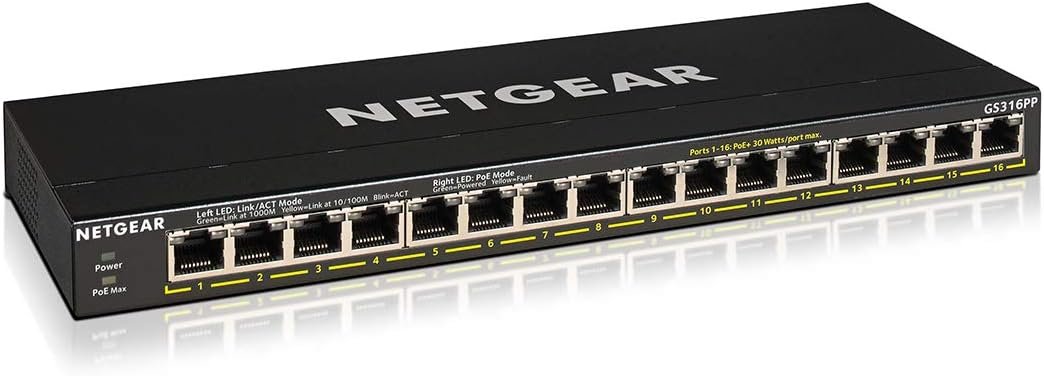
Introducing the NETGEAR GS316PP 16-Port Gigabit Ethernet Unmanaged High-Power PoE+ Switch with 183W PoE budget With NETGEAR FlexPoE integrated technology that allows you to change the PoE budget at any time from 183W to provide to your devices the power that they need with interchangeable external power adapters NETGEAR’s unique PoE technology automatically balances the PoE power based on the device needs independent of PoE class detected GS316P delivers the power the device needs at the most granular level The compact silent fanless design makes the GS316PP an ideal cost-effective and future-proof option for any business or home It also comes with NETGEAR 3-year and 24/7 chat for complete peace of mind
16 Gigabit Ethernet ports
16 PoE+ ports with 183W total power budget
Simple plug-and-play setup with no software to install or configuration needed
Supports desktop or wall mount placement
Industry-leading 3-year limited hardware warranty
Energy efficient design compliant with IEEE802.3az
Silent operation ideal for noise sensitive environment
Made for use in U.S. & CA only

Samsung Super Fast Charger,Samsung Charger Fast Charging Block,2Pack 25W Samsung USB C Wall Charger,10FT Quick USBC Cable for Samsung Galaxy S25 Ultra/S24/S23/S22/S21/S20/A14/A54/Z Fold 6/5/Z Flip 6/5
Original price was: $25.99.$18.03Current price is: $18.03.

ARRIS (SB8200-RB) - Cable Modem - Fast DOCSIS 3.1 32x8 Gigabit Cable Modem , Approved for Comcast Xfinity, Cox, Charter Spectrum, & more | 1 Gbps Max Internet Speed, 4 OFDM Channels - Renewed
Original price was: $168.98.$11.99Current price is: $11.99.
-89%


R. Allen –
Solid hardware
Here is a product I am actually professionally qualified to review. I have over 30 years of experience in computers and networking, so I have seen a few switches in my professional life, both good and bad. Netgear is a brand I will purchase for personal use. I have several of them around the house. I have also used them at work when I have a place with a single network drop and several devices that need network access. They are convenient and dependable work horses. This switch also comes with POE, which means you can power a wireless access point without using an adapter. It is unmanaged, so you can plug it in and use it with no worries about network addressing. I counted the number of devices I have on my network at home, and it is embarrassing. I can almost max this switch out, and that doesn’t include wireless devices! I am sitting at 12! Wireless raises that number by another 8 or so. Not bad? 3 people! This Netgear handles the throughput to our backbone to the Internet. I am not talking about a few emails here, but movies, YouTube, online gaming, software updates and downloads, blog updates, and a Zoom on occasion. I can always run a speed check and get 950 gbit or more, up and down. It will get warm, so give it a little bit of an air gap. This is a solid piece of hardware that I can recommend!The features ratings above are not applicable. There is no WiFi and I don’t need Tech Support or a user interface.
Brad –
Perfect for a mixed network environment
Works great in a mixed environment. I am using 15 of the 16 ports. I have a mix of devices – 1GB, 100MB, non-POE, POE. The switch handles them all. No setup, it just works. Quality build, solid case. Before I have multiple switches and POE injectors, but no more. And at a great price. Used two screws and mounted on the wall. Easy 5 stars.
Tony D. –
Easy to use
Router Very nice cable, fitment into ports is a sturdy tight click, POE works great on my Security cameras, will by more, very reliable
Fence Builder –
Trouble free you don’t know it’s there.
This switch has been reliable for about a year now. Simple and trouble-free. Been through an earthquake and multiple power surges.
S7even –
Great POE Switch
I have had good luck with Netgear equipment over the years and this item was an IMPORTANT PART of my overall network upgrade to 100% gigabit hardware. This POE Switch directly connects surveillance cameras from the front of the house to an identical POE Switch running the cameras at the rear via a very long cable in the attic. It worked great upon installation and has continued to work well up until this writing. My network has multiple PCs, a dozen cameras and several other devices like printers, sensors and such. It is so fast now and reliable.
Tom123 –
Switch is Fine. Customer Service is Painful
I had questions for Netgear customer support. Be prepared for the following:1. Netgear offers support for 90 days AFTER you register the product.2. To register the product you must go on to their website and create a user name and password.3. Then enter the serial number of product. Ok, that’s not unusual.4. I opted for sending questions through their online system. They responded wanting a photo of the back of the product and a copy of the receipt.5. I asked my question(s). I opened two cases: (a) One was about power imparted through the ethernet cable (PoE), if any, by routers and computers on a switch . Their literature makes such an issue of watts per port, I wanted to know. I am not a network engineer and perhaps answer should be obvious, but you know what they say about “assume.” (b) I sent them a schematic of my proposed system showing three switches and asked for comments about it.6. Then I received a message asking for my phone number. So I sent it back through their online support web page. Then I get a response stating they recommend not sharing personal info (WTF?).7. I then get a voice mail on my phone at 7 AM. The person says, in broken English, calling about case number ****(a), please contact us. Never did the person identify that they were with Netgear, did not give their name, did not give me a phone number for returning their call. It sounded like a spam call. The only reason I realized it was Netgear was that I recognized the last four of case number.8. Then for case b, they closed the case and asked me to call into an 877 phone number for support.9. When I called in that number, the second or third tier of the automated system asks for the first two letters of your product serial number. It never comes up with the letters “GC” for a switch. In another portion of automated sysem, they say if it is a router or mesh, press 1, for a cable modem press 2, etc up to press 9. Never got to a switch.10. Finally got backed out of that automated part and was able to enter my case number and was transferred to a human. The gentleman did not speak great English. I was patient and asked questions in several ways and got my question across. We talked about my case (b) and he said my schematic should work. Then we talked case (a) about power imparted and he said no load imparted from pc or router. I asked it the case would now be closed, and he said he would leave it open for a bit. I thanked him very much for his help.10. The day after I spoke to rep, I got an email from Netgear re case (a) asking if they could close the case.
Techmeister –
When you need more power this is the switch to get
Using this for PoE+ wireless access points (Wi-Fi 7 triple band) and cameras. Remember if you overload the PoE budget it will turn ports off starting at port 48 and working its way down. So the important stuff goes on port 1 and up from there. There is a light to tell you if the PoE power draw is too much. Works well.
Consumer of Stuff –
Easy!!
Got this to replace two older switches as we needed fewer ports. Took it out of the box, unwrapped it, hooked up the cables and power. That was it. Works great! The only thing that would be better is if NETGEAR had a tech guy in the Amazon truck who would pop in and do all that for you. My point is that this is one the easiest pieces of tech gear that I have ever installed even though I am no tech wizard. Thanks, NETGEAR, for making this.
Steve H. –
Needed a cheaper POE switch for new small office phone system. This POE switch fit the bill perfectly. NETGEAR is a quality brand! A+
Victor –
It is a netgear
Amazon Customer –
Needed a POE switch for Reolink cameras. Worked perfect for this application.
M. A. –
Works well, cool running, metal case, bottom screw mount, no excessive RF noise, worth the extra dollars
Tim –
After reading some other reviews about this switch working/not working with Unifi access points, I did some research. Some Unifi models (like the UAP-AC-LITE and UAP-AC-LR) won’t work with this switch because those models require 24 V passive POE. They also require 802.3af/A PoE, and this switch only offers 802.3af/B PoE. However, this switch DOES work with the Unifi UAP-AC-PRO. I currently have 4 or these models running on this switch.This applies to both the GS305PP and the GS305P v2 switches.