



Product description

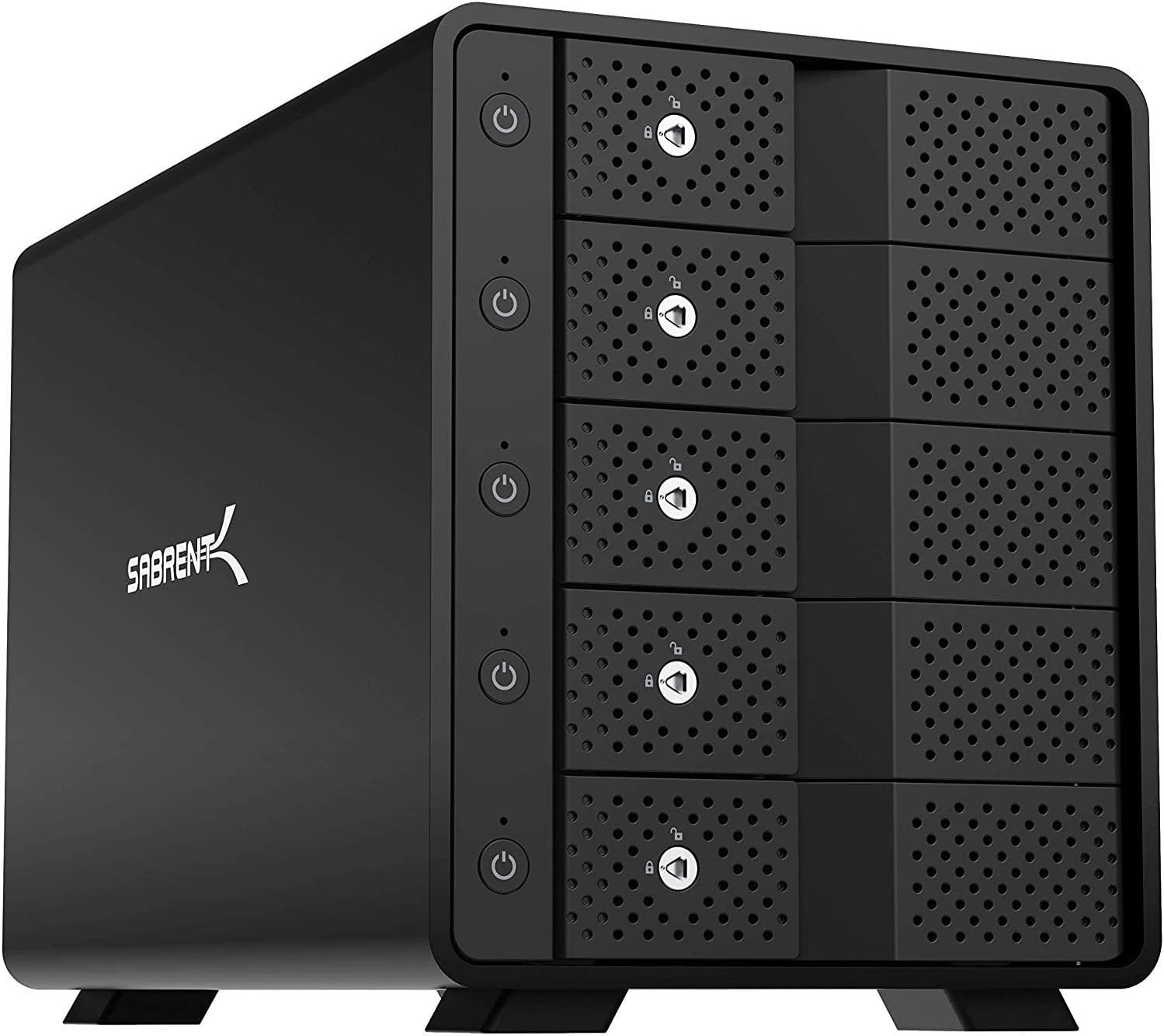
SABRENT USB 3.2 5-Bay Trayless Hard Drive Dock — Fast, Flexible and Secure Storage Access
• USB 3.2 Type-C 10Gbps Port — Fast Transfers, Backward Compatible with USB 3.0 / 2.0
• Supports 5 x 3.5” SATA 6Gbps Bays — Easily Hot-Swap Drives Without Tools
• Durable Aluminum Enclosure + Built-In 120mm Fan — Optimized Cooling During Heavy Use (Fan Noise Normal)
• Independent ON/OFF Power Switches — Control Drives Safely (Manual Restart Needed After Power Loss)
• Locking Key + Kensington Slot — Prevents Accidental Removal and Protects Your Data

Advanced Connectivity and Smart Protection for Your Drives
• Rear USB-C Port — Daisy-Chain Another Dock or Connect USB Devices Easily
• Built-In 120mm Fan — Keeps Drives Cool During Heavy Use (Fan Noise is Normal)
• Kensington Security Slot — Lock and Secure Your Drives for Extra Protection
• Auto-Switching Power Supply (100 to 240V) — Global Compatibility and Safe Power Management
• Main ON/OFF Power Control — Fully Backward Compatible with USB 3.0 / 2.0 / 1.1
• Note: This Multi-Bay Dock Does Not Support RAID — Drives Operate Independently

What’s Included — Complete Hard Drive Docking Station Kit
SABRENT 5-Bay Trayless Hard Drive Docking Station (DS-SC5B)
• USB Type-C to Type-A Cable (10Gbps Compatible)
• USB Type-C to Type-C Cable (10Gbps Compatible)
• Power Cable (Auto-Switching 100~240V)
• Locking Key for Secure Drive Bays
• Quick Instruction Manual for Easy Setup
• Compatible with Windows, macOS, and Linux
Customer Reviews
Price
MODEL
EC-UBLB DS-2BCR DS-SC4B DS-SC5B DS-UCTB BK-PCBS
HDD Supported
2.5″/3.5” SATA HDD/SSD 2.5″/3.5” SATA HDD/SSD 3.5” SATA HDD/SSD 3.5” SATA HDD/SSD 3.5” SATA HDD/SSD 2.5″ Converter To 3.5″
Transfer Speed USB 3.0
Up to 5Gbps Up to 5Gbps Up to 5Gbps Up to 5Gbps Up to 5Gbps —
Transfer Speed USB 3.2
Up to 5Gbps Up to 10Gbps Up to 10Gbps Up to 10Gbps Up to 10Gbps —
Max. Capacity
20TB 40TB (20TB x 2) 80TB (20TB x 4) 100TB (20TB x 5) 200TB (20TB x 10) 20TB
FAN
— 10mm 90mm 120mm 2 X 120mm —
RAID Mode
— RAID Supports 0, 1,single mode, JBOD (sequential). Does NOT do RAID arrays on its own Does NOT do RAID arrays on its own Does NOT do RAID arrays on its own —
Item Dimensions LxWxH
6.14 x 2.48 x 2.76 Inches 8.4 x 4.7 x 3.3 Inches 9.1 x 5.8 x 5.9 Inches 10.4 x 5.9 x 7.3 Inches 5.7 x 10.5 x 13.4 Inches 7.03 x 0.59 x 4.2 Inches
5-Bay Direct-Attached Storage (No RAID): Connect up to five 3.5” SATA HDDs or SSDs to one USB-C port. Each drive appears individually — this unit does not include RAID, ensuring simple, flexible storage.
Independent Drive Power Control: Each bay includes its own on/off switch and LED indicator, allowing you to manage drives individually without powering down the whole unit.
Ultra-Fast USB 3.2 Gen 2 Performance: Transfer files at speeds up to 10Gbps — perfect for backups, 4K/8K video editing, large media libraries, and data archiving. Fully backward compatible with USB 3.0/2.0.
Tray-Less Hot-Swap Design with Security: Quickly insert or remove drives without tools or trays. Each bay includes a locking key to prevent accidental removal, plus a Kensington slot for added protection.
Aluminum Build with Active Cooling: Rugged aluminum enclosure ensures durability and heat dissipation. A built-in 120mm fan provides active cooling — audible during operation, but essential for safe long-term performance.




InfoSciGuy –
Solid, stable, and fast.
The Sabrent 10-bay USB enclosure is the single best addition to my PC system in years. It’s about the size of a medium-sized desktop tower pc. It is solidly built of metal, and is quite heavy. Drives simply slide in to the ten bays, each of which has its own door and it’s own power switch. The controller in the enclosure handles handles access and governs traffic, requiring only a single USB-C connection to your laptop or desktop. The internal power supply is fed by a single standard three-prong grounded AC cable.I’ve found this to be a solid, reliable, and very fast platform for my various SATA drives, and a huge improvement over the tangled bedlam of external single drives, RAID enclosures, power supplies, extension cables, data cables, hubs, power supplies for hubs etc., etc., that had become a plague to my computer system. I see in some reviews that folks have expressed trouble with the drives disconnecting. My experience had been the exact opposite. I think the disconnection troubles I had in the past were due to running through one or more powered USB hubs just to accommodate all the external drives; I think various firmware-based power timeouts were involved. In this case, I’ve got the entire stack of ten connected to the OC by a single USB cable, going directly into the computer: no hubs. The drives go to sleep, certainly, but awake immediately upon demand. I’ve had zero trouble with disconnections. This is a big part of why I’ve characterized this unit as “solid, stable, and fast.”This could not be more welcome.A long time pc user, I kind of moved sideways from desktops to laptops as a primary platform, gaining flexibility, portability, and convenience – in many ways. But.In other ways, the laptop form factor imposes strict limitations, most especially, in storage expansion.As a multi-decade serious photographer and at-home video and music producer, the move from analog to digital has introduced serious, grown-up, storage, archive and preservation issues, not to mention capacity issues.So what began for me as a couple of USB external expansion drives grew over time into a glutted city of USB drives and USB RAID enclosures, accompanied by an increasingly unmanageable tangle of cables, power supplies, and hubs. I was plagued with disconnects, time-outs, and other issues, intermittent, yet never ending.This enclosures has alleviated all of that. The drives simply work, and work well.I broke up the RAID-1 enclosures, and over a period of several weeks, sequentially copied all the material on them onto individual drives installed in this enclosure: a kind of extended bucket brigade process. The drives originated mostly as bare drives I already had in use as RAID pairs. As a pair of RAID drives would become empty and available, I split them up, reformatted them, and moved them into the 10-bay enclosure.What about RAID? Well, Windows does a decent job of handling RAID in software. If you think about it, all RAID is actually in software, just some of that software is installed as firmware in hardware. So far, I haven’t rebuilt any of the four RAID-1 groups I had before, opting, for now, to manage mirroring and backup manually across the drives in the enclosure. If and when that becomes too unwieldy, I’ll move back to RAID-1 pairs, but software-based, on drives in the enclosure.To sum up moving my drives into this enclosure has been a rigorous but welcome project. It has resulted in fewer duplicate management issues, hugely increased efficiency, and much improved reliability.I am delighted with the Sabrent 10-bay enclosure.
M. Baker –
Higher price, but absolutely worth it if you find it on sale.
I picked up one of these on sale. I was replacing my old Drobo 810n and wanted at least 8 bays and USB 3.2 for 10Gbs. I run a 10Gbs home network, so I wanted to ensure I was not bottlenecking there. It’s connected to a Mac mini, and I created a RAID 5 on it. It’s using 10 x 8TB 7200 RPM drives. This has been running for 22 months now, no drive failures, good cooling, good bandwidth. I’ve had zero issues. I ended up finding a second one on sale for $300, and it’s now backing up the first.Unlike some other USB DAS’s, it’s reporting all the SMART data back to the Mac (I just got a warning that one of the drives through it’s first error). For staying cool, fan noise isn’t an issue. The price is a bit high, compared to 8 bay systems, but if you can find it on sale, it’s quality kit. I also have the 5 bay SSD USB 3.2 bay, and that has also been rock solid, and is much more reasonable price.
Amazon Customer –
An excellent enclosure if you don’t need RAID
This is for the 5-bay usb-c version.start with the bad, hence 4 star:1. it drops connection sometimes when use usb-A to usb-c cable connecting to usb-A 3.0 port on a thinkpad T470. it happens when creating soft-raid and writting to 4 HDDs at the same time. I had to use usb-c to usb-c cable, which runs robustly.2. sometimes, it will slow down for a while before picking up to full speednow the positive sides, which are quite many1. when using usb-c to usb-c connection with thinkpad T470, it has been rock solid. I have been running windows storage space in 4 disk parity on it and wrote > 1TB to it, and never had once disconnection2. HDD install is extremely easy and the door mechanism is strong so that I don’t worry HDD falls out if move around.3. the back circuit board does not block airflow, large opening between HDD and fan. sustained writing at full speed to 4 HDD for half hour, HDD still ~35C.4. fan is very quiet. similar to one in my synology NAS5. individual HDD has its own power button, you can shot-swap without worrying short-circuit anything. but it does create initial confusion as I was wondering why nothing happened after I pushed the main switch on the back6. HDD and fan power down when HDDs are inactive and with computer power down. naturally, it resumes also with computer power-on7. throughput has been great. can sustain writting to 4 HDD at 150MB/sec8. usb-c hub allows expansion in future, although I have not tested it yet.9. the led lights are quite small and do not feel disturbed by itI have looked through, twice, every single 4/5 bay usb-c enclosure; I do feel this is the best one, not one of, if you don’t need hardware RAID.update after a week. moved 10TB of data both to it and from it. all done with storage space in parity, meaning 4 HDD writing/reading at the same time. rock solid. did not disconnect or slow down even once. excellent.update after 6 months. 24×7 for the last 6 months. Absolutely no problem. no single disconnect. still quiet as day-one. no complaints.
Joseph –
Everything looks awesome just that they use stupid china fan which is totally crap. So I swapped in the famous and very expensive Noctua fan.
Dustyn –
To start I wish Sabrent would spend some more time providing detailed and correct specs about the unit. I say this because the box and the instructions say that it has a 120mm fan? Yet on other areas of that same box and online it says 90mm? Which is it? Guess you need to buy it to find out huh?Also, I asked a question here about whether this unit supports the UASP protocol. The answer I recieved here was “No, it uses the older USB3.0 BOT transfer method which is still plenty fast.” This is incorrect information. This unit in fact DOES support UASP which stands for USB Attached SCSI Protocol. I was SHOCKED and DELIGHTED to have discovered this when hooking up the unit to my PC. This allows for faster read/write data speeds to and from storage devices. Compared to traditional USB 3.0 BOT, UASP performs up to 70% faster read speeds and 40% faster write speeds at peak performance. It has to be the FASTEST unit I’ve ever used when accessing information off of a hard disk drive. I’m very impressed with the build quality of this unit and ease of installation when placing drives in the tooless bay slots. I have installed 4x 18TB Seagate Exos @ 7,200RPMs. Drives at idle are 29C and when under load don’t go over 40C.Lastly, don’t know what all the fuss is about over the loudness of the fan? It’s very quiet, and doesn’t bother me at all. The unit sits on top of my tower right on on my desk about 3-4 feet away from me. The only thing I hear are the low noise fans comming from my PC case. The Sabrents fan on the enclosure when I place my ear near it is quieter than my PC, and I have a quiet PC. So, I suspect one of two things in regards to the popular “the fan is too loud” postings: Either people got a defective fan from the get go, or Sabrents quietly released a new revision of the unit with a much quieter fan. I was researching ahead of time about possibly replacing the fan as others have when the unit arrives, but there is no need as it’s whisper quiet.This is a fantastic enclosure.A bit on the pricey side but I got the bonus of finally having a unit with UASP.
Piotr Jarzebowski –
Ciężka, solidna i działa bez problemu. Wentylator trochę słyszalny, ale nie przeszkadza. Łatwa i szybka instalacja dysków.
Rob Madden –
Able to take my drives from old computers and just plug them in and they were a Mix of old and new drives and SSDs everything worked
DEBIAUNE –
Le poids considérable du boîtier est immédiatement perceptible à la livraison – presque tout ce que l’on touche est en métal(Aluminium).Le boîtier dispose d’un connecteur d’alimentation 230 V direct, ce qui élimine le besoin d’une alimentation externe.Chaque Rack logement HDD possède son propre Interrupteur et de plus possibilité de le verouiller individuellement avec la clé fournie.J’ai ensuite testé sa vitesse avec un disque dur de 10 To tournant à 7 200 tr/min. J’ai obtenu un excellent débit de 285 Mo/s, à condition d’utiliser le port USB C adéquat.Mes ports USB 3.0 intégré n’offrant qu’environ la moitié de cette vitesse, j’ai ajouté une carte PCIe USB C 3.2 gen 2. (x2=10Gbps chacun) Avec cette carte,le boîtier est nettement plus rapide.De plus chaque Boitier possèdes un deuxième port USB C pour le montage en Série de 3 boitiers Maximum. (limitation Max de votre system windows).La température du disque dur est restée à un maximum de 38/40 degrés Celsius en fonctionnement et à 28 degrés Celsius en veille.Tous les disques durs installés dans les baies sont gérés individuellement par le système d’exploitation ; il n’y a pas de RAID matériel.J’ai pu aussi installé des SSD et HDD 2.5″ avec l’utilisation de “”rack SABRENT 2.5″ HDD to DESTOP3.5″ BAY CONVERTER”” disponnible pour un prix résonnable.Concernant le bruit : j’ai les 2 boitiers juste à côté de moi sur le bureau, il n’est pas plus gênant. Le bruit de fond provient surtout des certains vieux HDD de récup.La possibilité d’entendre les disques durs dépend de leurs modèles et de leur age.La qualité de fabrication est irréprochable. Les disques durs 3,5 pouces s’insèrent simplement dans les baies sans vis ni autres fixations pour les 3.5″ et un rack dispo pour les 2.5″;le système fonctionne parfaitement. Théoriquement, il serait possible d’insérer et de retirer les disques durs pendant que le système est en marche ; cependant,je le déconseille fortement, car le retrait du disque risque de l’endommager (surtout s’il est encore en rotation=DANGER).En conclusion : un boîtier élégant, une excellente qualité de fabrication et des performances rapides. Son prix est tout à fait justifié.Je le recommande vivement. C’est un boîtier fantastique.