




Product description
Zooz 700 Series Z-Wave Plus Scene Controller

Use it as a switch, a wall remote, or both.
The ZEN32 delivers modern style with versatility.
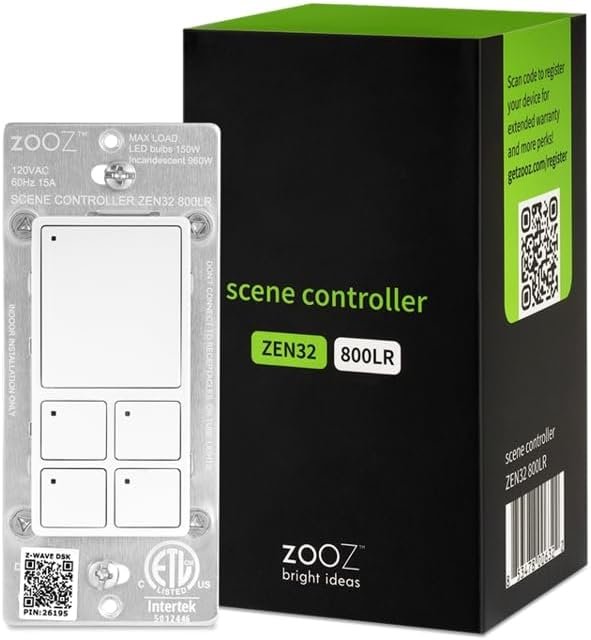
The main button on top of the switch provides simple on/off control of a resistive load up to 15A, a small fan under 3A, or up to 150 W of LED lights (dimming not available). This button will display as an on/off switch in your hub, allowing automation and the multi-tap scene control triggers.
Direct 3-Way Solution
Enjoy extra flexibility by wiring it as either a single pole or a 3-way switch with an existing mechanical switch or a momentary switch. You can even create a virtual 3-way if you’d like to have 2 smart switches in both locations, or even 2 scene controllers!
Wire it without a load
The versatility of the ZEN32 even includes the ability to utilize the main button for remote control only. Leave the load terminal empty, and the ZEN32 becomes a wall remote, with programming available from all buttons.
Scenes at your fingertips

Trigger your favorite presets with a click
Expand your smart home automation with the smart buttons on the ZEN32. Each of the 4 small buttons can be programmed to trigger up to 7 different actions. These buttons function as a remote control only. They don’t connect to a load directly and cannot control anything electrically like the main switch button. Use the buttons as triggers in automation rules and association groups.
Perfect for smart bulbs
Control your smart bulbs with the ZEN32. Disable the relay so power is always provided to the smart bulbs and use the main button to turn the lights on and off. Program the small buttons for spot control of each bulb or to easily trigger your favorite color and brightness presets.
Focus or relax
Voice control isn’t always the most intuitive way to control your smart lighting. Program more elaborate scenarios in your Z-Wave hub (sold separately) and assign them to the buttons on your Scene Control to set goodnight mode on your way out from the kids’ bedroom with a single click. Trigger your work routine with the best lighting temperature anytime you enter the office. Or enable fun animations on your connected LED strip when it’s game (or gaming) night.

Tech Inside
Z-Wave hub required (sold separately)
There’s no way to program and manage a reliable smart home without a hub today. Hubs bring all of your products together, whether they’re WiFi, Bluetooth, Z-Wave, or ZigBee, and connect them so you can build a truly intelligent ecosystem.
The Scene Controller is supported by Hubitat, HomeSeer, Home Assistant (Z-Wave JS), and is compatible with SmartThings. If your hub is not on this list or you don’t have one, check with Zooz before buying.
Advanced Functionality
With 4 colors and adjustable brightness levels, customize the LED indicators to your preferences or program the buttons to reflect the status of your connected devices.
Built-in Signal Tester
If you ever encounter a connectivity issue with the ZEN32, simply enable the range test tool straight from the switch to diagnose your network. The LED indicators will display a different color depending on signal strength to help you troubleshoot any issues.
Z-Wave Benefits Keep your Scene Controller up to date with over-the-air (OTA) firmware updates 700 series chip for extended range and faster, more reliable communication S2 authenticated security with SmartStart
MAIN BUTTON: Connect a 120 V light fixture (up to 150 W for LED’s) to control it via Z-Wave or use the main button for wireless control only with up to 7 button triggers available. Z-Wave hub required, sold separately. NOTE: your smart speaker is NOT a Z-Wave hub.
4 REMOTE BUTTONS: Program each button to activate scenes or other devices in your network for one-touch control of your favorite smart lighting presets. Use the buttons to enter “Away” mode on your way out or to turn off all of the lights before you go to bed with a single click.
DIRECT 3-WAY SOLUTION: No add-on switch needed! Works with regular 3-way switches as long as NEUTRAL is present. Wire it just like the ZEN71 model. Please follow the appropriate diagram in the manual and rewire both boxes exactly as shown. Works great as a single pole switch too!
Z-WAVE HUB COMPATIBILITY: Most basic Z-Wave systems aren’t advanced enough to allow scene control programming. All Zooz devices work best with the Z-Box Hub. The ZEN32 Scene Controller is supported by: SmartThings (with a custom driver, instructions included with the product), Hubitat, Home Assistant, and HomeSeer. Please do NOT buy this device if your hub isn’t listed here, it will not be recognized correctly by your system.
NEW 800 SERIES: This product is built on the latest 800 series Z-Wave chip for better signal coverage than ever, faster communication, with S2 authenticated security and SmartStart for effortless pairing. It supports the new Z-Wave Long Range technology as well as traditional mesh network.
EASY INSTALLATION: Clear diagrams and 7-day a week support included. No side tabs and just 1.1″ deep to fit shallow and crowded switch boxes. NEUTRAL WIRE REQUIRED (check before buying). The device is ETL certified and conforms with North American safety standards. Backed by a 1-year warranty, register your product for an extended 5-year warranty.







Nathan S –
Great Multi-Button Scene Control
PROS:– Internal relay can be disabled to work better with smart bulbs.– Each button LED can be configured to be white, blue, green or red, with low, medium or full brightness. They can also each be always on, always off, or toggled each time the button is pressed.– Each button sends a separate value for a single, double, triple, quadruple and quintuple press, as well as press-and-hold and release actions, making for a great controller for complex automations.– Compatible with 3-way circuits, using either a standard 3-way switch or a momentary push switch.– Sleek, modern appearance.CONS:– Face color is slightly darker than standard white faceplates and other switches (in North America anyway). See photo.This scene controller is a great value with lots of features for anyone wanting to set up their own automations. This switch seems designed specifically for the home automation DIYer. Construction seems solid. I’m not sure I agree with some other comments related to button softness, but that’s somewhat subjective. To me, the buttons seem fine and provide plenty of physical feedback. I wouldn’t want the buttons to be much harder to press as that would make multi-press actions difficult.The one gripe I have is that the color doesn’t quite match all the white face plates and other switches in the house. The face color is slightly darker. If Zooz were reading this, I’d also recommend more button LED color and brightness options instead of just 4 colors and 3 brightness levels. Each button has RGB LEDs, might as well let us use more then just red, green, blue and white.
JH –
I love this switch/scene controller
This is a great product with a ton of flexibility. Provides direct control of one circuit, and then 4 other buttons. Each button can be programmed to perform different actions on press, double press, hold, etc, which really gives you a ton of possibilities. There is a Home Assistant blueprint out there already for this switch, which makes it super easy to program to control whatever you want. Directions are pretty clear too, though I ultimately had to call an electrician to install mine but that’s because I needed a 2-way install and those can get confusing. After getting some help, the two-way control also works flawlessly. Build quality is also nice, and Zooz actually will provide you with firmware updates, which for some reason a lot of other manufacturers refuse to do. Zooz also supports a bunch of home automation platforms, and their support and documentation are quite good.My only minor ding is that the main switch is only a toggle, no dimming, but that’s fine for my uses.All that praise provide, I would only really recommend this for someone with a big home automation setup. Otherwise most of the best functionality would be wasted… like what are you going to control? This device is not very useful without other devices and a hub to interact with.
M.C. Ross –
Ties directly to home assistant without issue.
I’ve had this switch in my ‘front room’ for several months now and it works great. I have it connected directly to home assistant, and have the buttons as triggers for different things,, including the smart bulbs in the front porch light and a couple of wall sconce lights in said room, controls for the blackout shades on the front window, and even a “panic” button if you will that activates all of the floodlights built into the reolink cameras around the house. The family doesn’t think twice about how it works but it seems natural for them and I get to dork out adding different scenes like the party mode which triggers multi colors from the bulbs, and of course “rig for red” as I call it for when I’m gaming at night.. I bought a second one for the kitchen to control a smart fan and some other window shades but I haven’t installed it yet..All in all it’s a great controller that teams up well with home assistant, and has held a constant signal with my server.
Jeremy Burton –
Great Value. Works with Home Assistant
This is a really nice switch. The primary button is a hard switch, so it will switch power to whatever is behind it even if your smart home system is down, but it IS controllable by your smart home. That’s important.I use Home Assistant and it works well. Someone has already written an “Automation” package for it that makes it very easy to get it working as a switch and 4 smart buttons.The only thing I haven’t done yet is get the leds to sync with the on/off status. That should just be a script, but I haven’t done it yet. Some out-of-the-box smart home system will likely handle that for you.I would like to see the price of smart switches in general be lower, but it is a good value if you have a use for the additional smart buttons. Most smart switches are around this price to control one object. This can do that + 4 (even more if you start working with long presses and mult-presses etc.)
John –
I have installed a lot of different zwave switches. GE, Leviton, etc. I have approx. 40 zwave devices on my smartthings hub. Zooz are by far the best pairing, best features, easiest to wire and best looking. The size is smaller than most smart switches which helps when you are replacing standard switches and the switch box is smaller and packed with wire.
Mathieu H. –
Facile à installer et fonctionne très bien! Je m’en sert pour gérer mon éclairage extérieur et à partir de l’intérieur de la maison, il n’est pas toujours évident de savoir si la lumière est bien dans l’état désiré. Les petits indicateurs de couleur led me servent vraiment bien pour m’indiquer quel lumière est toujours allumée ou éteinte.
Ricardo –
Perfect for my needs. Works like a charm with Hubitat.
Francis P. –
From a conceptual perspective, I love the idea behind this product.You get a main switch connected to a relay, that can turn and off whatever it is that the light switch you’re replacing used to control. This can be deactivated if you intend on controlling smart bulbs instead.All the buttons have their own dedicated RGB LED that you can customize do your liking and even use as notification lights if you choose to do so.Each button can store up to 7 routines. From single press to quintuple press, hold and release. That’s up to 35 programmable actions from this little scene controller. This is nuts and honestly a bit overkill.I have installed 2 of these controllers, one in my bedroom, that control the lights and my smart speaker. For example, when I want to relax, I hit the blue button and the lights turn on at 35% brightness, orange color and a playlist starts to play on my google home. It works flawlessly.I am however experiencing a sporadic issue where the relay will sometimes turn off, even though I disabled the physical switch through the settings. When I was setting the RGB colors on the buttons, I noticed the main relay would randomly turn off. But when I was finished with my setup, it no longer appeared to change state randomly.I reported the issue to Zooz and their technical support proposed that I upgrade the firmware from 10.10 to 10.30. I read through the instructions and realized I needed to buy a dongle for my computer in order to wirelessly upgrade the firmware on the switches. I wrote back saying I was not too comfortable to spend additional money in order to gain the ability to fix a software issue that the devices came with right out of the box. I asked them if I could return the devices to Zooz on their dime to have it flashed then sent back, or if they could send me the dongle so I can flash the new firmware, then send it back.They’ve answered that they first wanted to make sure flashing the new firmware will indeed fix the issue before providing an answer on my requests. This is where this is sitting right now and will update when I get a final answer.Also a point to note, they are currently hard at work developing Edge drivers for the Smartthings platform. This previously required that a custom device handler be installed through the IDE, however going through the Edge Driver Channel, you can now install the drivers straight to your hub in a few clicks. They seem committed to supporting their devices in the long run, which gives me confidence in buying Zooz products as my home automation needs grow.If this device works flawlessly after I’m done with their technical support, I will gladly raise this to 5 stars rating.
Amazon Customer –
Great switch “panel”- small form factor with a ridiculous amount of programming options. Vendor was extremely helpful with a minor issue.