




With ultrafast speeds up to 5400 Mbps, the ASUS RT-AX82U Dual Band WiFi 6 Gaming Router delivers the fastest and smoothest wireless mobile gaming experience available. This router uses the latest WiFi 6 (802.11ax) standard and 160MHz channels, producing blazing fast speeds for next-gen hardware while still working seamlessly with all your existing WiFi devices. When you’re gaming, a simple tap of the Mobile Game Mode button on the ASUS Router app automatically optimizes the connection to minimize lag and latency. Additionally, one of the four LAN ports is dedicated specifically to gaming, automatically prioritizing whichever wired device is connected to it. You can also prioritize your devices wirelessly using the online control panel, or manage traffic, network diagnostics, and guest Wifi from the mobile app. ASUS AiMesh Technology support lets you create a flexible and seamless whole-home mesh network with other ASUS AiMesh-compatible routers, eliminating dead zones. This ASUS router includes lifetime free AiProtection Pro with the latest WPA3 security protocol and advanced Parental Controls so you can be sure every device is protectedThe product is multiple voltage compatible that voltage arrange is100-240V.
New-generation WiFi 6 router: Ultrafast speeds up to 5400 Mbps with the latest WiFi 6 (802.11ax) and 160MHz channels; Works seamlessly with all your existing WiFi devices.Processor : 1.5 GHz tri-core processor.
Mobile Game Mode: Minimize lag and latency for mobile gaming with just a tap on the ASUS Router app
Choose your lighting vibe – Feature ASUS Aura RGB lighting effects that you can choose from a variety of lighting effects and customize lighting to align with specific modes.
Commercial-grade Security Anywhere – Protect your home network with AiProtection Pro, powered by Trend Micro. And when away from home, ASUS Instant Guard gives you a one-click sharable secure VPN.
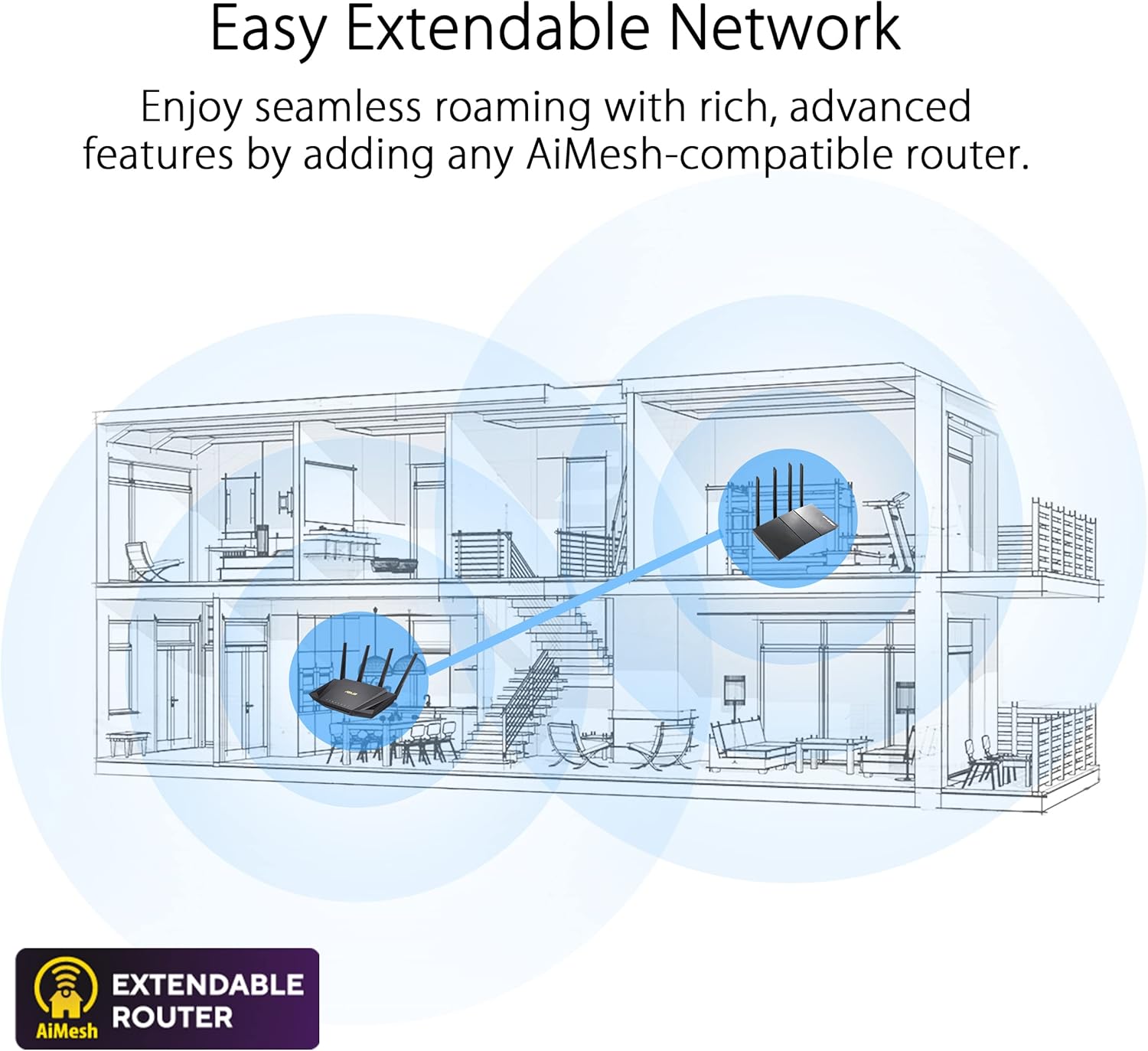
Easy Extendable Network – Enjoy seamless roaming with rich, advanced features by adding any AiMesh-compatible router.

Seagate IronWolf 8TB NAS Internal Hard Drive HDD – 3.5 Inch SATA 6Gb/s 7200 RPM 256MB Cache for RAID Network Attached Storage – Frustration Free Packaging (ST8000VNZ04/N004)
Original price was: $219.99.$12.99Current price is: $12.99.

UGREEN USB 3.0 Hub, 4 Ports USB A Splitter Ultra-Slim USB Expander for Mouse, Keyboard, Flash Drive, U Disk, Printer Compatible with Laptop, Desktop PC, Xbox, PS5, and More, 2ft
Original price was: $9.99.$7.59Current price is: $7.59.
-62%



Chicablah –
Easy setup
This router is an absolute beast! From the moment I plugged it in, the performance boost was undeniable. Setup was a breeze with the app, and within minutes I had blazing-fast, stable internet throughout my entire home—including areas that were previously dead zones.The design is sleek and futuristic, and those glowing LED lights give it a high-tech vibe that fits perfectly in my gaming setup. Streaming 4K, online gaming, video conferencing—everything runs smooth with zero lag or buffering.The multiple antennas really do their job with extended range, and I’ve noticed faster speeds even when multiple devices are connected. It also has advanced security features, which give me peace of mind.If you’re looking for top-tier performance, whether for gaming, working from home, or just handling a ton of devices, this router delivers in every way. Highly recommend!
LGL –
The speed is about 15% higher than with my older Wifi6 (AX) Router
About average to setup. Used both the Web Interface, and later, the ASUS app. Both work great with this router, but NOT with earlier ASUS AX routers.Great coverage in my @1800 Sq Ft Rancher. It is placed at one end of the house and gets at least a Medium Strength (grreat connect Icon too) to my devices at the Far end! All types of devices connect rapidly and get a Great Connection ICON (on the App).All Antennas are dead vertical, as is recommended for a single story, but since it’s on the Top Shelf of my Built-In bookshelf, I put two 1/2 inch Silicon Squares (Stick) to the BACK BOTTOM of the router so that it points slightly downward (also Recommended to aim the Lobes to connection height of devices.The speed is about 15% higher than with my older Wifi6 (AX) Router.Overall, a great purchase and upgrade without paying for a WiFi7, 6GHz BAND (BE) router–that I can’t connect with anyway since I have no 6Ghz devices. . .
Sean H –
Solid Upgrade for AiMesh – Stable Wireless Backhaul and Better Coverage
I upgraded to the ASUS RT-AX5400 to serve as the main router in my home network, pairing it with my older RT-AC68U as a secondary AiMesh node. Setup was straightforward, and the wireless backhaul between the two routers has been impressively stable. I was pleasantly surprised to see a noticeable bump in speed during testing—likely helped by the Cat 5e cable included in the box, which was an upgrade over the older one I had been using.Most importantly, this setup completely eliminated a persistent WiFi blind spot in my home. We now get consistent, strong signal throughout, even in areas that used to struggle. Stability has been excellent so far, with no drops or hiccups.If you’re looking to extend your network using AiMesh and want better performance and coverage without running an Ethernet cable, this is a solid option. Recommended especially for those upgrading from older ASUS routers.
antonio –
Excellent product definitely recommend
Excellent product works like a charm even the set up was easy not to mention the app interface also easy and kind futuristic looking. Love the way its designed as well looks very nice set up. Love the stability of my connection as well.
JC –
Good router for mostly newer devices
This was a very highly-rated item as reviewed by Consumer Reports magazine. Everything from coverage to setup was good, though I noticed a few of my OLDER devices (some smart plugs, an older thermostat) had trouble staying connected to the router, which was very surprising as these routers are “backwards compatible” meaning they are compatible with both the older and newer devices. After reconnecting some devices numerous times, most everything stayed connected – but I honestly think the router is fine – it’s my devices that are too outdated.
James S –
Serious firmware bug that ASUS has not fixed after many months
Update: After using this router for several months I am downgrading my review to one star. The guest network function is buggy to the point of being unusable. Periodically everything on the guest network drops connection until router reboot. The fact that ASUS has not fixed the well documented bug many months later is completely unacceptable. The router does not do what ASUS claims it does.Original review: I have been looking to upgrade my home router system from an older ASUS router and I grabbed this after seeing it on sale. I have had somewhat mixed experience with ASUS routers (more good than bad), but I am familiar with the software and all routers seem to have their quirks. So I jumped on this at a good price.Overall almost everything about the router is positive. It is easy to set up and worked with my fiber gateway right out of the box. As is often the case the default settings were not as secure as I would like, but the AiProtection wizard did a good job of identifying weaknesses I could easily close.My house isn’t all that big, but I have had problems with other routers getting signal in the far corners of the basement or with outside devices. However, signal strength has been very good. I have had zero problems with dead spots or dropped signals. The router also handles swapping between 5 and 2.4 GHz bands automatically, so I don’t have to worry about whether I am too far away to use 5 GHz.Now for the one bug. The guest network software has a well known bug that has been discussed extensively online. The problem is that devices connected to Guest Network 1 will drop access to the internet unless intranet access is enabled for Guest Network 1, which, of course, largely defeats the purpose of a guest network. I try to put my IoT devices on a guest network and found out about the bug when they all stopped working after a couple of days.There is a workaround, which is to only use Guest Network 2. I enabled it a couple of weeks ago and deleted Guest Network 1, and so far all has been good. (I have seen online that Guest Network 2 might not be compatible with mesh networks, but I am not running mesh so I don’t know if that is actually a problem.)All in all I am happy with the router. But it is frustrating that the Guest Network bug has been documented for so long and apparently still not patched.
Dante Wong –
Fue muy facil de configurar y lo que mas me gusta es que ASUS actualiza constantemente su firmwareLo uso como base para un sistema de malla con AIMESH y me ha funcionado excelentele he conectado un buen de aparatos tanto en red RJ45 como Wi.FI y funciona perfectoEl alcance es de casi 5 metros con varias paredes de block y ladrilloExcelente producto
Nafeesq –
Good product
Gary –
This router has the performance to match it’s futuristic looks.I upgraded to this from my old Asus AC86U and I was not dissapointed!With work from home the new norm during these times, the upgrade has helped tremendously with connectivity issues possibly caused by the growing number of devices connected all at once. I also noticed slight improvements to latency when gaming.The coverage is great all on it’s own but I took it to another level by pairing this with my old router.The ASUS feature is a godsent that doesn’t render my old router useless. I now basically have my whole home covered in WiFi with 2 routers working hand in hand. I can’t recommend this more.
Majed –
5 نجوم قليلة في حقة 🤩
Islam Zekry –
You should have DSL while its only work with ethernet cable