


Product description
IR Universal Remote, control your IR 38KHz devices.
Say goodbye to multiple remotes and hello to an organized smart home.
RM mini3 turns your smartphone into a universal remote and integrates control of home automation devices in one easy-to-use app BroadLink.
 Remote Control via APP
Control your home’s IR devices from anywhere, anytime with the Broadlink APP.
 Make your life more convenient
When paired with Alexa/Google Assistant, you can control your device with hands-free voice control.
 Smart routines, perfectly timed
Create custom schedules to sync IR devices like audio systems, TVs, or ACs with your daily rhythm.
 Control multiple appliances with one button
Customize different scenes with one-click option for sleep scene, morning scene, away scene and more
1 Remote Control
2 Voice Control
3 Setup Routines
4 Preset Scenes


1 Share With Family 2 TV Control In APP 3 Works With IFTTT 4 Schedule a Timer 5 Healthy Sleeping
The video showcases the product in use.The video guides you through product setup.The video compares multiple products.The video shows the product being unpacked. video Merchant Video
All Remotes in BroadLink APP, including Fan, Lamp and etc.
Easily set up and control all infrared devices via the app. Create and manage scenes to suit your lifestyle.
If you have an Android phone with a built-in IR transmitter, you can test compatibility by using the app’s built-in function to send infrared signals from your phone.
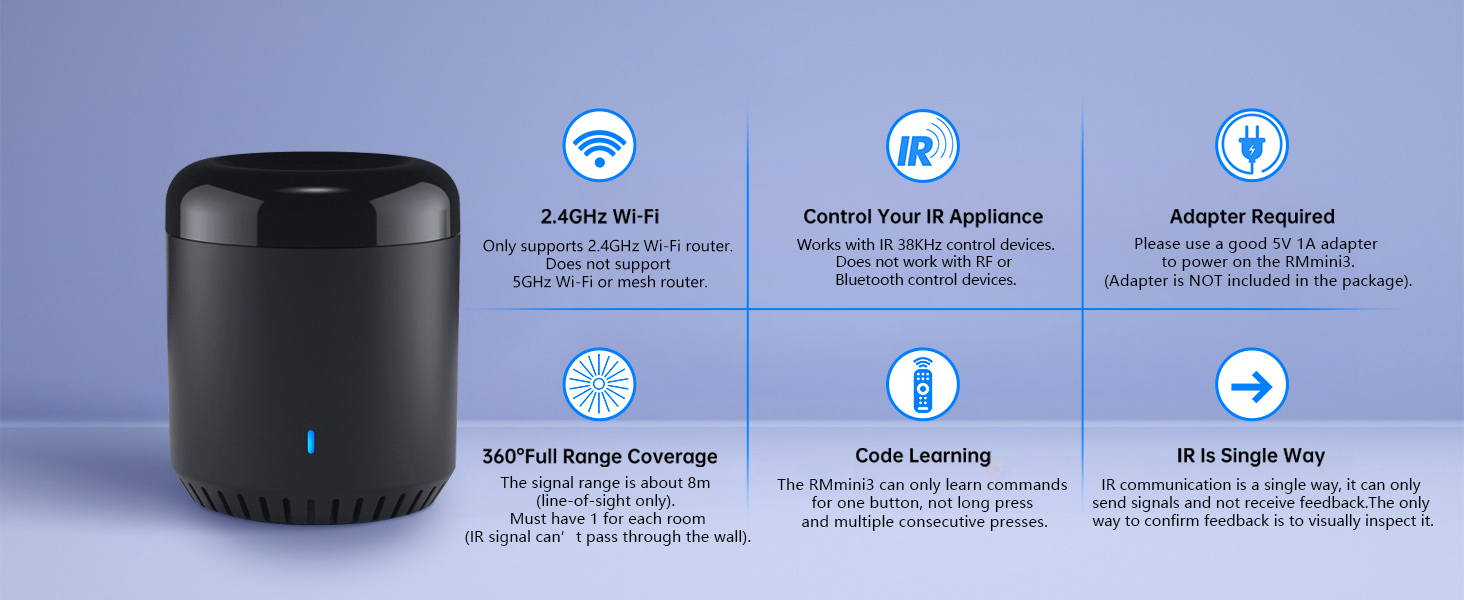
Note: RM mini3 only supports 2.4 GHz (NOT 5 GHz) Wi-Fi to configure in the app.
HOW TO USE?  Download APP
Search for “BroadLink” on Google Play or scan the QR code on the user manual.
Register an account and log in to the Broadlink APP.
 Add device
Go to the home page on APP, tap “Add device” and follow the instructions.
Disable mobile data traffic, select the device AP and stay connected to it.
 Connect Wi-Fi
Choose you home Wi-Fi (2.4Ghz Wi-Fi only), input correct Wi-Fi password.
The Wi-Fi password should contain no more than 32 characters.
 Link with Alexa
In BroadLink APP, tap “Add Voice Assistant”.
In Google/Alexa/IFTTT App, enable the skill/service named “Broadlink”, link account and discover devices.
BroadLink Smart Home
Add to Cart
Add to Cart
Add to Cart
Add to Cart
Customer Reviews
4.1 out of 5 stars 1,950
4.1 out of 5 stars 4,834
4.1 out of 5 stars 4,834
4.2 out of 5 stars 610
4.0 out of 5 stars 408
4.1 out of 5 stars 104
3.2 out of 5 stars 286
Price
$15.79$15.79
$20.79$20.79
$35.99$35.99
$23.69$23.69
$39.99$39.99
$11.69$11.69
$29.09$29.09
Model
RM mini3
RM4 mini
RM4 pro
RM4 mini S
RM4 pro S
LB26R1
Starter Kit
Function
Control IR appliances
Control IR appliances
Control IR, RF appliances
Control IR appliances
Control IR, RF appliances
Wifi controlled RGB Lighting
Smart Lighting Kit
Remote Control
✔
✔
✔
✔
✔
✔
✔
Voice Control
✔
✔
✔
✔
✔
✔
✔
Support Sensor Cable
✘
✔
✔
✔
✔
✘
✘
USB Cable Type
Regular Power Cable
Regular Power Cable
Regular Power Cable
Temperature Humidity Sensor
Temperature Humidity Sensor
No Cable
No Cable
Why can’t it connect to the APP / Wi-Fi ?
Broadlink RM mini3 only support 2.4 GHz Wi-Fi for configuration, does not support 5 GHz or mesh router.
Please check whether the frequency in the router setting is 2.4GHz, and make sure the length of Wi-Fi password does not exceed 32 characters.
Broadlink database list doesn’t have my AC model, what should I do?
Sorry there is no option available for your appliance.
Please choose “Learn remote” to create a remote, tap the buttons on the original remote to let the RM mini3 learn the commands. Then you will be able to control the appliance after learning.
Is my appliance compatible with the RM mini3?
RM mini3 supports IR 38KHz control devices, does not support Bluetooth or RF. Please check the manual of your appliance or consult the manufacturer to confirm.
How to tell if my remote is infrared or Bluetooth
1) Infrared remote has an infrared emitter (crystal head) on the top of itself, you need to point the emitter at the device when use it;
2) Bluetooth remote does not have an infrared emitter, and it usually needs to be matched before first use.
It can’t control my IR device stably, what should I do?
The IR signal can’t go through the wall, please check and make sure the device is close to your appliance and there is no obstacle in between.
Support 50,000+ IR(38KHz) controlled devices such as TV, Set-up Box, A/C, Personal Video Recorder, DVD, receiver and more. Supported devices library is constantly being updated by the cloud so your RM Mini3 is always compatible with newer devices. Large IR database that over 98% IR remote function. Option to program your devices features if certain cloud data is unavailable.
Control IR appliances with BroadLink App anywhere anytime. Set up timers to turn on/off appliances at a specific time or customize scenes with multiple devices. Turning your basic home devices into smart devices and making life smarter and more convenient. (Note: Please download the latest Broadlink App – BroadLink. The previous app e-Control does not work with Alexa.
Compatible with Alexa to voice control your TV, STB, Air Conditioner and Fans; Compatible with Google Home to voice control your Air Conditioner.
Enable and schedule features on a daily basis and customizable for your needs. The RM Mini3 only supports 5V 1A adapter and 2.4 GHz (not 5 GHz) Wi-Fi for configuration in the App, does not support mesh router.
Please note: IR signals can only be received in the absence of obstacles, please make sure there are no obstacles between the RMmini 3 and your device. One-Year Warranty. Video Guide are available on our Amazon Brand Store and YouTube.


Geo B –
Automation to start/stop Holiday Projector
I bought the Broadlink Mini 3 to automatically start and stop my rear screen video projector for Halloween and Christmas projection show in my front window. I bought this device not really knowing if it would actually do the desired job. I was happy to learn that this IR blaster allowed me to connect a non-listed video projector and map all the IR remote control buttons to the Mini 3. From there, I was able to define 2 “scenes”; one to turn on the projector, wait 10 seconds for it to boot up, then define the button sequence to start the desired video from a USB thumbdrive. The other scene turns off the video projector with transmission of 2 button presses of the power button. Each of these “scenes” are started independently at a specific time every day. Once setup, the Broadlink iPhone app is pretty intuitive. Also, the “scenes” are saved to the cloud thus you do not have to have your phone or app running for the automation to work. However, the only setup “hiccup” I ran into was not knowing what “type of device” is the Mini 3 considered in the app. In the Broadlink app, the mini3 is considered a “remote control”. From there you can scroll down and find the Mini 3 and complete the setup configuration.I did not need to configure this to Alexa or Google so no feedback on that.Also note there is a power cable provided but there is NOT a power block to plug in the wall.
Javarie –
Broadlink IR Remote Review
This is a fantastic device for consolidating control over multiple appliances. It worked seamlessly to manage my TV, AC, and other IR-based devices. The remote itself is reliable and versatile, but the biggest downside is the app. While it was once intuitive and efficient, it no longer works well, leaving the device underutilized. If the app were updated, this would easily be a 5-star product.
Brian –
Great app, but hardware requires reset for wifi connection
I bought two hubs and neither one would broadcast or connect Wi-Fi. I almost returned them but happened to reset one while it was plugged in and boom, that’s all it needs. Unbelievable that this isn’t mentioned anywhere in the setup.The app is quite amazing with Google Home. I have the broadlink hub set up to control an LED strip and I can tell Google to change the color, turn up the brightness, turn on/off. They also have predefined IR buttons that other users have set up so you don’t need to set up 20 different buttons.I also have a routine set to turn on my bedroom TV before I go to bed and then shut it off 1 hour after that automatically within Google home.
Lyron O Pinckney –
Device works wonderfully, I hope this helps
I have the RM Mini 3 and it works great for my Projector, Soundbar, & Fireplace. I didnt have any trouble until I added it to Alexa which was very frustrating at first but [FOR ME] it was fixed by using Routines in the Alexa App.1.) Download the IHC app (colorful star with dots logo) then register your account using an email or your phone number (DO NOT USE FACEBOOK)2.) Setup all of your intended devices within the IHC app.3.) **FOR EACH ACTION** you want executed by Alexa, first create a scene in the IHC app. Alexa will only discover the SCENES you create in IHC. Example: Because I wanted Alexa to turn my Soundbar up by increments of 10 I created a Scene called “Vol Up 10″4.) Add the IHC Skill through the Alexa App & let it discover new devices. (The skill logo should be the same colorful logo as the IHC app you downloaded)5.) Alexa will now recognize your Scenes HOWEVER she will ONLY allow you to turn them ON. If you try telling her anything else she will respond that the “Device is not responding” I assume this is an Alexa issue not the device or RM Mini 3. To remedy this just go to ROUTINES in your Alexa app & create a new one.6.) – “ENTER ROUTINE NAME” [My Example: VolUp 10]- Choose a “WHEN THIS HAPPENS” phrase [MyExample: Alexa, Turn Volume Up 10]- Under ‘ADD ACTION’ scroll down to pick’SMART HOME’ & choose the skill you wantactivated. [I chose my “Vol Up 10” Scene]Now it should work how you need it to & just follow the same process for each action you need. I know its long but I hope this helps!
Amazon Customer –
I bought a Hornbill smart lock on sale in October. Unfortunately I didn’t notice when I purchased it that you need a gateway for voice control. The Hornbill documents do not recommend a specific gateway so I chose this one. It works great!Connected to my wifi quickly, synced up with the smartlife app and Alexa and now I can voice control my lock.
TeeTong –
Very fast delivery from the merchant. In terms of the product, i am enjoying it everyday.
PPM –
Very useful product, RF & IR , perfect working both frequencies
Amit kumar –
Although It’s stops working sometime but work for me i use this device to operate my tv , ac with IR blaster feature and my electronic gate lock by RF blaster feature . Rf feature does not support Alexa echo device . Initially I had some difficulty in setting it up.But later it started working fine.
Claude Manseau –
Je l’ai jumelé avec mon a/c de chambre et il et maintenant contrôlé par mon google home