


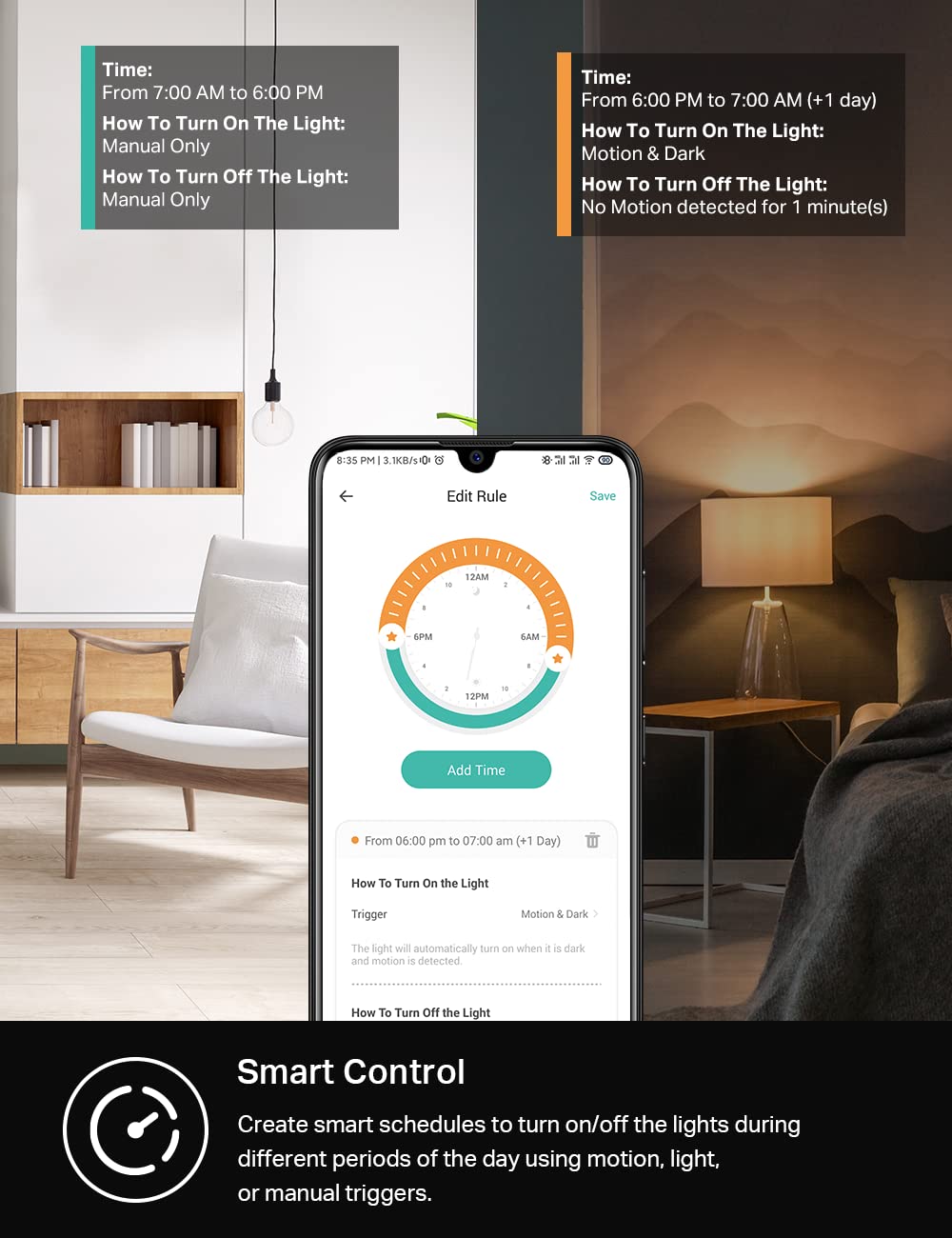

The KS200M is smart switch with an advanced motion and ambient light sensor built in. Ideal for areas where hand-free operation is ideal, the KS200M is perfect for those who want more automation in their home, including those with limited mobility or those with children in the home. Walk into a room and have your lights automatically turn on. Lights can be programmed to turn off after a set time without motion detection to save on electricity. The smart switch also includes an ambient light sensor that will detect daylight conditions and prevent the lights from turning on during the daytime if desired. Fully customize your experience with settings based on your routine. Best of all, the KS200M is hands-free, voice controllable, and app accessed. From Amazon Alexa, Google Assistant, to Samsung SmartThings, the Kasa Smart KS200M gives you convenient voice controls.You can expect Kasa Smart quality with the KS200M which has undergone rigorous safety testing and has been UL certified by 3rd party Underwriter Laboratories. In addition, the device is backed by an industry leading 2-year limited warranty. If you are one of the 7 million plus Kasa Smart users, you will also appreciate that the KS200M is compatible with other Kasa devices meaning, you can set groups, and smart actions to work in conjunction with other Kasa Smart devices.Take control of your smart lighting, and have total automated freedom with the Kasa Smart KS200M Smart Switch with motion sensor.This which can achieve more automation, intelligence, and personalized settings. Standard: IEEE802.11 b/g/n Wi-Fi Standard: 2.4 GHz Wi-Fi only Max load: 600W INC, 300 W CFL. Power Supply: AC 100~125 V, 50/60 Hz Neutral Wire Required. 2-year warranty.
Product Dimensions : 5.06 x 3.33 x 1.82 inches; 4.48 ounces
Item model number : KS200M
Date First Available : December 27, 2021
Manufacturer : TP-LINK
ASIN : B099KGWGQM
Best Sellers Rank: #1,016 in Tools & Home Improvement (See Top 100 in Tools & Home Improvement) #2 in Motion-Activated Wall Switches
Customer Reviews: 4.4 4.4 out of 5 stars 6,611 ratings var dpAcrHasRegisteredArcLinkClickAction; P.when(‘A’, ‘ready’).execute(function(A) { if (dpAcrHasRegisteredArcLinkClickAction !== true) { dpAcrHasRegisteredArcLinkClickAction = true; A.declarative( ‘acrLink-click-metrics’, ‘click’, { “allowLinkDefault”: true }, function (event) { if (window.ue) { ue.count(“acrLinkClickCount”, (ue.count(“acrLinkClickCount”) || 0) + 1); } } ); } }); P.when(‘A’, ‘cf’).execute(function(A) { A.declarative(‘acrStarsLink-click-metrics’, ‘click’, { “allowLinkDefault” : true }, function(event){ if(window.ue) { ue.count(“acrStarsLinkWithPopoverClickCount”, (ue.count(“acrStarsLinkWithPopoverClickCount”) || 0) + 1); } }); });
【Advanced Motion Detection】Completely hands-free and smart operation of your connected lights. The switch automatically turns lights on when motion is detected and turns off after a preset time. Ideal for areas such as bedrooms, hallways and restrooms where hands-free operation is ideal.
【Daylight Detection】Smart ambient light detection will sense daylight and prevent lights from turning on during the day.
【Smart Mode & Away Mode】Set different light triggers based on your routine for effortless control. Automatically turns devices on and off at different times to give the appearance that someone is home.
【Works w/ All Bulb Types】600W Incandescent/Halogen, 300W CFL/MLV/ELV
【Voice & App Control】Manage your device with voice commands via Amazon Alexa, Google Assistant, or Samsung SmartThings. Hands-free operation of your lights from anywhere through the free Kasa app.
【Trusted & Reliable】The KS200M is UL certified, meaning rigorous testing is done for safety and certified by a 3rd party laboratory. Includes our industry leading 2-year warranty. Kasa is trusted by over 7 million users worldwide.
【Kasa Smart Action】A part of the Kasa Smart Ecosystem, the switch works with other Kasa devices, so you can set smart actions, and groupings with your other Kasa devices.
【App-Guided Setup】Neutral wire is required, standard wall plate size. No need to understand complex switch wiring or master vs auxiliary switch configurations; The Kasa app guides you through easy step by step installation. Need 2.4GHz Wi-Fi connection.

Smart Home Energy Monitor with 16 50A Circuit Level Sensors, Measure Power Usage in Real-Time, History with App (16 50A Circuit Level Sensors) - Compatible with Home Assistant
Original price was: $349.00.$23.99Current price is: $23.99.

Aeotec Heavy Duty Smart Switch, Z-Wave Plus Home Security ON/OFF controller, 40 amps record electricity consumption
Original price was: $29.99.$21.99Current price is: $21.99.
-33%


Aaron C Reskew –
Makes life easy, but has a few issues
Update, Oct 2024:The motion sensor is still very sensitive but it turned out the problem with the timer was my error. I’d set up a rule to turn the light off after 10 minutes but elsewhere in the app I’d set it to turn off if it didn’t detect motion for 1 minute. So after 1 minute of me being out of sight of the motion detector it turned itself off, as I’d instructed it to. So a good slap of my own forehead here, a very loud “D’oh!” in my best Homer Simpson voice, and I’m restoring the fifth star to the product.Update, Aug 2024:The motion sensor is very sensitive. I’ve got mine set to the lowest setting and it activates when I’m 10 feet away in an adjacent room. It would be nice to be able to set it to be much less sensitive, so it activates if I walk past it but not if I walk somewhere in the general vicinity. It’s as if the angle of view is fairly narrow, so that if I’m walking along the wall where it’s located it doesn’t respond until I walk right in front of it, but if I’m in the next room it will activate with me a clear 10 feet or more away. That’s tedious, because it means if I stand at my bench to mend something the pantry light keeps turning on.There’s also an issue that might be with the switch and might be with the Kasa app (I suspect the app, but the two go together). Because I’m prone to forget to turn off the pantry light (and sometimes it’s hard to turn it off if I’ve got both hands full) I set up a rule in the software that activates when the light is turned on, and turns it off 10 minutes later. 10 minutes is plenty of time to find what I need in the pantry and leave, except that it actually turns off after more like 2-3 minutes.These aren’t major issues but are irritating enough to knock off a star. There’s not much point having time-based options if what happens bears so little resemblance to what I programmed, and it’s been known for years that motion sensors that activate whenever anything happens remotely near them are of limited use.I still plan to install the other one in the attic, I’ll just leave it to a standard rule to turn it off.Original review:I fitted a motion sensor switch to the room in my basement where I keep the chest freezer. When I take stuff down to the chest freezer I need to figure how to turn the light on, which can be tricky when I’ve got both hands full with stuff to go in the chest freezer. I can flick a switch with an elbow but it’s a bit of a drag. And sometimes when I leave the room I forget to turn the light off, and find it still turned on a couple of days later when I’m next down there.A switch like this solves all these problems at once. The motion sensor means all I have to do is walk past it and the lights come on. And being a smart switch it means I can set up a rule that turns the light off again after 15 minutes. As a fallback I have a “scene” set up in the Kasa app that turns all the automated lights off at midnight regardless, so if the rule doesn’t work as expected it will still shut off at midnight.Be aware these switches are quite deep. I had to replace the back box to fit it, because the previous switch I had was the smallest switch available. The metal back box that was in place was deep enough to hold the Kasa switch but didn’t have enough free space to handle the cables in and out and the wire nuts behind the switch. But now I have a deeper back box and a switch that works very nicely.Installing the switch is about as easy as it gets. It has four wire tails – a white one to connect to neutral, a green one to connect to earth, and two black ones to connect to line/load. All you have to do is figure which wire is which, use the supplied wire nuts to join the wires together, and configure the switch. If you can’t figure out electrics as simple as this, pay an electrician to do it for you.The default level of sensitivity had the light triggering if I went anywhere near it, so I turned it to the lowest sensitivity (this is done in the Kasa app) and now I have to walk right up to it before it activates. That’s perfect for my needs, I don’t want it turning on unless I actually go into the room where it is installed.As a smart switch it can be configured to activate only when ambient light is low, it has different levels of sensitivity for the motion sensor, and it can be controlled remotely and programmed to turn on and off at particular times. That sort of thing has obvious uses if you’re going to be away for a few days, you can set up timers so it’s not so obvious you’re not home. You can also do all sorts of weird and wonderful things if you’re so inclined, so if it takes your fancy you can set it up so that if you walk into the room where the switch is installed it will some totally unrelated device on or off. Why you’d want to turn the attic power strip off when you walk into a room in the basement is another matter, but you can if you want to.I have two of these, and I’m thinking a motion switch to turn the attic light on might be a handy thing to have, for similar reasons.
Lance Y –
Works perfectly with Amica LED puck lights
We added a bunch of LED puck lights in our hallway underneath the AC duct, and it really brightened the area up – too much! It looked like a hospital operating room and my wife immediately told me we needed a dimmer switch. Looking at the literature for these lights, they have a short list of recommended dimmers, and this set was not on that list. They discouraged using smart dimmers completely, but that doesn’t fly at my house. All my lights and fans are connected to smart switches, and these hallway lights were going to be the same. I bought these Kasa 3-way smart dimmer switches and they work perfectly. The lights go really dim with no flickering, and they were really easy to tie into my Amazon Alexa system. We have had zero issues with connectivity, and I love that they have a ring of light about the size of a dime built into the switch when they are off so I can see the light switch in the dark to turn them on. The price is great for such a highly functional smart 3-way switch – definitely recommended!
Eric and Nichole –
Works great for triggering garage lights upon opening garage door!
I am having my garage renovated (paint on walls, polyurea flooring, recessed lights instead of garage door light only). I wanted something that would trigger the four hardwired recessed lights I had installed when the garage door opened as I am getting read of the chain driven garage door opener and switching over to one that directly turns the torsion rod so I can have a cleaner look on the ceiling where the old garage door opener used to be. I was advised by my electrician to look for an occupancy switch or a wifi switch and this particular one does both! For about $13 this wires into the actual power line that turns the 4 recessed lights on/off and allows me to set the motion sensitivity, time of day it looks for motion, it even offers different environmental settings to give it an idea where it’s located on your property. I’m seriously impressed at the suite of features at this price point. I was able to get it to easily connect to my 2.4ghz wifi signal I use for my smarthome devices only (i leave 5ghz+ for personal tech devices) and get my preferred settings all squared away. The default motion sensitivity setting was not strong enough to detect the door opening but I bumped that up to high and now it works flawlessly when the garage door opens. It also allows you to adjust the amount of time you want the light to stay on after it stops detecting motion which was a plus. There seems to be even more settings on there as well if I needed them. Interestingly I found this switch while looking at Homelink’s site (I wanted something to be compatible with the Homelink buttons on my car’s rearview mirror but it turns out the motion sensitivity works just fine so I won’t even attempt to link it to my car).If you’re looking for something similar in a garage project this really fit the bill and for a fantastic pricepoint – great job Kasa!
Micheal T –
The Kasa KS230 KIT V2 is a fantastic smart switch upgrade. Setup was easy, and the app made configuration a breeze. Dimming is smooth, and remote control via Alexa or Google Assistant works flawlessly. The dual 3-way control is super handy, and the fade-on/off feature adds a nice touch. Sleek design, reliable performance — highly recommended for smart home enthusiasts!
Warren –
I have a house filled with a lot of Kasa, Tapo, and Omada devices throughout, and after a few firmware updates over the years they all work very well via Alexa.There are some things to consider when installing iOT devices.1. Don’t use standard grommets that use up valuable space in you 1/2/3 gang boxes. Look at using flatter connectors.2. Follow the installation instructions, and really read them. These are easy to install, but the Kasa devices all need a neutral wire.3. Do the initial firmware updates and use your App to check every so often. The bug fixes are important to.4. Some smart switches can be a pain, like the 3 way, especially when wiring in an older house. If you don’t have a red wire (14/3) it won’t work. I do have one that one side works and the other does not. Possible a problem with the traveller wire.5. For everyone who has a home network with 2.4ghz and 5ghz signals. Let all your iOT devices run on the 2.4ghz. Do not use tablets, smart phones, firestick or other media devices on this, use the 5ghz, trust me, you’ll see amazing improvements and a lot less dropped signals. Remember 2.4ghz usually can have only 32-64 devices depending on the router, and is prone to interference. Don’t waste your bandwidth, big devices…use the big signal.6. If you have 1 router in a big house, expect problems. Install a few EAP225s if you can (Cat 5e or better wiring and either a POE switch or POE injectors) will improve performance. Cable company routers and extenders usually are basic for a high price, and if they aren’t wored, they can be temperamental.Over the past 8years I have been installing TP link devices and their customer service is usually pretty good if you understand electrical and networking, if not you may struggle.In my opinion, TP Link has an excellent spread of devices for the home.I am installing their fan controllers next, and really hoping they make a solid smart thermostat that does not need a C Wire, or comes pre packaged with a solution.Since installing these devices and programming schedules, I have also seen a drop in my power bill…which is always welcomed.One more item to note: Only purchase from “Prime” which ships from an Amazon warehouse to ensure you get a factory fresh device.I hope this helps many who gave these less than 4 stars, I trust this brands performance after many years of use and their evolutions.
Chris Prokopetz –
Works well, connects fast when using the Kasa App. Put these on a wifi guest account which was created just for the ito devices.awesome…
Brett –
Très faciles a programmer et jumelage instantané
Chris Woodman –
Awesome product very easy to install and work impeccable with out Google home system!!