


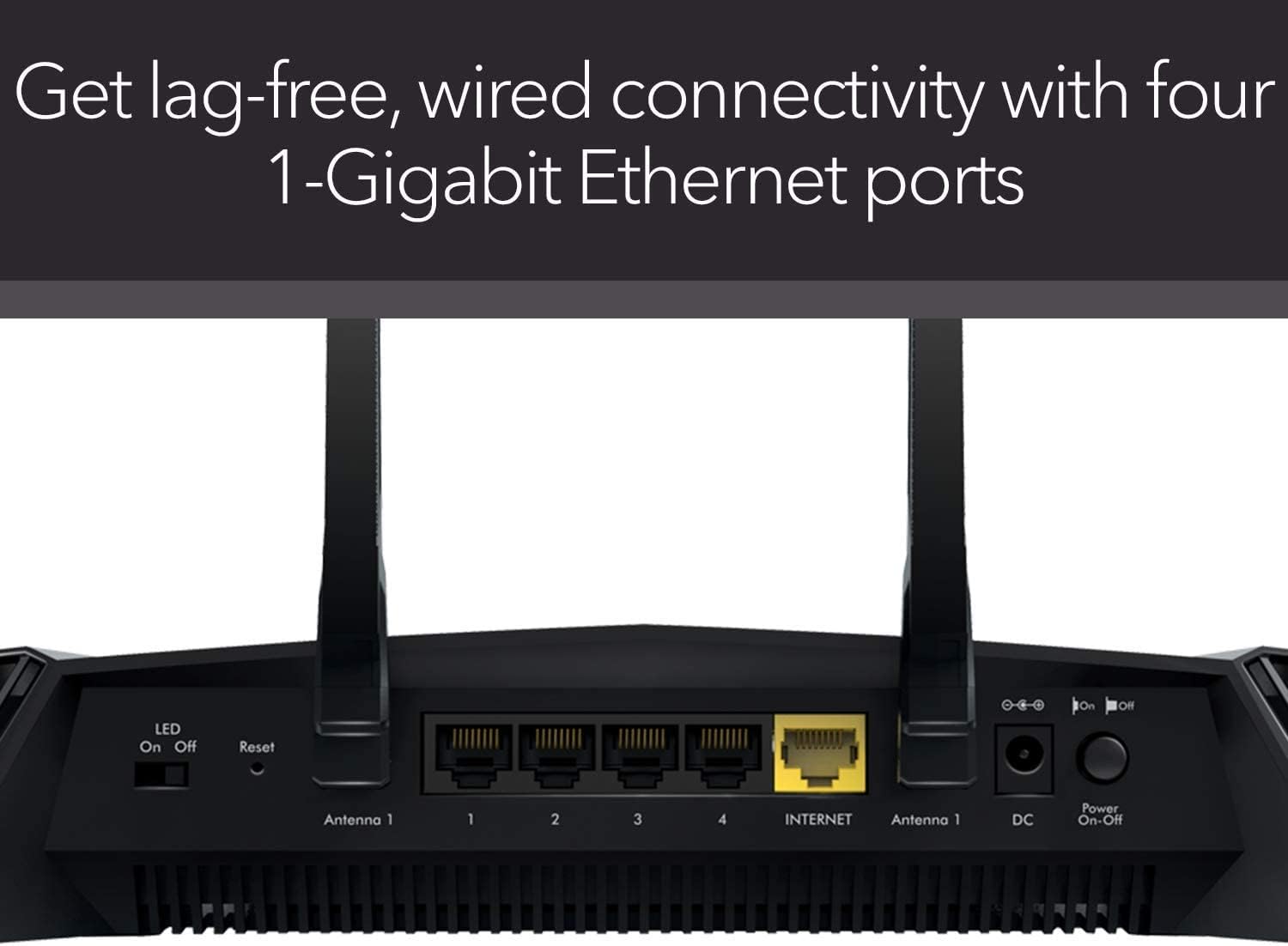


XR500 Nighthawk Pro Gaming Wi-Fi Router uses state-of-the-art software to optimize your internet connection by stabilizing ping, reducing lag spikes, and keeping you in the game with reliable wired and wireless connectivity for fast-paced gaming. Personalize your gaming dashboard to view real-time bandwidth utilization by device, ping and many other parameters. Limit lag and get a guaranteed local connection with Geo Filter or enable Quality of Service for prioritized gaming devices and allocated bandwidth. VPN Client protects your network identity and prevents DDoS attacks. Blazing-fast 2.6Gbps Wi-Fi speeds, Gigabit Ethernet ports, and a dual core 1.7GHz processor make online and network gaming frustration free.
Minimize ping and maximize performance with four 1 Gigabit Ethernet ports for lag free, wired connectivity and 1.7 GHz dual core processor network efficiency.Beamforming : Implicit & Explicit Beamforming. LEDs : On/off LED lights option.
Amp up your WiFi with AC2600 dual band router that delivers blazing fast speeds up to 2.6 Gbps
Put your gaming traffic in a designated express lane with advanced quality of service, bypassing network congestion and reducing lag spikes, jumps and jitters
Make every millisecond count by using geo filtering to connect to the closest servers and players so you can respond and dominate
Monitor your network and game ping in real time so you can see who’s hogging the bandwidth by device and application

Seagate Exos X18 ST18000NM000J 18 TB Hard Drive - Internal - SATA (SATA/600) (Renewed)
Original price was: $452.51.$12.99Current price is: $12.99.
-42%







Mattomatic –
This network engineer is very impressed
I’m a network engineer and I wanted to replace my enterprise gear at home with something simple to manage, yet powerful. I’m getting old and I’d rather not troubleshoot network problems at home. Not that it happens often, but it’s been a nightmare when the wife calls saying that the Internet isn’t working. Time to downgrade. Enter the Netgear XR500.The XR500 ticks off the boxes I was looking for:-It does not need to be rebooted for silly wireless issues. It’s rock-solid stable.-Never needs a reboot to change a setting.-The WiFi range goes well into my yard, past my neighbors home and into the street. How?? It blows away a multiple AP setup it replaced.-My iPhone X is speed testing at 91/5.5 on a 100/5 Internet connection. My computers test at 110+/5.5.-AirPlay runs flawessly to my Apple TV 4K.-Initial setup is simple. My dog could have done it.-VPN is simple to configure and has detailed instructions accompanying the menu options.-Dynamic DNS is insanely easy to turn on. It even configured an account for me.While there are very few drawbacks:-Remote admin can only be secured to one IP or a range. I can’t input a list of IP’s I’d like to have access from.-There’s no mobile app for DumaOS. The web view works pretty well on mobile though, so I’d say that 75% makes up for it. (UPDATE 10/27/18: The Nigthawk app works great with this router; I highly recommend it.)-I could not get the Internet to work in “manual setup” mode. The router would proxy any DNS address to itself: 192.168.1.1. There might be a bug that caused the proxy not to turn off, or maybe there’s a setting I simply couldn’t locate. When I used the automatic setup, Internet started working in one click.Overall I’m very happy with my XR500 and I’m excited to have my home network all under one box again. My “issues” with the router are all “fussy network engineer-problems” that most users would *never ever* encounter. Since my number one concern was stability, I would go as far to say that there is no other home-class router on the market that could satisfy me. I’m a demanding user and the XR500 delivers in spades. In the network world, this thing is the equivalent to an indestructible tank. Congratulations to the Netgear and DumaOS teams who developed this product. You absolutely outdid yourselves.UPDATE 10/27/18: I’m still absolutely loving this router, and I can’t recommend it enough. I recently updated my XR500 to the latest firmware, and believe it or not, it didn’t require a reboot! This thing NEVER needs to reboot. You may be able to tell that I’m the kind of techie that gets excited about servers with up-times measured in decades. The XR500 definitely gives off that feel! I hadn’t thought about it until today, but we never have network problems at home anymore. Not even one- The last time the Internet stopped working, it was because the power was out during a storm. This device is amazing, and I have ZERO regrets in my purchase decision.
Jay –
Beastmode Achievement Unlocked
After over a decade of loyalty to Cisco based routing products, I made the switch to Netgear when purchasing this router in February of 2018. I don’t write reviews. Ever. For this router, I felt the need to write a review because if you are looking for a router with consistent updates, and a community that fervently communicates needs and upgrades to Netgear, with Netgear actually listening, look no longer, this is the product for you. I know how much time I took researching routers myself, so hopefully this will help you too.1. Setup—a breeze for those who know the ins and outs of networking. An app is available to those who are less network savvy. If you don’t know what you are doing, there’s always help and forums where you can find out how to get to where you need to be.2. Features—I found many of the same tools that I had from my Linksys E3000 available with this router. And then there’s what my last router did not have. DumaOS takes what is already a killer router and just puts it way over the top. Everything is customizable. If I want to shut down a ton of IPs so I can game with a consistent ping of 12-15, I can do it with a mouse click. With testing, I’ve seen a ping as low as 8. Part of this magic is the DumaOS multi-node connections module that is based on geographic proximity. The pic I’ve provided with this review shows a ping of 18, and that is with about 35 IPs running, including 2 Nest cams and a DCAU setup for mesh backhaul with 2 additional APs. The internal processor of this router makes this possible. I could go deeper into everything I have connected but you would be easily bored and stop reading this review. Again, DumaOS is the heart and soul of this router. I almost wish there was an option for purchasing an ultra version of DumaOS. It’s not a perfect world, but it’s really the best out there for maintaining a rock solid connection.3. Reliability—I haven’t once needed to restart the router for any reason related to the router, only from activities by my ISP (Xfinity). And I’ve only done that three times over 9 months. The connection to all my devices is rock solid, does not drop out—at all. I’ve been able to run my other two Linksys routers with the same mesh config I was using with my E3000 with no issues.4. Range—I can’t really review this aspect as I have a mesh set up.5. Ports—has all the ports I need. It’s worth noting that I do not have an NAS attached to the router. I’m not really a believer of NAS due to the I/O load it puts on a LAN. I would barely even use the NAS if I had one, so it doesn’t make much sense in my application to use one. I would caution against using one if you are looking to use this for gaming.6. Price—the old adage “you get what you pay for” applies here. This isn’t a router for those looking for a “best bang for the buck” type of application. If you buy this router, you know why you are buying it. It delivers for every penny spent on it.7. Looks—every router looks like a UFO these days. Can’t say much here, it just looks cool, period.8. Remember—a router is only as good as its ISP. So keep that in mind. If you have problems currently and think this router may fix them, rethink your approach.If you really want to step up your game, this is the router for you. Netgear and DumaOS have made me believers. Maybe they will make you one too.
Alex H –
Excelente producto, facil de instalar, gran velocidad, muy buena señal.El empaque venia dañado con un corte de navaja que llego hasta el router.
Customer –
I have a dead zone in my duplex house which my old dlink 605L can only show 1point and cannot have stable connection. Signal strength of this in 2.4 Ghz is penetrating there also which great. I can able to login to office and work without any noticable issue any where from home.5 Ghz is just passing 1 wall. whereas 2.4 Ghz is passing 2 to 3 walls in between.Another thing about this router is Duma Os which is awesome if u r monitoring and managing home network frequenty. DHCP settings works as charm as I have some IOT devices where I need static ip address to be assigned.Overall its good router and value for money if ur house is having lot of dead zone and u r serious about ur home network.
SuperE –
******** Quick Rating ********Pros:- Does help to keep pings consistent for the most part.- For basic use, it’s easy to set up; but more advanced users will appreciate some of the under the hood settings.- Fixed my bufferbloat issues.- UI in the admin panel is practical on desktop, but useless on mobile.- Bandwidth control on a per-device level is really nice.- Looks amazing.- Encrypted guest access.Cons:- Can cause some games to simply not connect if servers are outside of the geofenced area.- No mobile admin UI; Netgear app is very limited and doesn’t make use of any of the features this router has to offer.- Ironically, I’m not getting the best pings I’ve ever had with this router, but the connection is stable.- Weak content filtering.*****************************Let me start by saying that I’ve tried several high-end routers before settling on this one. We have several gamers in the home, but also have a lot of streaming and high-volume data transfers happening throughout the day, so the network and internet at home take a beating.Previously, I was constantly having bufferbloat issues no matter what I did – this made it impossible to game unless it was after 11pm and forget about live streaming during the day – it didn’t happen.My internet is a 150/10 cable connection and it’s usually always stable.The XR500 has several features that I really wanted to take advantage of:- Geo-filtering connections while gaming online.- Granular control over bandwidth used by each device.- Bufferbloat protection.- Guest networks with encrypted connections (it’s shocking that other high-end routers don’t offer this…).All of these needs were met, although there were a few caveats.Most games do fine with the geofilter – I set mine to 2000km as it gets a good part of the east coast from where I am. Certain games like Rocket league (which have previously been notorious for me when it comes to lag) will often kick me out when looking for a server because the host or another player was outside of the geofilter. I would say this can happen maybe 3 out of 10 times when looking for a host. But when it does connect, the pings are STABLE – not the lowest I’ve ever seen – but stable!Using this with my Xbox One has been very simple. When gaming on a PC, the geofence works a little differently because it can’t auto-detect games as easily. When you add a PC, it basically gives you an option to select a geo filter by game (some like battlefield, COD, Overwatch are listed, but others like CS:GO and DOTA 2 are listed as “Source engine). You have to select one of those and it will set a distance for the geo filter for you. But you will automatically be put into “spectating mode” when selecting a PC, which means it’s not using geo filtering. The idea is that PC games are good enough when deciding which server to connect to, while consoles aren’t… at least that’s what I’ve been reading about this feature. That said, I only use geofiltering on my console.This router does have features like secure remote management, VPN, content filtering, guest access, and many other features you’d expect on a router of this calibre.I will note that content filtering isn’t nearly as good as it is on the Netgear R7000 I was using previously, which worked via opendns to filter categories of websites and not only keywords.Regarding guest mode, this is as good as it gets. You can set up both a 2.4GHz (b/g/n) and 5GHz 802.11 (a/n/ac) guest SSID and can set whether each guest can see another on the network. Guest access can also be encrypted.Overall, I’m happy with this router. My connection is as stable as it’s ever been and my son no longer yells at me because of lag ;)I wish that a mobile admin UI would be available, but this router is great as a set-and-forget unit.
Amazon Customer –
This has been a nice upgrade from the both the Netduma R1 (which I stopped using because it was a little glitchy and the wifi wasn’t great for a medium to large house) and the Netgear r7000 (which was “ok” but did not have the features of the DumaOS). I did extensive testing today when I got it and I can’t believe how well the Anti Bufferbloat works. Internet in my area is not the greatest – Average ping times on PSN (Cod / Fornite) were always around 85 – and with this – around 52. For those that don’t know, that doesn’t sound like much, but for those that game – it’s life or death. Testing bufferbloat on dslreprts I continuously get A+ rating with everything set at 75% and set to “only when needed”, which is nice because it doesn’t screw up the internet speeds for everything else. With my other router, the tests were never consistent, but with this I must have ran the test 40 times and all were A+. I was shocked as I always just though it was my crappy ISP why the results were never consistent. I literarily just got my first Solo win on Fornite on the second game I played after getting everything with this new router configured. Played all night and connection felt great. I got more kills just tonight then I did all last week. Luck?.. I don’t think so. So far so good.
CÉSAR CH. –
Instalación muy fácil, viene en varios idiomas, mi casa es de dos pisos y la señal llega a toda la casa. Puedes seleccionar equipos para darle prioridad y dar todo el ancho de banda a ese equipo, puedes seleccionar los servidores al que te quieras conectar ( para juegos COD WZ)