


From the brand
Philips 4200 Series Smart Lock
Philips Wi-Fi Lock


Philips Door Lock
Philips Smart Lock

Front Door

Backyard

Apartment

Garage
𝐅𝐥𝐞𝐱𝐢𝐛𝐥𝐞 𝐖𝐚𝐲𝐬 𝐭𝐨 𝐔𝐧𝐥𝐨𝐜𝐤: Unlock the way you want: app, passcode, fingerprint, physical key, or voice via Alexa/Google Assistant. Everyone in the family can choose what works best — convenience meets flexibility. Batteries are not included.
𝐔𝐧𝐥𝐨𝐜𝐤 𝐅𝐫𝐨𝐦 𝐀𝐧𝐲𝐰𝐡𝐞𝐫𝐞: Built-in Wi-Fi lets you lock and unlock your door remotely anytime, anywhere from your smartphone — no extra hub needed. Stay connected and in control, even when you’re at work or on vacation. Note: The lock only support 2.4Ghz network. Keep the router and lock with 65ft for better remote control.
𝗩𝗼𝗶𝗰𝗲 𝗖𝗼𝗻𝘁𝗿𝗼𝗹 𝗥𝗲𝗮𝗱𝘆: Pair with Alexa or Google Assistant to unlock or lock with your voice. Great for when your hands are full or you’re relaxing at home and still welcome who’s at the door.
𝗬𝗼𝘂𝗿 𝗙𝗶𝗻𝗴𝗲𝗿𝘀 𝗶𝘀 𝗬𝗼𝘂𝗿 𝗞𝗲𝘆: Just one touch unlocks the door instantly. No need to search for keys — Your fingers is your keys, perfect for busy mornings. Philips wifi lock store multiple prints for easy family access.
𝐂𝐨𝐝𝐞 𝐀𝐜𝐜𝐞𝐬𝐬 𝐌𝐚𝐝𝐞 𝐒𝐢𝐦𝐩𝐥𝐞: Create up to 100 custom passcodes for family, friends, or renters. Easily share unlimited one-time or scheduled codes to guests, cleaners, or deliveries— no need to be home to open the door.
𝗚𝗲𝘁 𝗡𝗼𝘁𝗶𝗳𝗶𝗲𝗱 𝗜𝗻𝘀𝘁𝗮𝗻𝘁𝗹𝘆: Always know who’s coming and going when your door opens, locks. Real-time alerts keep you in the loop, even when you’re away. Check a full history of who accessed your home and when if you want.
𝗔𝘂𝘁𝗼-𝗟𝗼𝗰𝗸 𝗳𝗼𝗿 𝗔𝗱𝗱𝗲𝗱 𝗦𝗲𝗰𝘂𝗿𝗶𝘁𝘆: Set your door to lock automatically after 10 to 180 seconds. Whether you’re rushing out or have your hands full, your home stays secure without extra steps. It doesn’t have door sensor.
𝐄𝐱𝐭𝐫𝐚 𝐏𝐫𝐨𝐭𝐞𝐜𝐭𝐢𝐨𝐧 𝐰𝐢𝐭𝐡 𝐀𝐰𝐚𝐲 𝐌𝐨𝐝𝐞: Going out of town? Activate Away Mode to disable all unlock methods except the master code. A simple way to add extra security while you’re away or on long trips.
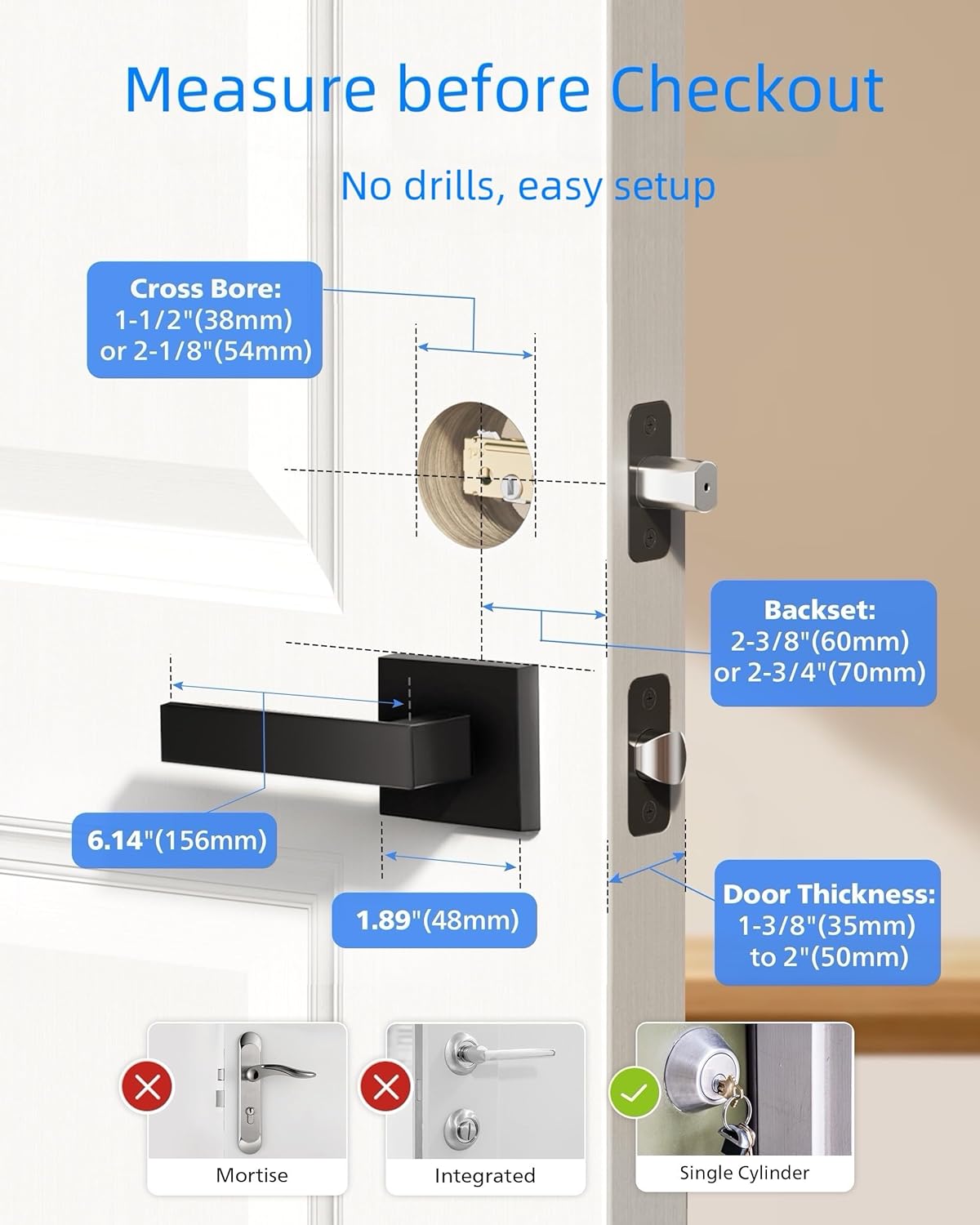
𝗘𝗮𝘀𝘆 𝗜𝗻𝘀𝘁𝗮𝗹𝗹𝗮𝘁𝗶𝗼𝗻: Compatible with most doors 1-3/8″ to 2″ (38mm to 50mm) thick. 𝗣𝗹𝗲𝗮𝘀𝗲 𝗰𝗵𝗲𝗰𝗸 𝘆𝗼𝘂𝗿 𝗱𝗼𝗼𝗿 𝘀𝗶𝘇𝗲 𝗯𝗲𝗳𝗼𝗿𝗲 𝗽𝘂𝗿𝗰𝗵𝗮𝘀𝗲. Install it yourself in minutes using just a screwdriver. Note: 1. Please use 4 or 8 AA alkaline batteries(not included) 2. Please press and hold the reset button for 5 seconds to activate the lock. 3. Please check the installation video on the details page for installation.
𝐓𝐢𝐦𝐞𝐥𝐲 𝐂𝐮𝐬𝐭𝐨𝐦𝐞𝐫 𝐒𝐞𝐫𝐯𝐢𝐜𝐞: Philips US-based team is available by phone Mon-Fri 8AM – 8PM & Sat 9AM -5PM PST, plus 24/7 via email. We’re here when you need us.


Daniel G. –
A good smart lock
This lock has been excellent. It offers multiple ways to unlock: by key, passcode, and fingerprint. I can control it from the app on my phone, set it to auto-lock after entry, and add users while tracking who entered the house. Installation was straightforward with no special tools required. After one week of use, my experience has been very positive.
KimG –
Great keyless entry for the price
It works and exactly as described. We needed to be able to let someone if my dad fell but didn’t want to have a code that would work. Creating a one time code was perfect. Also finger print works great and love it locks after a few seconds
GiGi –
Seems to work as advertised, except for the Alexa part.
Not going to lie, had our handyman install this, so I can’t speak to the actual putting it on the door part. This is the brand that he recommended & has at his house. Connecting via Bluetooth to the app was easy, connecting to the home wifi, not so much. My wifi was too advanced for it since the lock only connects on 2.4, so I had to set up a separate 2.4 network for it on my Orbi mesh network, which was easy in the Orbi app. Once I had it locked down to 2.4 only, the locks hooked right up. Amazon is still not connecting, but I’ll work on it. Tips: You can press the check mark on the keypad to lock instantly. You can set up a max of twenty fingerprints, but you have to set them up on each lock. Max number of individual codes is 100. Needs 8 AA batteries. The QR code to set up the lock is on the battery compartment lid.
Paul O. –
Winner to Yale assure 2
I recently switched to this Philips smart lock after trying the new Yale Assure 2, and the difference is night and day. Installation took literally one minute—everything fit perfectly, and the app recognized the lock instantly.The lock’s operation is incredibly smooth, and the fingerprint reader works every single time. Signal strength is excellent too; it connects immediately without the lag or dropouts I saw with the Yale unit. The build feels sturdy, not flimsy plastic, and there are plenty of customizable settings for access, notifications, and auto-locking.Exactly what I needed: simple, reliable, and solidly made. Highly recommend.
Humberto rivas –
BBB
Super easy install, worked as soon as installed, connected to wifi easily, bought another brand at first but this one easy to install instructions clear on how to install and again worked 1st time
Scott R. Bader –
Finally one that works
We went through 2 other locks like this that were either a huge pain to install or in the end did not work. This one was relatively easy to install, works with our wifi, and works well.
Courtney Owens –
App is not dependable
I bought the Phillips Home Access Smart Dead Bolt for our AirBnB. We loved the idea of having our own code and could assign guests their own code with the option to change it with each guest. It was a pretty easy installation but getting the app to work was a different story. The app did not find my device the first day we tried it. We tried scanning the QR code provided on the back of the battery panel and even tried manually entering in the combination it was asking with no luck. The second day it was able to find the device simply by being next to it, it would connect to the Bluetooth and could verify our master code we entered in but would not go any further than that. It would say “connection failed”. I tried removing the batteries, trying new batteries, I did a speed test on my WiFi, I tried resetting the lock and deleting and redownloading the app all with no luck. It was very frustrating. I tried calling the number provided for customer support but could not reach anyone, I had to leave a message. I did end up emailing Phillips about their product but by the time they got back to me we had already switched out the lock. They said the app needed to be updated and they were working on it. I am unsure if this would have helped but I felt like this product was not dependable with the app not working to its full capacity. Especially if this would have happened when I was trying to get guests in my house.
Gibby –
Solid purchase
Really like this one, the app works great with it, and the finger print recognition is really impressive. Definitely a buy if this has the features you are looking for super solid choice. (Have it installed for about 2 months 11/25)