


Product description
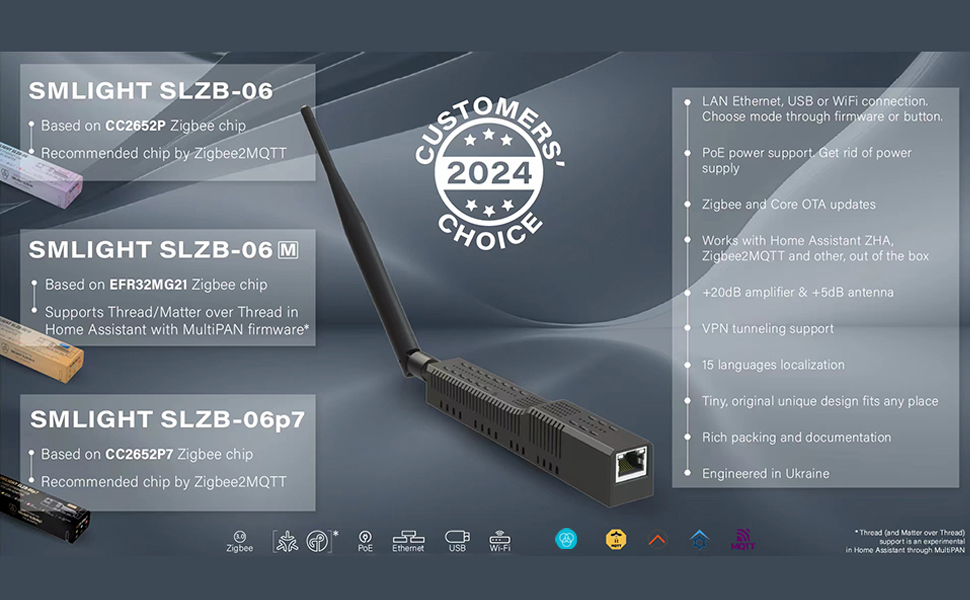
WHAT IS SMLIGHT SLZB-06, SLZB-06M and SLZB-06P7 ZIGBEE ADAPTER?
SMLIGHT SLZB-06/06M/06p7 are a network device that serves as a central bridge for managing communication in a Zigbee network. SLZB-06 can also serve a Matter-over-Thread network. The devices are designed specifically for Zigbee2MQTT and ZHA Home Assistant ensuring smooth work out-of-the-box. These devices have the smallest size and reachest packing.


KEY SPECIFICATIONS FOR SLZB-06* SERIES ZIGBEE COORDINATORS:
3Modes Zigbee-to-Ethernet, Zigbee-to-WiFi and Zigbee-to-USB Matter-over-Thread SLZB-06 has also experimental supports of Matter-over-Thread. Different Zigbee SoCs Options SLZB-06 on CC2652P, SLZB-06p7 on CC2652P7 and SLZB-06M on EFR32MG21. Plug-and-play Pre-flashed and ready to use with Zigbee2MQTT and ZHA Powering PoE and Type-C powering, PoE IEEE 802.3af standard support. Firmware OTA update Zigbee and Core firmware OTA update over web-interface (one-click update). Most powerful chip Most powerful version of ESP32 chip inside: 2 cores @ 240Mhz + 16Mb memory. Double protection VPN tunneling with Home Assistant and security authorizations.VPN tunneling with Home Assistant and security authorizations. Securely protected login with password to web-interface, internal whitelist firewall settings Multi-Building Coverage Can cover multiple buildings with 2 or more coordinators and Zigbee2MQTT. You can install as many coordinators to work with Zigbee2MQTT+Home Assistant as you want. Support multiple languages 15 language localization interfaces. Zigbee firmware/Core firmware Coordinator or Router Zigbee firmware/ Standard or Opensource Core firmware. Rich packing Zigbee Coordinator, +5dB antenna, screws and screwdriver, adhesive tape, Type-C adapter, manual.
Add to Cart
Add to Cart
Add to Cart
Add to Cart
Add to Cart
Price
$74.99$74.99 $74.99$74.99 $79.99$79.99 $55.99$55.99 $34.99$34.99
Zigbee Soc
CC2652(Texas Instruments) EFR32(Silicon Labs) CC2652P7(Texas Instruments) CC2652(Texas Instruments) EFR32(Silicon Labs)
Core Soc
ESP32-V3,16MB 2 core @240Mhz ESP32-V3,16MB 2 core @240Mhz ESP32-V3,16MB 2 core @240Mhz ESP32-V3,16MB 2 core @240Mhz N/A
Serial Soc
CP2102N(Silicon Labs) CP2102N(Silicon Labs) CP2102N(Silicon Labs) CP2102N(Silicon Labs) CP2102N(Silicon Labs)
POE Powering
√802.3af √802.3af √802.3af X X
USB Powering
✓
✓
✓
✓
✓
Zigbee to USB
✓
✓
✓
✓
✓
Zigbee to Ethernet
✓
✓
✓
✓
X
Zigbee to WIFI
✓
✓
✓
✓
X
Zigbee2MQTT
✓
✓
✓
✓
✓
ZHA
✓
✓
✓
✓
✓
Which Zigbee chip should i choose?
CC2652P
CC2652P (48Mhz, 88Kb RAM) is the Top 1 on our list. Reliability has been tested over the years and by many users. CC2652* chips are fully supported in Zigbee2MQTT (EFR32 has an “experimental” support status), and are also fully supported in ZHA. That is, it is a universal coordinator for both ZHA and Zigbee2MQTT. Zigbee firmware supports up to 200 end devices. Even with the maximum number of Zigbee devices, the chip parameters (processor 48Mhz and 88Kb RAM) are not even close to the maximum, so there is no difference in speed compared to other chips in the series (CC2652P7: 48Mhz+152Kb RAM, CC2674P10: 48Mhz+264Kb RAM). So, CC2652P is #1.
CC2652P7
The CC2652P7 (48Mhz + 152 Kb RAM) has the same processor (48Mhz) as the CC2652P chips, but a slightly larger amount of RAM – 152Kb (CC2652P: 88Kb). At the same time, neither the processor nor the memory is used even by 30% when the chip is operating in coordinator mode with the maximum possible number of connected end devices. Therefore, this chip is more of a marketing ploy. Our recommendation is to pay attention to CC2652P. It is cheaper, more reliable (because it has been tested by a large number of users), and supports +20dB of gain at the firmware level. That is, If you like marketing gimmicks, the CC2652P7 is your choice.The CC2652P7 chip is ranked #2 in our rating.
CC2674P10
The CC2674P7 (48Mhz + 264Kb RAM) has the same processor (48Mhz) as the CC2652P and CC2652P7 chips, but a slightly larger amount of RAM – 264Kb (CC2652P: 88Kb, CC2652P: 152Kb,). At the same time, neither the processor nor the memory is used even by 30% when the chip is operating in coordinator mode with the maximum possible number of connected end devices. Therefore, this chip is more of a marketing ploy. In addition, the firmware for this chip is in test mode. As of February 2024, we recommend that you buy these coordinators at your own risk, or if you are a firmware developer and you need a test device on this chip. Our recommendation is to pay attention to the CC2652P. It is cheaper, more reliable (as it has been tested by a large number of users), and supports +20 dB of gain at the firmware level.That is, if you like marketing gimmicks, CC2674P10 is your choice.The CC2674P10 chip takes the 4th place in our rating.
EFR32MG21
The EFR32MG21 (80Mhz + 96Kb RAM) does not differ significantly from the CC2652P chips in terms of technical characteristics. However, there are a few things that the user should know: (1) This chip is ideal for working with ZHA (since the native Home Assistant coordinator is built on the same chip), but it is listed in the “experimental” section for Zigbee2MQTT. In practice, these chips show more stable operation than CC26** in Zigbee coordinator mode. In addition, although both EFR32MG21 and CC2652P chips have a +20dB amplifier, EFR32 chips usually show higher LQI with end devices. We put this chip on the 1st place along with the CC2652P chip in our rating.
EFR32MG24
EFR32MG24 (80Mhz + 256KbRAM) does not differ significantly from EFR32MG21 chip in terms of technical characteristics, except for the size of RAM: 256Kb versus 96Kb in EFR32MG21. The amount of RAM is at the level of the CC2674P10 chip. However, as in the case of the CC2674P10 chip, even with the maximum connection, the processor and RAM are not loaded to the maximum in EFR32MG21. So whether it makes sense to overpay for EFR32MG24 is a rhetorical question. Therefore, here we would say the same as with CC2652P7 and CC2674P10 – if you like marketing gimmicks, CC2674P10 is your choice. This chip takes the 3rd place in our rating.
SMLIGHT SLZB-06 FREQUENTY ASKED QUESTIONS (FAQ)
Q1: Do these coordinators work with Zigbee2MQTT and ZHA?
A1: Yes, all models work with both Zigbee2MQTT and ZHA.
Q2: Do I benefit from using SLZB-06p7 based on newer SoC C2652P7?
A2: If you do not plan to have more than 200 end Zigbee devices, you do not need pay more for CC2652P7 chip. Moreover, CC2652P and CC2652P7 are based on the same processor Cortex M4F 48Mhz, the only difference is RAM.
Q3: Can I connect multiple adapters to the same instance of Home Assistant?
A3: Yes, you can. You will need to run two or more instances of Zigbee2MQTT. Please check out the product manual with an explanation.
Q4: Can I use “passive” 24V PoE?
A4: Adapter supports active PoE standard IEEE 802.3af. So Only PoE routers and injectors with this standard will work.
Q5: Is it possible to use device in Wi-Fi mode?
A5: Yes, it is. What you need is just choose mode to Zigbee-to-Wi-Fi and connect to your Wi-Fi network.
Q6: Are there any delays in Zigbee while using via Ethernet?
A6: No, actually Ethernet 100Mb is much faster rather than the baud rate used for USB serial connection 115k.
Q7: My Home Assistant server is located in the basement. Can I put SLZB-06 in my leaving room and connect to it via Ethernet?
A7: Yes, basically that is the point for SLZB-06: you can locate your Zigbee Adapter wherever you want and do not stick to the server. Even remote connection remote buildings works.
Q8: How to select mode USB/Ethernet? Any physical switches?
A8:The device can be switched between USB or Ethernet either through a web-interface or by button. Just short press – and the work mode changed. Switching by web interface allows changing the work mode distantly.
Q9:Can I update firmware distantly, without physical access to the SLZB-06?
A9:Yes, you can. Both main chips used in SLZB-06 (CC2652P and ESP32) can be updated distantly from the other global point. That makes the device suitable for installation in rare-visited locations or installation places.
【Powerful Features】Can be used as a Zigbee coordinator/Router/Signal extender(+20dB amplifier&+5dB antenna,Having a wider signal coverage range)
【Three Connection Methods】LAN Ethernet,USB or WiFi connection.Choose mode through firmware or button.
【Two Power Supply Methods】Can be powered through POE or USB.
【Widely Applicable】Widely Applicable:Works with Home Assistant,ZHA,Zigbee2MQTT.
【Powerful Chips】Based on CC2652P7 Zigbee chip with Cortex-M4F 48Mhz, 153kB RAM, new for Zigbee2MQTT and for ZHA;
【Remote Control】Can add as many Zigbee coordinators to one server as you want. So you can easily cover different rooms, buildings and connect them to the same Home Assistant instance.


Amazon Customer –
Easy to set up with Home Assistant, works great
I had a bit of a hitch right at the start when the unit I was sent was clearly a used one, and had someone else’s password set. There’s no obvious way to factory reset it (e.g. with a button or somesuch), and I found absolutely nothing about it by googling. Finally I happened upon the company’s online flashing tool, which has instructions for how to open the housing and short across two particular pads on the PCB with a wire to force the chip into flashing mode. I then was able to log in to a fairly broken web UI, where I flashed an OTA update (to the same version I’d already flashed from the web tool), which fixed it. It was smooth sailing from there.I’m using mine with PoE since I happened to have a spare injector on hand, but they claim it works fine with USB too, as long as you use an A-to-C cable. I’m not sure why C-to-C cables are a problem, but it warns you not to use them in multiple places. In my book, the most important thing is that it’s not a big stupid USB dongle that will sag off the side of my Raspberry Pi, block all the other USB ports, and constantly lose connection due to the plug bending under its own weight. This thing connects with cables no matter how you use it, which is great.Things to note:- The antenna is removable; it uses a regular (non-RP) SMA connector.- The indicator lights on the side are completely undiffused and very annoying, but can be turned off easily in the config UI. Unfortunately, the Ethernet port lights don’t seem to be controllable, but they’re a lot dimmer.- It does make a quiet high-pitched whine when run from PoE. I have mine across the room from my bed and can’t hear it at all, but I would not mount this right next to my head.Overall, it seems like a pretty good device. I have not managed to range-test it yet, but I’m just using it for battery-powered wall switches in my apartment, and it’s more than enough for that.
Jay –
Works well with Zigbee2MQTT (Z2M)
Picked the SLZB-06 since it was recommended by a few, and I’m happy to report that it works well with Zigbee2MQTT / Home Assistant. It being PoE is a huge win, my server is on the opposite end of the house, and with PoE, I can easily run it to a more central location, reducing the need for repeaters.My LQI values in Z2M is lower compared to my Conbee II, but according to some research the LQIs are known to be inaccurate for this device. I’m not worried too much about it since my end devices respond instantly and I haven’t had any drop outs. It’s been a few months of usage and so far everything has been very stable.It also has a really nice web interface for administration, and even helps you connect to Z2M by providing the config, all in one place. You can tell this was made by/for home automation enthusiasts.
Duane F Bruns –
Great Zigby Coordinator for Home Assistant
Works great. Easy to setup with Home Assistant. Good range. Power Over Ethernet (POE) makes it easy to locate it in a good location.
Kyle –
Just works, awesome product
Very much a plug and play experience. No problem installing and getting migrated from my old coordinator in HA.
Professional Automotive Detailer –
Using for zigbee devices and love it
Had this over a year now. Works as advertised and has a pretty long range. First time setup can be confusing without documentation. Otherwise, will buy again if I had too. The value in being either a zigbee coordinator, router, or matter hub is massive. Allows for lots of different connections (eth, wifi, etc..).
Mark Davidson –
Awesome little zigbee coordinator
Works great! Compact size and lots of features through the web interface. Ethernet or WiFi connections work great. I got the non-POE version but they make a POE model as well.
clutchman27 –
Zigbee with good range
As someone diving into the world of home automation, I recently picked up a set of door sensors over the holidays, and I must say, I am thoroughly impressed with the performance of these Zigbee-based hub paired with the door sensors.Initial Setup:The setup process for this Zigbee unit was surprisingly straightforward. I began by plugging in the USB power connection, which powered the unit instantly. The next step was to configure the Wi-Fi, and the whole process took only a few minutes. Once connected, I accessed the web management page and quickly updated the firmware, which was smooth and fast. The entire setup process, from powering on the device to being ready to add sensors, took less than 10 minutes.Integration with Home Automation:Integrating the unit with my Home Automation software was even more seamless. Within just a few minutes, I had the unit added to my system, and the door sensors paired effortlessly. Each sensor was detected in under 30 seconds. This level of responsiveness was a pleasant surprise and speaks to the reliability of the Zigbee communication protocol.Range and Signal Strength:One of the standout features of this system is the range. Initially, I had the hub in my office on the first floor. To my surprise, I was able to maintain a stable connection with devices in the garage on the opposite end of the house. This strong signal was unexpected, especially for a first-floor to garage communication. After this, I decided to move the hub upstairs and switched the connection from Wi-Fi to a POE (Power over Ethernet) connection for more reliability. Reconfiguring the device was easy, and I just used the same IP address when switching from Wi-Fi to LAN. Despite the change in location, the range remained excellent, with no noticeable drop in signal strength. I had no trouble maintaining communication with the garage and sensors in the bedrooms.Performance Overall:Throughout the entire experience, from setup to daily usage, the performance was solid. The sensors responded quickly, and the Zigbee communication stayed strong even over long distances within the house. This product delivered excellent value for anyone looking to integrate door sensors into their smart home setup, and its seamless integration with Home Automation systems adds to its appeal.Conclusion:I would highly recommend this Zigbee unit to anyone looking to expand their home automation setup. The ease of setup, reliable communication, and strong range make it an ideal choice for anyone getting into smart home technology.
Baptiste –
I should have grabbed this model long time ago i stead of hacking some cheap Tuya to make them Tasmota compatible.This model is amazing, has PoE, works with Thread/Matter, is stable, has a nice Web Interface, can be updated OTA through Home Assistant…No really, don’t cheap out like I did and grab that beast!
Cliente Amazon –
Perfecto, ideal si no tienes PoE
Christopher Staschke –
Greg J –
Well packaged and promptly delivered. Used as Zigbee/Matter coordinator in Home Assistant, upgrade from Zigbee only SLZB-06. The Zigbee network is not reliably restarting after a Home Assistant reboot which was not a problem with the SLZB-06; possibly due to my own set-up circumstances.
Benjamin Berthold –
Das Einbinden in Homeassistant war nach dem Update des Adapter und vollständigen deinstallieren anderer ZHA Komponenten einfach schnell und funktioniert einwandfrei.