
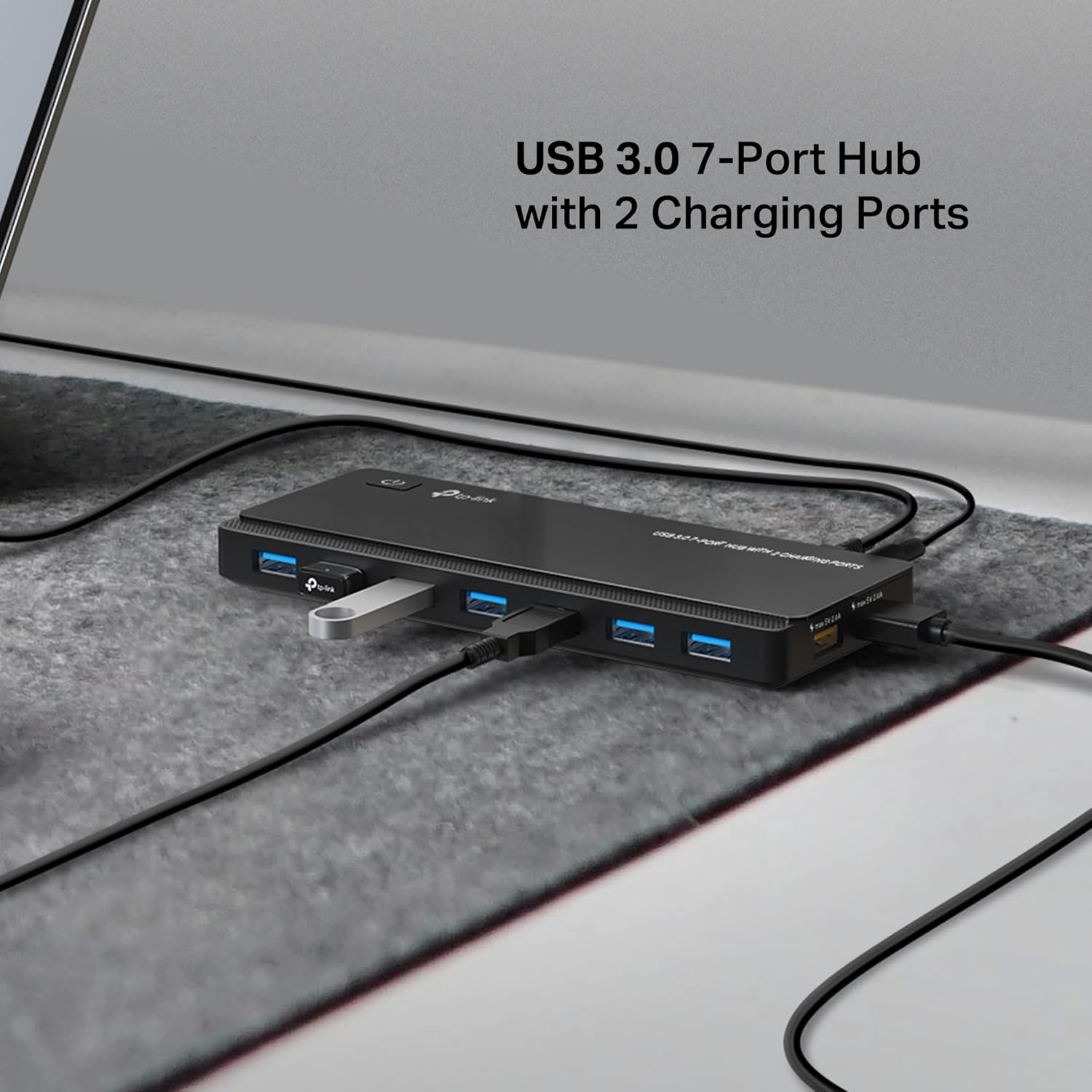
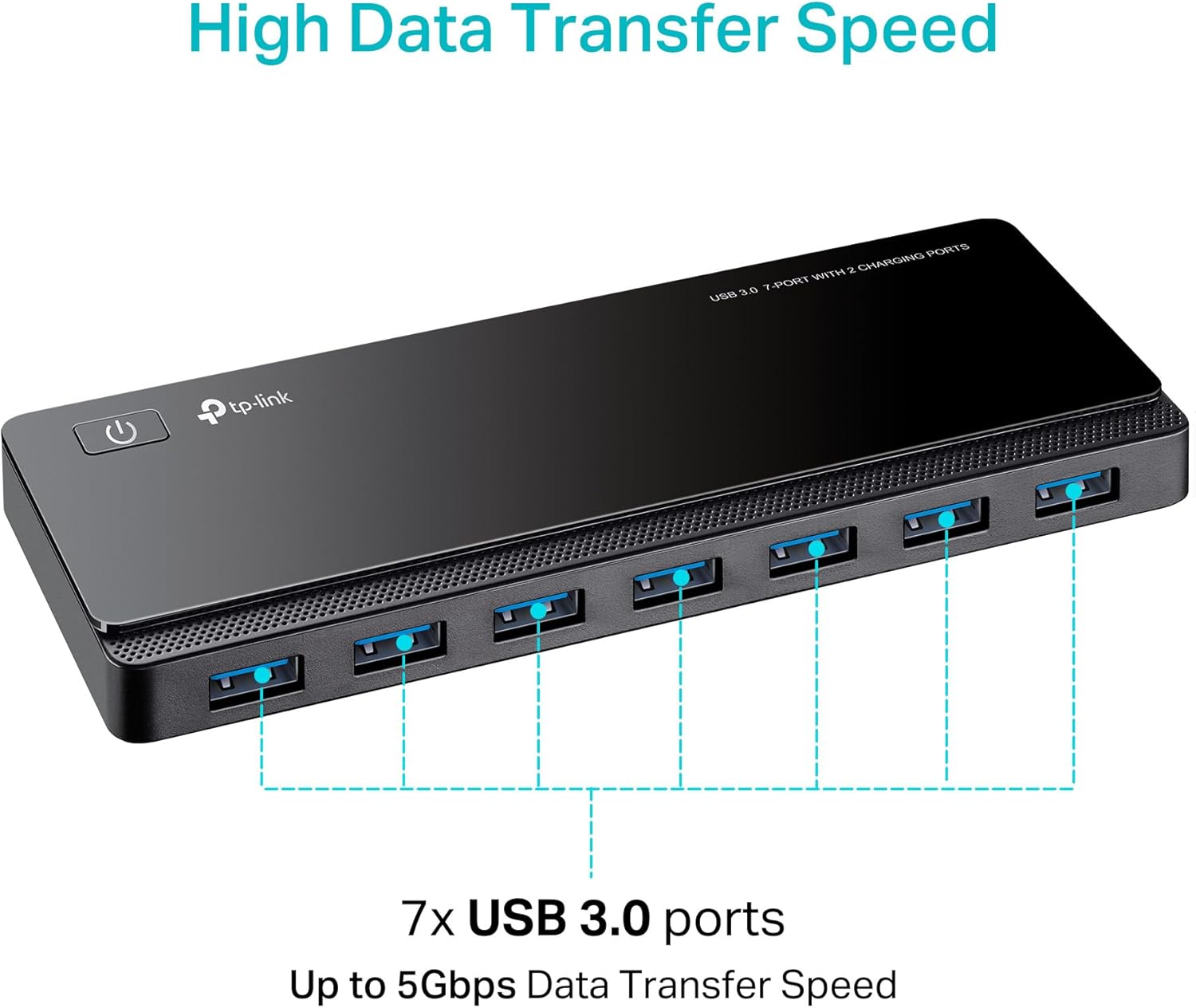


TP-Link UH720 is a 9-port USB hub. 7 USB 3.0 ports can be used for data sync and 2 ports are dedicated for quick charging. It also come with a power adapter to provide robust performance and a power on/off button to conveniently turn on/off the hub as need.
With TP-Link UH720, you can now transfer data at up to 10 times the speeds of the older USB 2.0 standards. Speeds of 5Gbps are a vast improvement over USB 2.0’s 480Mbps top speed. It is also backwards compatible, allowing you the capability of using USB 2.0/1.1 products if need be.
UH720 is Plug & Play for Windows, Mac, Linux, Chrome OS and more PCs, no driver installation required.
Please Note: 2.4Ghz wireless devices, such as wireless keyboard and mouse adapters, may not work in close proximity to USB 3.0 devices or hubs. Connecting to a USB 2.0 port is recommended.
The non-charging ports are intended for data transfer only. They provide insufficient power output for charging. And the charging port are for charge only, will not work for data sync. Ensure that the adapter is connected before using this hub. And for best performance please connect it to the USB 3.0 port of your PC.” Interface Available: 7 USB 3.0 Standard A 2 2.4A Charging Ports, 1 USB 3.0 Micro B.
Faster Speed with USB 3.0: USB 3.0 ports offer transfer speeds of up to 5Gbps, 10 times faster than USB 2.0. This 7-port USB 3.0 data hub can instantly expand 1 USB 3.0 port to 7 external USB 3.0 data ports for keyboard, mouse, printer, hard drivers and other USB devices.
Smart Charging Ports: 2 Extra 5V/2.4A charging ports supporting 2.4A output specially designed for ultra fast charging. Charges most USB charging equipment, regardless of large batteries such as smartphones or tablets, or mini-battery equipment such as smart portable devices, at full speed.
TP-Link Charging technology intelligently identifies connected devices, automatically delivering the fastest charge to your smartphones, tablets or devices with a USB charging connector, minimizing charging time.
Protect Both Your Equipment and Your Data: UH720 has a sophisticated circuit design with multiple overheat, overload, overvoltage and short circuit protections. A built-in surge protector keeps both your devices and your data safe in the data transfer process.
UH720 supports hot-swap USB ports that can be safely connected and disconnected while the computer is on and running.
Plug and play: No drivers required for Windows 8.1 / 8/7 / Vista / XP or Mac OS X and Linux systems. Backward compatible with USB 2.0 / 1.1 and current transmission speed is limited by the settings of the connected device
Manufature’s 2-year warranty and 24/7 technical support

TP-Link AC1200 Gigabit WiFi Router (Archer A6) - Dual Band MU-MIMO Wireless Internet Router, 4 x Antennas, OneMesh and AP Mode, Long Range Coverage
Original price was: $49.99.$5.99Current price is: $5.99.

Mini Portable Projector with 4K Support, Bluetooth 5.4 WIFI6, 5watt Sound Base Speaker, 160 ANSI, Android 11, 210° Rotation , Auto Keystone Correction Video Projector HY300 ULTRA
Original price was: $89.99.$8.99Current price is: $8.99.
-29%





Christopher M. –
Well Engineered and Manufactured Product button always works and never flakes out.USB Hub work with both Windows 10 and Mac OS 10.15.3 without issue. No issues on either Device Manager. This hub is the first one that does not get impacted by sudden power outages or during times of hot swapping devices involving removal of the main USB connector at the laptop port. On OTHER Hubs -upon reconnect post reconfiguring and or cleaning like all the past ports I’ve had. This is the first and only hub i’ve used that doesn’t require cycling and a total reconnect in a certain sequence regarding connecting external devices to get it working post power outages etc.. This is the first USB Hub I’ve had that is simply Plug & Play across the board without all the memory issues associated with older style hubs.I run two external Kenisis Ergonomic Keyboards and a Kensington Slimblade trackball setup running off the older version of Kensington’s Trackball Works without issue or interrupts / random disconnects. Other USB hubs had issues post sleep / wake / power power wherein, the Kensington Software would not see the trackball thus forcing one to remove the device and reconnect in order to get the software to “see” the trackball. This USB has none of those issues.This is thee best USB Hub out of seven that I’ve ever used. I’d order another as a backup in fact. I highly recommend this model knowing the issues that plagued older revisions were redesigned and reconfigured with new hardware to remedy those failures.The cats have jumped up and toppled my keyboard trays with trackball off the desk and yanked the USB hub – dangling by the cable and it was still online and connected. These cables are securely fitted into this newly designed hub (Note: Mine was delivered to me October 2021 per order history).The transfer speeds have been just as fast as the laptop ports.Highly Recommend this particular USB Hub. Hopefully, it’s going to last many years (reliability). I’ve only had it since October of 2021. The Hub has been in use nearly 24/7.
1. Unit is rock solid in both, performance and build construction.2. The Power and USB Connector interface was redesigned. A tight interference fitment = zero issues.3. Been using this since October 2021 24/7 on a 2014.5 Macbook Pro Retina with zero issues4. The speed / port speed checks out5. The two charging ports charge an iPod Classic 160GB as well as stylus pens and small USB desk lamps.6. Tested on a 2014.5 Macbook Pro Retina running OSX 10.15.3 and Boot Camp running Windows 107. Running memory cards affixed into a USB Media Transfer Hub works flawless and just as good as directly mated to the MBP Laptop Port.8. Even running an iPod works fine – the computer sees it without asking to connect it directly to the MBP.9. Garmin Diesel 740Z mated up charged without issue and was later connected without issue when running firmware and map updates. *See Note10. Firmware updates for the Kinesis keyboard – no issues when connected to the USB Hub. ** See Note* ** NOTE: As a rule of thumb here: I don’t recommend getting into the habit of running firmware updates while attached to a Hub. My default recommendation is mating to the laptop ports and bypassing USB hubs in general.The old design issues involving the USB and power connector were designed out and replaced with rock solid fitment. Form, Fit and Function under quality control are superb on the unit I received in October of 2021.USB Front Port Fitment is firm and tight and feels very robust upon insertion without side to side slop like on other ports I’ve tested. Same applies to the two charging ports on the right side.The Power
Dennis –
Good Quality hub
Hub works fine so far. Plug and use. No disconnection or buzzing noises. Transfers have been error free for the moment. I will have to use it more to see how durable it is.
Drallam –
Fantastic USB Hub – Perfect for Expanding Ports & Works Seamlessly with VMWare and Home Assistant!
I purchased the TP-Link Powered USB Hub 3.0 to add extra ports to my PC, and it has been an excellent investment. With 7 USB 3.0 data ports and 2 smart charging ports, it gives me all the connectivity I need in one convenient hub.Not only does it provide the additional ports I was looking for, but it also works flawlessly with VMWare and Home Assistant. This hub integrates seamlessly into my setup, allowing me to connect multiple devices without any issues.The build quality is solid, and the powered design ensures that all connected devices receive sufficient power, even when I have several things plugged in at once. It’s reliable, functional, and does exactly what I need it to do.If you’re in need of extra USB ports for your PC and want something that plays nice with VMWare and Home Assistant, I highly recommend this TP-Link hub. It’s been a great addition to my setup.
Jasen –
Perfect for out-of-sight charging
I needed a hub to charge a bunch of devices, and I wanted it to stay hidden behind a dresser where there’s only about an inch of space between the furniture and the wall. Most hubs orient their ports so they won’t fit into small spaces. The slim design of this hub with ports along the edges makes it work perfectly in tight spaces! A couple command strips keeps it attached behind the dresser with all the ports facing “up” for easy access.So far I’ve got six devices connected to the hub, with a couple ports to spare. It’s powering two inductive chargers for iPhones and two iPads all using the “data” ports — charging may be slower, but that’s fine since they can charge overnight. It’s also charging two Apple Watches, and those only work if connected to the “charging” ports — so luckily there are two of those. Can’t say how this hub works for actual data transfers, but it’s perfect for hidden charging.
Ivan –
Good Product, Somewhat Misleading Description
I had bought this product for a new computer I had built and from the get go I had some problems with connecting USB’s into it and them staying connected to my computer. For the longest time I had assumed it was my computer being buggy and just not being properly updated, but it turns out that it was a compatibility issue. The description of the product says that this hub is compatible with Windows/MacOS and Linux, but what it fails to mention is that if you are using Windows, you need to be using Windows versions between 7 and 10. I’m a Windows 11 user and the whole time I was under the assumption that it would be compatible with my that version of windows when in fact it isn’t and even says so on the box. This info is not anywhere on the page so just be aware of that.Anyway, the Product itself is built extremely well and even works well on a laptop I tested it on that is running Windows 10 Home. If it was not for the lack of such an important piece of information on the product page then I would have rated this 5 stars. If you are still wanting this hub specifically and are running a Windows 11 computer, TP-Link actually sells an exact version like this on their website called UH720 V4. Just updated to work with Windows 11, albeit at a raised cost.Regardless of the problems I faced, I recommend this product for anyone needing a reliable piece of hardware that gives you some extra leeway on how many accessible USB ports you have.
Draco –
Great with MagicJack
Perfect for working with Starlink and MagicJack. Gen 2 Starlink and Starlink ethernet splitter + MagicJack pro. Works excellent and was plug and play, eliminates issues with PC hibernation and connectivity with the usb.
Nicky Choo –
This is great as it has 7 ports and 2 charging ports as well. Works well. I bought the first one several years back, since then have bought 3 more – one for my son and another for my PC and one more for my Mac. Works well with both Macs and Windows PCs.
Asela Jayaratne –
Work well
deepak a. –
I liked the product – excellent because of power supply support – all 7 nos USB ports and charging ports work well and the data transfer / copying speed is fast.
Mattschwarz –
Reaktion, Kompatibilität, alles voll in Ordnung.Habe, wie fast alles im Arbeitszimmer an WLAN-Steckdosen hängen, um nur dann Strom zu verbrauchen, wenn ich es auch benötige. Funktioniert dort auch sehr ohne Probleme.Passt alles.
Cliente de Amazon –
INTRODUCCIÓN:Exsiten millones de estos aparatos “Hubs” pero es complicado encontrar uno de buena calidad, este HUB TP-LINK cumple perfectamente mis necesidades, es una calidad excelente, llevo aprox. 2 meses usandolo y es realmente bueno.INSTALACIÓN:Sólo conéctalo a la pc con el cable que también va incluido y ya estas listo para conectarle tus periféricos favoritos, quieres carga rápida? conecta el HUB a la luz con su eliminador que también va incluido y ya estás listo para cargar tu teléfono o lo que quieras.CALIDAD:Tiene una calidad de construcción realmente sólida, muy buena, lo único malo es que en la parte superior se raya bastante ya que es de un plástico brilloso, de allí en más no he tenido ninguna clase de problema.EXTRAS:Me encanta que tenga un botón de Encendido, esto es útil por si ya no quieres cargar tus periféricos o desactivarlos de tu computadora sin tener que desconectarlos, es un detalle asombroso.Ya incluye el eliminador que sólo es necesario si quieres cargar rápida en los 2 puertos USB dedicados, pero puedes usar el HUB perfectamente sin conectarlo a la luz con los otros 7 USB Restantes.Ya incluye el cable USB que va del HUB a la PC.He utilizado el HUB en su máxima operación y no he notado sobrecalentamientos o ningún funcionamiento raro, todo muy bien.El precio está un poco más elevado que el promedio de HUBS pero realmente vale la pena pagar un poco más por este por las ventajas que da y la calidad