


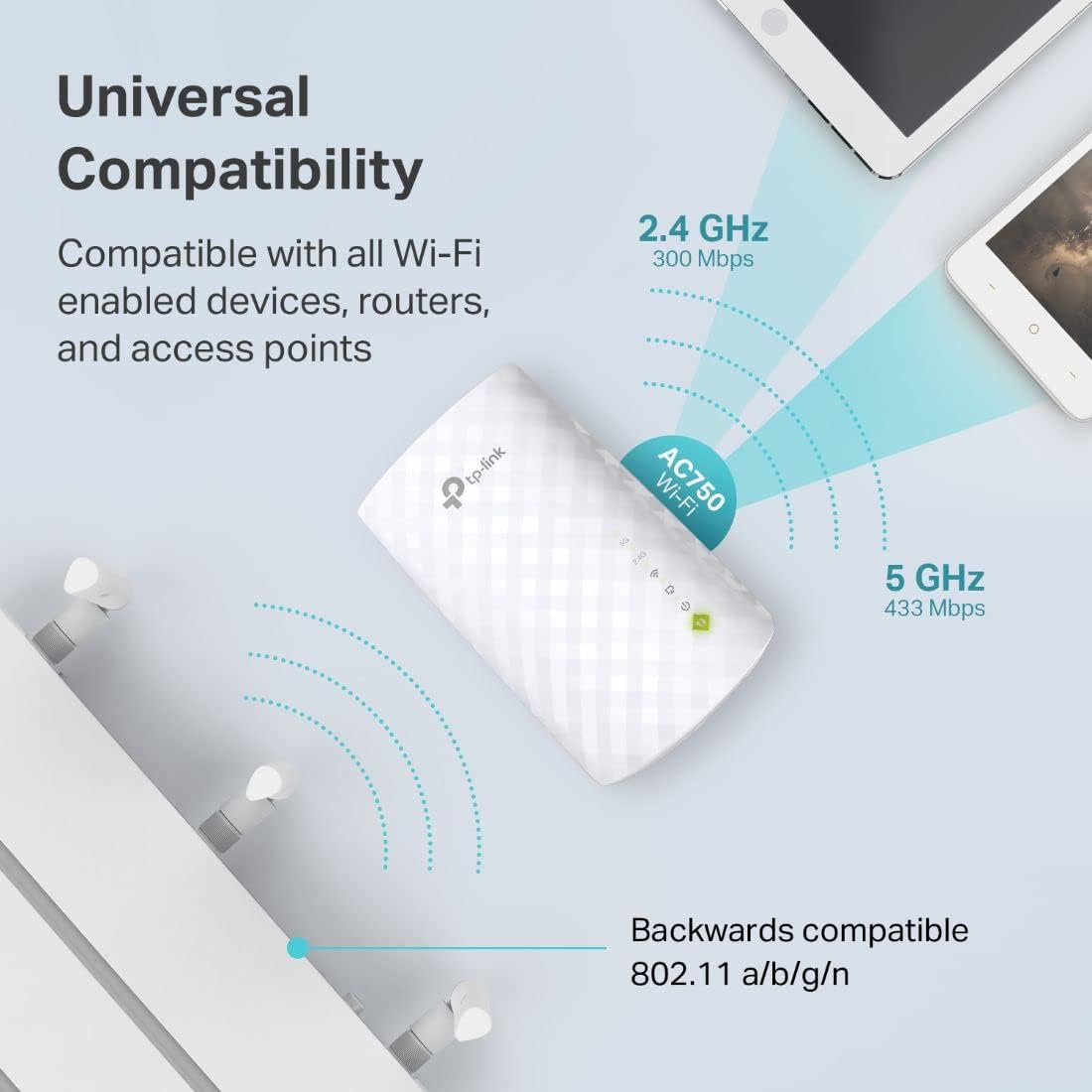
RE220 expands your existing Wi-Fi coverage with next generation 11AC Wi-Fi technology. It works with any standard Wi-Fi router and creates stronger dual band connections in hard-to-reach areas, allowing you to enjoy seamless wireless coverage throughout your home or office. RE220 provides APS (Adaptive Path Selection), with APS, Dual band or tri-band range extender can dynamically select the best backhaul connection between 2. 4/5G/5G2 to ensure RE to router have the best connection, and in such way maintain a better overall Wi-Fi performance. Comparable to NETGEAR AC750 Wi-Fi Range Extender (EX3700-100NAS) Maximum wireless transmission rates are the physical rates derived from IEEE Standard 802. 11 specifications. Range and coverage specifications along with the number of connected devices were defined according to test results under normal usage conditions. Actual wireless transmission rate, wireless coverage, and number of connected devices are not d, and will vary as a result of 1) al factors, including building materials, physical objects and obstacles, 2) network conditions, including local interference, volume and density of traffic, product location, network complexity, and network overhead and 3) client limitations, including rated performance, location, connection quality, and client condition. Operating Temperature: 0°C to 40°C (32°F to 104°F).
Dual Band WiFi Extender: Up to 44% more bandwidth than single band N300 WiFi extenders. Boost Internet WiFi coverage up to 1200 square feet and connects up to 30 devices(2.4GHz: 300Mbps; 5GHz: 433Mbps)

Surge Protector Wall Outlet Extender, Multi Plug Outlet with Rotating Plug, 6 AC Outlets 3 USB Ports (2 USB C), 1800J, 3-Side Power Strip Wall Mount, Outlet Splitter for College Dorm Travel Essentials
Original price was: $11.99.$7.99Current price is: $7.99.

BUFFALO LinkStation 720 8TB 2-Bay Home Office Private Cloud Data Storage with Hard Drives Included/Computer Network Attached Storage/NAS Storage/Network Storage/Media Server/File Server
Original price was: $379.99.$63.99Current price is: $63.99.
-6%





BluEyedTiger –
Exactly what I needed and works astonishingly well for a small price
So far the TP-Link AC750 RE220 Dual-Band WiFi Extender (2019 release) has worked great and suits my needs perfectly.It’s small and visually appealing so you don’t need to worry about hiding a bulky or ugly device. It actually resembles an plugin oil diffuser like a lot of us might have. It is very light weight so it shouldn’t sag from the outlet when plugged in. You will lose an outlet plug and if that’s a problem you can always use an extension cord and put it where ever you want. The front of the RE220 boasts 5 easy to understand LEDs informing you of its status (power, ethernet, WiFi, 2.4 GHz and 5 GHz bands) and a WPS button. The bottom of the device has a high speed RJ45 ethernet port (this is absolutely golden for wired devices) and a reset button which is recessed so you don’t have to worry about accidentally pushing it and ensuring that you have to mean it when you do use that feature. It is supposed to work with any WiFi router. The mobile app and web user interface also give you management options like enabling the High Speed Mode, restricting particular devices for a specified amount of time and it even lets you turn off the LEDs if they might disturb your sleep or distract you. I personally have not used the extra features as of yet but they sound like they might be pretty useful, especially being able to turn off the LEDs. I think everyone has noticed blinking lights from various devices and they can be super annoying if they’re in your bedroom or visible when you’re trying to focus.The RE220 was very simple to set up with easy to follow step-by-step directions in the box, which guide you through the process and inform you about your options for setup (WPS, mobile app, web UI), where to find the app, a QR code for the app (this is also printed on the box) and the web UI address for setup if you opt to use a computer instead of the app or WPS feature. I chose to use the app which is also very simple which made the process all the more enjoyable. All you have to do is follow the on-screen prompts and it goes smoothly. It has you setup your 2.4 GHz and 5 GHz WiFi bands separately as they each have a password although it’s usually the same and it’s also true that not all networks are dual-band. I didn’t have a single problem during setup. It was quick and painless.The only setup issue I did have was mine. In my haste to get the RE220 going, I didn’t rename the extender’s WiFi signal to match my home network so it caused conflicts with my IoT devices that were trying to talk to each other because the network is password protected and I had actually created a second password protected network. This caused some communication issues. The instructions even tell you that you may want/need to do this but I was in a hurry so I could get other things done and overlooked that. Once the signal was renamed and the password set to match the original network it worked great and without issue. This was very easy to do within the mobile app but could also be easily done using a laptop or desktop computer.I bought this to solve an issue with a device I got a great deal on. I stumbled upon a used Sony Media Streaming Bluray player for $15. I couldn’t believe it and couldn’t pass it up. I didn’t really need it but I was tired of using my phone or laptop to stream movies and video to my bedroom TV. It was always a hassle and the only alternative was a wired connection directly to the TV and that in itself was a pain and more so if I wanted to play any of the discs that I have since my laptop doesn’t have a built-in disc player and I have to connect the USB BR/DVD/CD player. The problem was that the player required a wired network connection and not wireless. I can’t complain since it was practically free. I don’t know about you but my house does not have wired ethernet. I could do that myself but it’s time consuming and the money needed cancels any value in my purchase, in fact, it probably would have exceeded the cost of a brand new media player and I didn’t want to make that kind of investment just to get a media player on the network. My TV is a few years old and it doesn’t have WiFi or smart apps itself and I’m not ready to spend a few hundred just to get that kind of experience there either. Not when I can work around it for much less. This network extender allowed me to connect the Bluray player to the network using a spare network cable that was laying around from an old printer or maybe it was an outdated gateway from an internet old service provider. Regardless, the cable was brand new in the package and all I had to do was plug it into the TP-Link RE220 extender and my Bluray player and BAM the player was on the network and asking me to install updates. To top it all off, the WiFi signal in my bedroom is much stronger and everything using the RE220 signals have a much more reliable signal. That’s not to say my Arris Gateway didn’t give me a good signal to begin with, it’s just a stronger signal.The speed of the TP-Link RE220 AC750 WiFi Extender works great for watching Prime videos in HD. I get full 1080p just fine. There is always a loading delay but I think that’s the player which is a few years old so the memory and processor speed is not top of the line but it was $15 so again I’m not complaining. If you plan on watching 4k Ultra video, you may want to do some research to see if the TP-Link RE220 AC750 WiFi Extender meets your needs speed-wise, but it claims 433 MBps for 5 GHz and 300 MBps for the 2.4 GHz bands which should be fast enough but it’s not GigaBit speed for sure. I don’t have a GigaBit speed router so it wasn’t a concern. My TV isn’t 4k Ultra capable so I didn’t worry one bit about it. I did notice that when I watched a movie using the Amazon Prime app on the player, it checked the connection speed and displayed the result and it’s exactly what I see on my Samsung Galaxy S9+ on the home WiFi so the RE220 does not seem to be slower than the Arris Gateway my network is running on to begin with and the only speed issues I ever see are when too many devices are simultaneously using too much bandwidth (multiple HD TVs, cell phones, laptops, remote set top boxes, etc). First world problems…am I right? The only solution there is a faster internet connection and router which hasn’t been necessary and saves money and even if I did upgrade I think this WiFi extender would still suit my needs.
Con –
This WiFi extender didn’t just boost my signal—it boosted my entire life into chaos.
I bought this TP-Link WiFi Extender thinking, “Cool, maybe I’ll finally stream videos in the basement without buffering.” Innocent, naive me. WRONG. This device is basically a tiny WiFi overlord with delusions of grandeur.Day 1: I plugged it in. The lights blinked like it was winking at me. I thought, “Cute.”Day 2: My WiFi improved. I could stream videos in the attic, in the garage, even in the neighbor’s yard (sorry, Bob).Day 3: I realized it’s too powerful. My toaster now tweets about the state of the network. My dog refuses to sit anywhere except directly under the extender because, apparently, the signal makes him feel… enlightened.This extender handles 30 devices simultaneously. I tried it. The results were… cinematic:• Phone streaming Netflix, yelling at me because I paused it• Laptop downloading five games while judging my life choices• Smart lights blinking in sync like a tiny rave• Refrigerator quietly judging me for using WiFi to look up recipes instead of cookingPros:• Dual-band 5GHz/2.4GHz: covers up to 1200 sq. ft., or possibly your dreams• Ethernet port: because even wired devices need to bask in WiFi glory• Supports OneMesh: your whole house will be a networked utopia… or dystopiaCons:• May inspire your appliances to form alliances against you• Can cause existential dread if you accidentally check your router map and see it controlling 30 devices at once• Dog may refuse to leave the optimal signal zoneVerdict: 12/10.This WiFi extender didn’t just boost my internet. It boosted my life, my appliances’ egos, and possibly the intelligence of my dog. I no longer just surf the web—I live in it, under the benevolent tyranny of a blinking LED overlord.
Antonela –
At the beginning I was not able to connect following the instructions so I tried the second option and it worked. Much easier btw
Farukh Imam –
Easily connected to any router, follow the manual and it takes minutes to configure. Not sure about the life of product as it’s been a day I am using it
DELFINO FRIAS LOPEZ –
Es un magnífico extensor de señal. Lo mejor es que es de banda dual, así que si el módem sporta también la banda de 5 Ghz además de la banda de 2.4 Ghz, este extensor te facilita mucho la vida desde su configuración que es muy sencilla mediante la app, hasta su operación ya que tiene muy buena potencia y alcance. Resolvió mi problemática que tenía por falta de alcance. Proporcionando una señal muy estable. Un plis que me encanto es que incluye un puerto Ethernet para conectar vía cable algún Smart TV o laptop. Sin duda lo recomiendo ampliamente y lo volvería a comprar.
Omhadif Omhadif –
لكن التغطيه ضعيفه يغطي مساحه صغيره تقريبالا يغطي الطابق العلوي
Akhil J. –
Last November I purchase the tp link – AC750 (model RE220) wifi extender from Amazon. But due to some connecting issues wifi can’t reset or connect on other devices. So I planned to register the issues in the tplink official site While login in the tp link site. outside of USA Can’t Apply For The Warrenty claim… Actually I’m purchased from UAE. If you can provide the warranty. Then why selling the product in the Amazon with one year warranty. It’s a total scam…….. Tp link products very bad quality…..