


Product description
UGREEN Nas DXP2800: Free Up Space, Free Your Digital Life.
The video showcases the product in use.The video guides you through product setup.The video compares multiple products.The video shows the product being unpacked. what is ugreen nas Merchant Video
All-round 2-bay NAS that’s perfect for home users and creators who want smart media management and effortless backups. Supports both Docker and virtual machines.


1 Why NAS ?
2 Cost-effective
3 Aluminum Alloy Shell
4 Access Anywhere
5 Widely Compatible


1 Your AI Assistant
2 Baby’s Growth Album
3 Family’s AI Album
4 Award & Media Recognition
 The Highest-Funded NAS Product on Kickstarter
On Kickstarter, the UGREEN NASync series has garnered support from over 13,000 backers, raising $6.6 million and becoming the highest-funded NAS product on Kickstarter, earning the “Best of Kickstarter” award.
See What the Pros Say
“I think UGREEN has done quite well across the board with this series.” — TweakTown
“Performance advantage in similarly priced models from the competition.” –TechPowerUp
“The DXP4800 Plus is a 4-bay NAS that has the best hardware in its category. ” –Android Central
“The presentation of the DXP4800 Plus is genuinely top-tier. ” –NASCompares

The video showcases the product in use.The video guides you through product setup.The video compares multiple products.The video shows the product being unpacked. Unboxing the UGREEN NASync DXP4800 Plus Merchant Video
Unboxing the UGREEN NASync DXP4800 Plus Unbox Therapy
Unbox Therapy
The Greatest Storage That’s Ever Lived? Salem Techsperts
“This impressive piece of tech has earned my approval! I actually replaced my old NAS with this, and that’s not something I take lightly…”
The video showcases the product in use.The video guides you through product setup.The video compares multiple products.The video shows the product being unpacked. The Greatest Storage That’s Ever Lived? Merchant Video
 NASync DXP4800 Plus Hands On Zach’s Tech Turf
“This is the UGREEN NASync DXP4800 Plus, it’s basically like building your own private cloud server, but it’s super easy…”


1 High-Performance CPU
2 8GB DDR5 RAM
3 Fast Transfers
4 Dual M.2 NVMe Slots
5 Heat Dissipation


1 UGOS Pro
2 Security
3 Video Center
4 Virtual Machine & Docker
5 2 Years After-sales



1 Professional Services
2 Versatile Interfaces
3 Packages Included
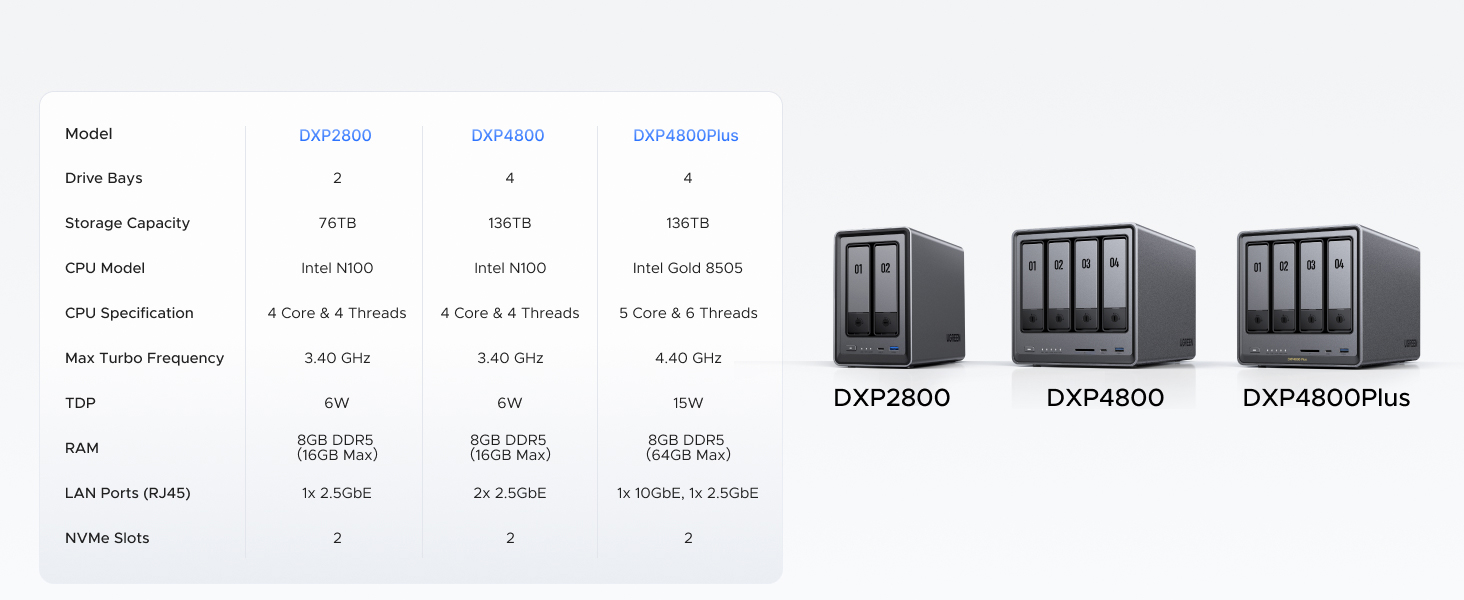
4 Model Compared
5 FAQ
Spend Less, Store More: Unlike costly cloud storage subscriptions, NAS only requires a one-time purchase with no ongoing fees, offering much better long-term value. Storing your data locally also provides far greater data security and gives you complete control.
Massive Storage Capacity: Store up to 76TB, giving you more than enough space to back up all your files, photos, and videos. Automatically create photo albums and enjoy your personal home cinema.
User-Friendly App: Simple setup and easy file-sharing on Windows, macOS, Android, iOS, web browsers, and smart TVs, giving you secure access from any device.
AI-Powered Photo Album: Automatically organizes your photos by recognizing faces, scenes, objects, and locations. It can also instantly remove duplicates, freeing up storage space and saving you time.
Secure Private Cloud: Keep full control over your data with advanced encryption, ensuring your files and personal information are always protected.
Best Performance in Class: Equipped with a 12th Gen Intel N100 processor and a 2.5GbE network port, this NAS can comfortably run multiple apps at the same time and transfer a 1GB file in as little as 3 seconds.
Widely Compatible: UGREEN NASync is compatible with Western Digital, Seagate, Toshiba, and more third-party hard drives. Please check our compatibility list for full details. Note: Storage hard drives are not included and need to be purchased separately.
2-Year Warranty & Support: You will enjoy 24/7 specialist support and 30-day free returns. We are here, standing with you. We stand by our products. Facing an issue? Whether it’s damaged packaging, a quality defect, or receiving a used item, contact us via Amazon. We’re here to make it right.






Burn0u7 –
Great NAS, UGREEN is awesome
I’m an IT nerd by trade. Normally, i build my own NAS units out of old machines. This time i decided to bite it and just buy a NAS because i’m lazy in my older age.This NAS is easy to set up and get running. has a ton of options for anyone, completely user friendly, easy to upgrade. Flexible thatit supports most x86/x64 based operating systems. you’d just need to upgrade the primary boot drive internally which is a 128gb SSD i believe. Yes you can run windows server on this thing but the default UOS has everything you’d need with less overhead. You can run TrueNAS or UnRaid if you want. tons of videos online showing you what to expect. Note that if you do change / swap the OS, you should either image the default boot drive or pull the drive and replace it then store the original drive in a safe place because ugreen has said you cannot download the stock base OS and restore it.The image i included or attached is the desktop. this is the web interface. the unit has a physical HDMI port and does supply video but i have not used it.Do yourself a favor though. upgrade the ram. the 4 bay unit has 1 ram slot. uses DDR5 i have DDR5 5900 in it, a single 32GB module. The Ram module runs at 1.1v i believe too. it will speed up the transfers and help the unit do what it needs to. Also drop in a pair of 512gb NVME drives and assign them as cache drives. this will boost the overall throughput too. i dropped in a pair of 2tb nvme drives just because i have a couple of them laying around.My unit i stuffed in 4 24TB sata NAS drives. you can use desktop drives but just know this thing will hammer on those drives so desktop drives might suffer in longevity and might prematurely fail. NAS / Enterprise grade drives will last longer and they are built to suffer.I have NAS grade drives in my unit. All are 7200 RPM. i get anywhere from 240MB/s to about 290MB/s transfer speeds this is before i added the cache drives. now i usually get around 730MB/s the unit manages the cache automatically. it will fill the cache drives then shove the data from cache to long term storage as it goes.I have mine configured for RAID 0, BFS file system. it asks you how you want it configured when you plug drives in and do the initial setup.
L-Squared –
Setup is easy but has a few quirks
Overall this product is great. It’s certainly beginner friendly. The sync feature is terrific; it keeps folders on the NAS and computer identical with no intervention from me after initial set up.Although it’s beginner friendly, I ran into more trouble setting it up than I was expecting. A browser couldn’t find the NAS on my network. I tried multiple browsers all on the same network and on different devices. I tried various other troubleshooting but in the end I could only set it up with the app. After it was up and running I tried a browser again out of curiosity but it still couldn’t locate the NAS. The app has worked perfectly though. I even had to go through the set up process twice. It timed out the first time and the NAS seemed to freeze. After the first failed attempt, the second try worked fine. Once it was up and running it didn’t give me any problems.I’ve had it up and running for a few weeks now and it continues to work very well. It comes with a few apps already installed and the ability to add more which has also been convenient. For items not available via an app directly you can use the docker, but that’s a bit more do it yourself.
Old-and-Wise –
Attractive, high-performance home-office NAS; poor documentation
My old Diskstation DS411 died so I was in the market for a new NAS. I chose this one due to great reviews from the likes of Macworld, its decent price (despite a recent increase thanks to tariffs), and the fact it actually accommodates up to 4 drives: 2 SATA drives (3.5 inch or 2.5 inch) and 2 NVMe M.2 SSDs.I played around with a few configurations and eventually settled on using a pair of Fanxiang NVMe M.2 S880E drives in RAID 1 as storage pool 1 and a pair of old SATA SSDs that had been lying around also in RAID 1 as storage pool 2. I’m using pool 1 as my primary storage and pool 2 as backup; or eventually if I need more storage space I can simply use pool 2. The DXP2800 has two USB 3.2 Gen 2 ports at the front — one C and one A — so you can hook up a fast external SSD and achieve up to 10Gbps speeds for backing up your NAS storage itself.I downloaded the UGREEN NAS app to my Mac; it’s similar to the web interface but runs faster and seems more stable. The initial software bundle is barebones but satisfies my need which is simply network storage. If you want to run this as a media server, just download apps from the App Center. Otherwise, UGREEN supports all the protocols out there. Hardware-wise, you can hook up a monitor via HDMI and a keyboard and a mouse via a pair of rear USB 2 ports. There’s a C-type USB 3.2 gen 1 port back there. Ethernet support is up to 2.5GbE.To install one or two NVMe M.2 drives, you need to access the left side of the drive bay. It’s not hard to do but a little harder than necessary, to get each M.2 in place. It took me about 5 minutes to get the hang of it and succeed.The DXP2800 runs fast and feels fast. Even as it indexes the terabyte of files I have stored its CPU usage does not go above 20%, whereas even at idle the DS411 is always above 90% in CPU utilization. The DXP2800 has been quiet so far, and UGREEN puts a magnetic mesh desk filter over the fan outlet, which is really a thoughtful touch because it makes dust cleaning sooooo easy.My only complaint is the lack of documentation from UGREEN. It’s disappointing they built a really nice hardware system and puts in a stable and growing software system, yet didn’t go the last 1 yard of giving us decent documentation. IF you try to search for anything in the Support app, it’s more likely to give you a terse “not found” error than helping you. I’d recommend using ChatGPT or DeepSeek if you have questions; they really helped me navigate a few relatively tricky issues.
Tenzin –
Great NAS! Got it on sale, and its been awesome and running straight for a month.Slotted in 3-12tb NAS drives and run them in RAID 5. Took 3 days to build the array, but its been running well.It only has a few Apps available at the store so far, including Docker and Jellyfin which work pretty well if you configure them right. Took me a few hours to learn how to do it and configure everything, but thats from 0 knowledge and it was pretty easy to pick up.I wouldn’t really run VMs on it, just because the CPU is rather limited.Mostly set up as a photo back up(with the sync and backup App) and a media server(Jellyfin). I run the Jellyfin server on my Linux server though, since I find its easier to configure. You just have to permanently mount your network drives so you can access the NAS storage. It even has a built in remote access without configuring ports, so you can access and backup when your away from you local networkWould definitely recommend to get this if you have no experience with NAS, since its very easy to pick up
Don –
Pretty good, easy to setup and get running. Still learning but so far pretty good
Amazon Customer –
Super easy to setup and use
PCExp –
UGreen Nasync DXP2800 2-Bay NAS ReviewThe UGreen Nasync DXP2800 is a compact yet powerful NAS that delivers impressive functionality right out of the box. Setup was straightforward — my initial 4TB drive took about half a day to complete the RAID 1 sync process, which is expected for a full mirroring configuration.What stands out most is how the DXP2800 operates like a mini-computer. It includes a wide range of built-in functions, including Docker and virtual machine support, giving it serious flexibility for power users. File backup and transfers between connected drives are seamless, and the included media backup application makes image backups convenient and reliable.One of my favourite features is the ability to expand the memory and add an NVMe M.2 SSD for faster data access and future proof.
TWL –
I have a WD MYCLOUDEX2ULTRA 2-Bay NAS. It is set up as 2 x 6TB RAID1. The WD NAS management software is hard to use. It is very slow and has many issues with Apple Time Machine. It does not have sufficient power to support HDDs larger than 8 TB. After reading many online reviews, I purchased the UGREEN DXP2800. I set up 2 x 14TB IronWolf Pro HDDs as RAID1 and 2 x 1TB Kingston M.2 SSD as R/W cache. I installed Tailscale to allow remote access. The backup time is night and day between the WD and UGREEN. It used to take 4+ hours to back up my MacBook Pro (1 TB SSD) using Time Machine. The UGREEN DXP2800 took less than an hour. The other day I had trouble with the UGREEN NAS client on my Windows laptop. I submitted a ticket through my UGREEN cloud account and received help almost immediately. After going back and forth a few times with the UGREEN support team, the problem was resolved. I am impressed by the device performance as well as the timely technical support. I strongly recommend the DXP2800 for home use.