
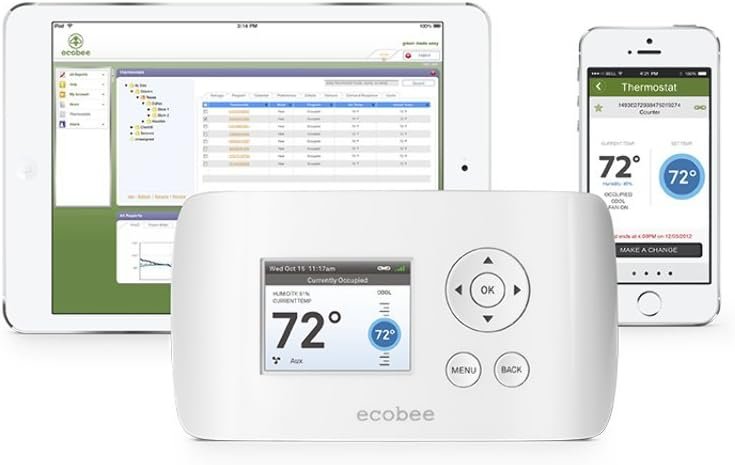
The Smart Si Thermostat from EcoBee is a Zigbee compatible, Wi-Fi enabled, energy saving solution that gives users total control over their home’s heating and air conditioning from anywhere with an Internet connection. The Smart Si Thermostat from EcoBee is a Zigbee compatible, Wi-Fi enabled, energy saving solution that gives users total control over their home’s heating and air conditioning from anywhere with an Internet connection. The screen of the Smart Si has a high resolution, easy to read color display to show the indoor temperature as well as the live outdoor weather and forecasting. With the Smart Si Thermostat, users will receive access to a free, secure web portal, allowing full thermostat control from any location with an Internet connection. The convenience doesn’t end there – the EcoBee Smart Si Thermostat also has a free downloadable mobile app for iPhone, iPad, iPod Touch and Android devices. The ease of access to this thermostat allows for total control from anywhere in the world, which can lead to increased energy savings and lower electric bills. Users can easily set energy saving programs that cater to their schedule and can be adjusted on the fly, whether your stuck at the office late, sitting in traffic or on vacation. Programmable periods can be set for when you’re awake, sleeping, home or away and even custom periods for vacations, weekends and more. Seven-day programming gives the option of individual settings for each day of the week or users can take advantage of 365-day scheduling. Because this thermostat is smart, it also has the ability to communicate through email alerts when something isn’t quite right with the system or if maintenance is needed. The Smart Si Thermostat can support up to 2 heat and 2 cool stages on a conventional system or up to 3 heat and 2 cool stages on a heat pump system.
Full color display
Push button control
Remote management
Wi-Fi enabled
Contractor branded alerts
Intuitive User Interface makes it easy to quickly set a personalized program,Vivid color screen with easy-to-use interface
Built-In Wi-Fi enabled. Adjust settings anywhere, anytime via Computer, Smartphone, or Tablet
Build-In Live Weather Functions to assist in saving the most energy possible
Works with heat/cool and heat pump systems
Broadband Internet access required for Wi-Fi, Weather, and Mobile features

Aqara 4MP Camera Hub G5 Pro PoE, True Color Night Vision Security Camera Outdoor, HomeKit Secure Video, Thread Border Router, Local Detection, Thread/Zigbee, Supports Alexa, Google, Smartthings, White
Original price was: $199.99.$16.99Current price is: $16.99.

Kasa Smart Plug Ultra Mini 15A, Smart Home Wi-Fi Outlet Works with Alexa, Google Home & IFTTT, No Hub Required, UL Certified, 2.4G WiFi Only, 2 Count (Pack of 1)(EP10P2) , White
Original price was: $16.99.$11.37Current price is: $11.37.
-94%




Narflar –
Really good Dual Fuel thermostat without the need for a Dual Fuel kit.
This is mainly a comparison between the ecobee EB-SMARTSi-01 and the Nest that I just replaced.I got this to replace a Nest Thermostat that gave me fits. The Nest Gen 1 had a nasty habbit of shorting out between the Orange and Red wires causing my heatpump to never switch to heat. Nest support had of course never heard of this and I went through 2 of them before I gave up and looked for an alternative.Let me start off by saying, I got the Nest and then the ecobee because I wanted a Dual Fuel thermostat without having to install a Dual Fuel kit. The Nest did this just fine but you can tell it was an afterthought. The ecobee has more options regarding dual fuel than the Nest. If you look at Dual Fuel thermostats they are all just as expensive as the smart thermostats and require you to install an additional piece of hardware to disable the compressor based on outside temperature. The Nest and ecobee both use online weather reports to get the temperature. This may not work well for someone who’s local weather doesn’t match online weather reports but it works fine for me.Installation: the install on the Nest is a bit easier. The wiring panel on the nest is laid out in an easy to understand way. If you place a wire in the wrong spot the thermostat knows and will tell you. I believe this is also it’s downfall which caused it to short out. The ecobee has a standard wiring panel and uses actual relays and you can hear them click when engaged. This is reassuring to me that the device is functioning. I had no idea the Nest was broken until 5am when it was 60 degrees in my house.Configuration: This is almost a tossup. The nest does the initial configuration itself based on the wires hooked up. But using the single button and ring to navigate the wifi config and any other features is a bit of a pain. The ecobee is rather intuitive with it’s navigation. Some of the settings left me scratching my head but a quick look up in the manual and online answered any questions.Display: Ecobee has a less vibrant display but it’s always on. The Nest’s display causes the unit to heat up and throw off the temperature reading. You’ll be configuring something and when you go back to the main display you’ll see it’s 90 degrees in your house. It’ll take some time before the unit cools down to the household’s temp. So, because of this, the Nest uses a proximity sensor to turn on only when you are in front of it. Sometimes it works, sometimes it doesn’t. You’ll end up waving your hands in front of it to turn it on and it’ll just sit there. If you just press it the display turns on but that defeats the purpose of glancing at it to see the current temp. Also, the nest only displays inside temp. The ecobee will display inside and outside temp it gets from it’s online source.Online Control: This is where the Nest shines. Just about every setting in the Nest is available online. Both the website and the phone apps show exactly the same thing. The ecobee only has some basic settings available on the website. If you want to change thresholds and such you have to do it from the device. But regular temperature control and schedules are easily adjusted online.Online Data: Now this is where the ecobee stomps all over the Nest. The Nest just gives you a general report of how much your heating or cooling ran for a day. Ecobee on the otherhand gives you so much data. If you like numbers you can even export them to excel and do your own charts. It gives you outside temp, inside temp, inside humidity, when and how much the compressor and aux ran, and what your heat and cooling setpoints were. It really helps if you to understand why the heat ran all night or if it turned on unexpectedly.Support: I’ve only had to use ecobee’s support once and it was on a weekend. If you look at their website it says they aren’t open on the weekend. I emailed off them a quick question on the setup of the device and someone responded within an hour. I didn’t expect any response from them until Monday during their office hours. That really made me feel good about my purchase. Nest on the other hand, takes days to answer emails and when I got pushed to Tier 3 support (multi hour ordeal) I was told someone was going to call me in a few days with a resolution to my problem. It took about a week and I never heard anything. It wasn’t until after I called them for an update did someone finally contact me abut the issue. Thing is, they didn’t even discuss the problem with me. They just wanted my address to send me a new unit. I’ve already gone through two, why should I expect a 3rd would work any differently. I still haven’t gotten an explanation from them.Looks: This is subjective of course. The Nest is all futuristic and modern looking. But to be honest, as I look at the spot on the wall where the ecobee sits and the Nest used to sit… The ecobee fits in better. The Nest stuck out and didn’t belong. The ecobee looks like a thermostat. The color and shape lead it to not draw people’s eyes to it. It’s not a conversation piece, it’s a thermostat.Dual Fuel: This won’t apply to everyone but it’s why I got these in the first place. Otherwise I’d have a cheap $20 thermostat on my wall. I have an oil fired hot water system radiator system for my aux heat. It uses a single 2 wire 24v thermostat. In order to uses this with either smart thermostat you have to replace the old heating thermostat with a relay. You run the W2 and Common wires to trigger the relay when Aux heat is called for. Both accomplish this task just fine. The ecobee has some more options as to running the Aux with the Heatpump to help but once it hits the thresholds you set the Aux heat or Heatpump will be disabled.All in all, I’m liking the ecobee. This whole project of setting up for dual fuel has forced me to learn more about HVAC wiring that I ever intended to but because of that I can appreciate the extra settings in the ecobee. If I am forced to compare the two thermostats to something it would be the Apple and Android phone systems. One works as long as you stay within it’s limited design, the other gives you the ability to tweak and make the device what you want within it’s design limitations.****Edited 11/17/2013*****I’m updating this review to comment on a feature that just experienced. The pump on my hot water radiant heat system seized in the middle of the night. This happens from time to time. Usually we just wake up to a cold house and have to do a little troubleshooting to find out what’s going on. Well, the ecobee sent me an email saying that the Aux heat had been on for 3 hours and the temp has decreased by 3 degrees. It even said in plain english that their might be a problem with my Boiler. This was displayed on the thermostat and in the email. This is an amazing feature. The Nest, with all it’s advertised smart technology doesn’t do anything like this. It saved me me time in troubleshooting and I knew exactly what was needed to remedy the problem.
Brian –
Still happy with purchase after 3 years…
I’ve had this installed in my home for over 3 years and for the most part I am happy with it. I did have to run my own power to it which I was able to do myself. I didn’t purchase their kit, I just used a power brick I had that was the correct voltage. The Ecobee is really only as smart as the programmer; YOU. Just like anything, it takes some time to figure out the interface and whatnot, but once you do you can do a lot with this with various schedules. One thing you have to remember is that if you set it for 70 degrees at 8am, it will not turn up AT 8am to 70, it will strive to get the temp to 70 degrees BY 8am. It learns how quickly your system can heat or cool. So if you have your night time temp at 62 and you set it for 70 by 8am, it may kick on at 7:15am or 7:30, depending on how cold it actually is in your house, how cold it is outside, and how quickly your system can supply heat.I’ve been using it with a single-stage 20 year old natural gas heater with A/C. Today I am getting new 2-Stage heater installed and this supports 2-stages so I’m anxious to see how that works and what (if anything) is different. I love the ability to adjust the heat or A/C from anywhere on my iPhone, and to adjust the schedule from my phone or a web browser.As I see someone else mention, the up-down buttons are a bit finicky; you press up but it goes down. You have to fight with it a bit but it will eventually go the right direction. I use my phone for the most part, so that isn’t too much of a problem but can be frustrating when trying to adjust it manually. If it were not for this I would have given it 5 stars.Once or twice over the last 3 years the outside temp was incorrect which does cause issues. I’m assuming that was an issue with the service they use to grab the temp. In my case I have the device setup to not deliver heat or cooling if the outside temp is outside of a certain range. So for cooling, if it is colder than 60 outside I have it set to not let the A/C kick on; because it is below 60 out and we should be opening WINDOWS!However, one time the temp outside was like 80 but the Ecobee was reporting it was zero for a few hours and let the house get very hot because I told it to never kick on below 60. But like I said, that rarely happens. This is not a default setting, it is an advanced setting I changed. You can also set things like maximum or minimum set points. So in the winter, I don’t let the wife or kids kick it up beyond 74.Overall I love this, but if you are not very technical then stick with a traditional thermostat!!
Christrina –
This is the most economical choice if you have a newer Modine or Reznor, want wifi control, and to take advantage of that sweet sweet c wire without spending big money.Installs easily and works with my ecobee 3 lite in the official app and existing home assistant integration.
Nationwide –
There is no customer service or warranty after the Amazon 30-day return. I received one that was DOA but did not return in time and when I spoke to ecobee customer service they told me this model is discontinued and no longer supported. So apparently that means I’m on my own… Scam.
Roger –
I own the expensive round ecobee and works great, bought this one for the garage and is just as good as the round smart ecobee. Wifi work flawlessly I would buy it again in a heartbeat
Andy & Diane Carr –
Replaced my 5 year old thermostat with this new one because it would no longer conect to server. Took it out of the box and plugged into existing pin connections and it works great.
Canuck Craig –
Installed this in my 2010 Keystone Retreat Park Model RV, and although it works fantastic for the Air conditioning in the summer and I can adjust it before I head up to my campsite the heat does not work as good, as soon as I select heat the Ecobee reboots over and over. To fix the reboot issue I had to disconnect the heat wire, I found that the voltage drop is significant when calling for heat and that I would need a power booster to make heat work. Not an issue with the Ecobee more with my wiring. I installed this myself I would recommend a professional HVAC tech install for you into an RV, I have another Ecobee at home which I installed myself with no issues at all, works fantastic.