


Product description

KEYESTUDIO Smart Home Starter Kit
Unlock the power of smart home automation with this comprehensive kit. Explore the world of electronics and coding through hands-on projects, and bring your ideas to life.
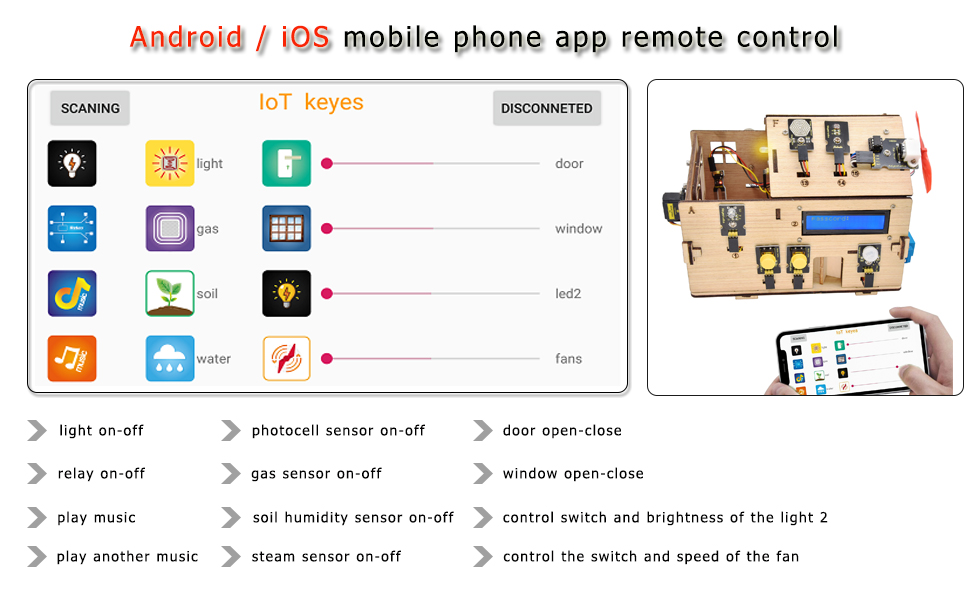
In this kit, a bluetooth remotely controlled smart home automation system, for monitoring the human, soil humidity, gas leakage and rain inside or outside the model house, was developed. This system can also control the light and the door by using motion and light sensors outside the home, can also control the door, window, light, fan, buzzer(music) of the house and accept alert by using the mobile phone APP we developed.
Before starting any project, you need to get your Arduino talking to your computer. This allows you to write and compile code for the Arduino to execute, as well as providing a way for your Arduino to work alongside your computer.
Note: The kit does not contain batteries, you need to prepare 6 AA batteries to run it.
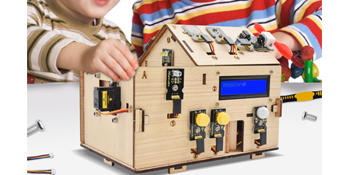
It is made specifically for arduino hobbyists and anyone with kids or students to learn something new. Children without programming experience require parents’ guidance. If you don’t have Arduino programming experience, and you can’t determine if the product is suitable for you, search for keywords in Google Browsers “Keyestudio KS0085” you can preview its Wiki online tutorial.
Electronics Programming Building Skill
A Large Number of Hardware
we also provide rich projects
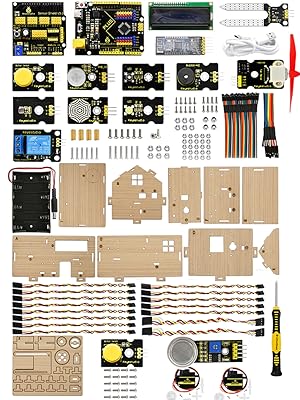
The model smart home automation system consists of two parts: hardware and software. The hardware consists of many units such as your smartphone and personal computer, a KEYESTUDIO plus control board, a KEYESTUDIO sensor shield and a relay, a fan module, two button modules,a soil humidity sensor, a gas sensor, a motion sensor, two servos, a photocell sensor, two LED light modules, a steam sensor, a, HM-10 BT module, a buzzer module and a 1602 LCD display.
A step-by-step detail tutorial Easy to assemble and program No soldering All are packed and labeled individually in a box Fun and Creative Unlimited Expanding more functions if you have experience The technical support is always on time
Take your existing skills and capabilities to the next level by building challenging applications with ease.

Multi-function – Turn The Idea Into A Practical Application!
Lights and people photocell sensor, human infrared sensor and LED module – after dark, if someone has passed the model smart home, the LED light is on, if no one LED is turned off. Password and door Press the button to enter the password and confirm it, the LCD displays the password, if password is correct the door open, if wrong, LCD displays “Error” then display “Again”, you can re-enter the password. Soil dry reminder Soil humidity sensor, bt module, mobile app – soil humidity sensor is inserted on a flower pot, when the soil of the flower pot is too dry, the buzzer will ring, and the “water” will be reminded on the mobile app. Gas leak alert MQ-2 Gas Sensor – when the gas sensor detects that a certain hazardous gas is too large, the buzzer will issue a “didi” alert. Close the window if raining Steam sensor, photocell sensor – when the raindrops are detected, the servo2 is activated, and the window is automatically closed, and when the sunlight is strong, the window opens. BT remote app control Play music, control doors and windows, and all sensors, control the brightness of the lamp and the speed of the fan.
Entry-level Coding Kit for Beginners : Designed for learning electronics and programming in a simple and fun way.KEYESTUDIO coding kit contains instructions to make 15 projects to learn about the basics of different modules like buttons, LEDs, sensors, etc., and learn how smart home works.
Intro to Electronics Kit: In this kit, you can build a model smart house with laser-cut wood boards, a lot sensors and actuators, and the plus control board.Through DIY assembly and learning, you can get a good understanding of the working principle of smart home.
Multi-function :The smart home includes the functions of Lights and People Photocell Sensor/Human Infrared Sensor/LED Module/Soil dry Reminder Soil Humidity Sensor/Gas leak Alert/Steam Sensor/BT remote App Control etc.Turn The idea Into A Practical Application!
Creative&Thoughtful Kit :Great for anyone that’s into learning Arduino, electronic, home automation and coding. Holiday/Birthday kit for aspiring engineers and adults.
About KEYESTUDIO Arduino Starter Kit : You need to prepare a computer to upload code to it and 6 AA batteries to power it. Then it will run automatically or you can control it with your Android or iOS mobile phone.We have online tutorials to teach you how to assemble and upload code.


Peter –
A solid and fun Arduino projects collection
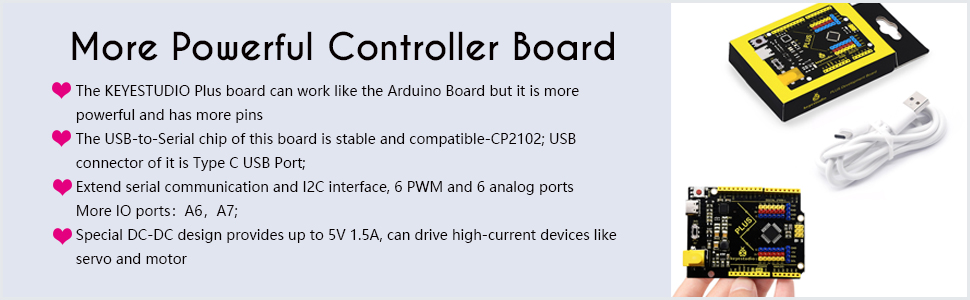
This Smart Home is not my first Keyestudio kit for the Arduino. It lives up to the same quality of my previous kits. I especially like how Keyestudio takes the basic Arduino board and improves upon it with things like USB C, special IIC pins , and extra IO connections.This kit is a little more convent than some, because everything is included. This means control boards, sensors, cables and wires. Oh wait, you do have to add six AA batteries. I got a pack of six at the Dollar Tree.This is a great kit for the person who is not only looking to learn the basics, but who also wants to create something with an immediate, practical application component (element). The kit allows the user to start with the simple programming of turning an LED on/off, and work up to using a phone app to control several environmental things around the home.The two controlling boards are really well made and offer a great opportunity to experiment with the Arduino even before you begin working with the Smart Home. Six AA batteries powers the whole house. This works fine, but I plan to try connecting a pair of 18650 lithium batteries at some point. The power connector on the control board will make this easy.If you are new to Arduino, take your time and go through all the beginning steps carefully. The library explanation is pretty good. The introductory projects help familiarize you with Arduino sensors.The wood house is definitely a fun touch. It goes together easily and is cooler than a plastic box of parts. It uses real metal hardware to attach many of the parts. The servo experiments are made extra interesting with the introduction of a special gear.I am thinking of adding solar cells, mounted on the roof later for more experimentation.All in all, a very satisfying and worthwhile kit for the Arduino enthusiast. There is plenty of opportunity for future experimentation. The Smart Home builds a capable foundation.
Emmanuel Anaya –
Fun and Educational Smart Home Kit!
The kit comes with everything needed to build a miniature smart home, including sensors, modules, and a well-designed wooden house. The quality of the components is great, and everything fits together nicely.Setting it up was a fun challenge, and the included instructions made it easier to understand how each sensor and module works. It’s a great way to learn about home automation, coding, and electronics. Whether you’re a beginner or someone with experience in Arduino projects, this kit offers a lot of possibilities for customization and creativity.
Gandhi –
Good kit for the price
I give 10 stars for the thought that went into the design. It is well thought out. It is complete and like how the sensors and actuators work together. The window sensor that senses rain and door that reacts to password are good examples of tying things together as a well planned system.I also give 5 stars for the step by step instruction rather than introducing the big blob of C code. The customer service is very responsive and has a 1-day turn around (Us/China timezone difference).Once you get a hang of the board, shield and sensors, motor/motor driver, there are endless possibilities to build projects.Why I am giving 4 stars:1. The chipset should be compatible with Raspberry PI/Linux. CP2102 in my understanding is distributed with Linux/Raspberry PI but I am not sure why the instruction does not mention it. The support is not aware of this either. Hooking this up as a Pi Slave will open up more opportunities.2. Please open source the code the App. It keeps crashing and Bluetooth connection is not stable. The messages are in Chinese and does not help debugging.3. The revolving door does not attach cleanly and gets stuck during open/close of door. It does not clearly integrate with the mobile app. The window operation needs better directions. If you didn’t understand C code you can easily get into a situation where the window motor keeps spinning with no room to open.4. Nit pick: Slot 18 – what is that for?? Was it intended for the pot with soil sensor? Annoys me that there is a hole with no purpose 🙂
Scott Salyer –
Neat to build, no clue how to control
The house itself was fun to build – took some trial and error because the instructions are on a giant wiki page and the pictures are a bit low quality, but once it was together it looked really neat! Unfortunately (and the reason for 3/5), the app crashes as soon as you grant it location access (apparently required) so I have no clue if what I built actually works or not.If the app gets fixed I’ll happily update this review, but I’ve seen some other negative reviews on this and it looks like it’s been a known issue for a while with no updates. I wish they’d open source the app and let the community fix it!** UPDATE #1 **The Android app is the one I was trying and it crashes, but on iOS everything pretty much works as expected and the app runs. Hopefully they patch whatever is broken on the Android version and I can update this again with good news!
zekefarsiguy –
Take it slow
Take it slow and you should do pretty well. I love this kit.
Dan Hoover –
Really well done kit
I’ve messed with a lot of Arduino kits over the years, but this one has jumped to the top of my list. The instructions were great. Everything went through the first time. I REALLY like that they go through and teach you how the sensors work before they tell you to put the kit together. Then at the end you put it all together.I downloaded the android app. It took me a few mins to wrap my head around it, but you can open and close the doors and read sensor values and all sorts of cool stuff with it. The big wooden gears are also a nice touch. All the parts are laser engraved to make assembly a breeze. The house part took me an hour and 15 mins to do casually while watching youtube, but the manual has enough in it to keep you busy for a week.
Mikołaj Gorgolewski –
Ogólnie fajna zabawka i świetny sposób aby poćwiczyć Arduino. Jednak mój entuzjazm zmalał po wykryciu wspomnianego niechcianego skryptu
Customer –
4.8 stars, but I rounded up. I thoroughly enjoyed myself with this, but if you’re making it with a kid, be prepared for quite a bit of head-scratching. Also, it is great for experimenting but most certainly not a complete “Learn to Code” kit (though honestly what is?)My full, exhaustive review is below. Note that I am coming from my perspective here as a 20-something dude that likes robots, wooden model kits, and Arduinos. Your mileage will almost certainly vary, and I would assume that a “Regular Joe” would give this a 3.5-4/10 and a “Parent/Grandparent + Kid Hobby Tag Team” would likely give it a 4.5ish but maybe 4 for the money and the finagling. Though it’s by no means a bad deal; there’s a lot here and the box is full of goodies. Again, I thoroughly enjoyed myself with this.For starters, this kit arrived quickly, was packed exceptionally well, and was a ton of fun to put together.You get a bunch of little bags of components/parts/nuts/screws and stuff. Everything small is even labelled, it’s attention to detail you rarely see.The whole thing is powered by a Keyestudio PLUS Controller Board, which is basically an Arduino Uno on steroids, with USB-C and cool enhancements like that.You get a sensor shield for it, as well as a beavy of sensors and stuff. Buttons, a relay, two LEDs (one white, one yellow), a soil hygrometer, a moisture sensor, a photodiode, a fan module (with a built-in L9110 motor controller, a little DC motor, and a plastic fan and nosecone; good stuff), a gas sensor (honestly dunno why), two servos, and a buzzer.There’s a few wooden boards with laser-cut parts for the house itself. Some are parts of the house itself, others punch out. Gears and fasteners and stuff. Smells good, but maybe I just get nostalgia from the smell of wooden kit parts because my grandpa and I used to build so many of them together. ☺️The instructions basically tell you to go to the Keyestudio wiki, which has its own big page for this kit. It’s somewhat tricky to read/comprehend, but if you take your time and follow along step by step you should be able to figure it out, given enough time and a bit of head-scratching. But hey, use it or lose it, right?The app used to control everything is frankly a bit of a buggy mess, but that’s mostly the fault of the fact that it’s using a Bluetooth module and an Arduino-compatible board. I know from experience that you can only do so much with that setup, communicating with plain text. That’s why I bought a Pi Zero W honestly; Arduino + Bluetooth is cool but not as cool as it could be or sounds like it is.Anyway, the instructions also have a dozen-odd projects to do before building the house. Mostly hello world stuff with some of the major components.Good stuff, and an Arduino hackers’ dream really. Most of the stuff will probably go over your head or be kinda weird the way it’s explained unless you’ve done this stuff before. It ain’t a catwalk for an absolute beginner, but if you know a thing or two about Arduino, electronics, programming, etc. you can figure it out.Rarely did I stop in ten process of going through the projects/build and think “Wait, I don’t know what I’m doing here” though there were a couple times.I was running through it all pretty quickly, and it took about 5.5 ish hours for the unpacking, setup, projects, building, etc. Unless you have a ton of patience or are going through Arduino withdrawal (guess which one describes me) you’re not finishing this in one sitting. But that’s good, really.It’d make a great project for a kid and adult/older sibling to walk through together over the course of a week or two, a little bit at a time so you don’t overload their brains or go beyond their attention span. It any kid who loves coding, hacking, building, crafting, robots, and/or kits like these would have to be in a pretty bad mood to not at least get a kick outta this. It’s like a major upgrade to those build-it models you might see at your local dollar store (Needless to say, the kind of stuff I was raised on).Overall, yes there are a lot of little things that bring it down. Yes it’s a challenge to put together, and not always a good challenge. There are some downright tiny parts, but at least there are a few extras of some components. Some steps require quite a bit of precision (like putting a gear on a servo; I honestly can’t say I enjoy that bit) and some things would probably break on you pretty easily.The wiring of the whole house is frankly nothing short of a mess. But honestly what is to be expected when there is just that much going on?The big 6xAA (it needs the voltage, but I’m sure it’d last quite a while on good batteries; I just powered it from my laptop personally) battery pack can power the main board, or you can use the provided USB-C cable.The “final product” is a bit underwhelming in some aspects. Like, why is there a random soil hygrometer sticking out of the roof? I guess to check the water level of a nearby houseplant? But you’d have to figure out an uninterruptible power supply to make it worth it.Why is there a gas detector? Like really? The instructions say it can detect “flammable/hazardous gas” well OK but I’d rather not rely on a glorified bird house to tell me that there’s dangerous fumes in the air, thank you very much. Also, there’s like a password on the door that uses the buttons on the front of the house, but I couldn’t get it to work properly. And why is there just a random relay on the side that goes “Click click click” when you trigger it but it isn’t attached to anything else? 😅You’ll probably notice the two squares of foam tape on the roof of my house. That is because I have up on the roof, and also because you need to take the roof off in the current state of this thing to reach the Bluetooth module so you can unplug it while uploading new code… Yeah…The app again is really quite a mess, but honestly you could use any app that communicates over Bluetooth 4.0 and plain text (ASCII? I dunno) and there are some good ones out there. You just need to get the right letters to send to then board.Overall, if you’re looking for something easy to help your child/friend/loved one learn to code, hate to say it but this ain’t it, chief.It advertises being compatible with Scratch and Visual Programming, which is not a lie, since again, there’s a glorified Arduino Uno in there.But none of the code samples in the documentation are in Scratch. And the final big loop the whole thing runs off is nearly undocumented and comes out of nowhere at the end of the instructions. Sure, the other projects do give rather simple example programs for the components and decent explanations, but it’s by no means a complete curriculum.Honestly though it’s Keyestudio, you really can’t go wrong with their stuff. Their staff are generally pretty friendly and will get back to you if you have any questions promptly. Their stuff is top-notch as far as I’m concerned, at least at their budget-friendly price point.Would I recommend this, and to whom would I? Yes, I would recommend this to someone with either a child or who knows a child that would be interested in it (not really for an adult to put together themselves. I had fun though, since I tend to see these types of things through rosy specs, but I digress). It’s no learn-code-quick scheme or teaching aid necessarily, but it’s a great time kicker rainy day type project that doesn’t require much other than your time, concentration, and thumbs (popping out/pressing in wooden pieces, spinning nuts, holding stuff together, pressing down wire blocks, etc.)Although I would probably rather recommend getting just the Keyestudio PLUS Controller Board, the Keyestudio Sensor Shield to go along with it, and a Keyestudio Sensor kit or something if what you want to do is just tinker or have parts for other projects. I honestly think that Keyestudio is basically one of the best brand names in the hobby microcontroller accessories market (Kuman and DFRobot are also very good IMO) so I do feel good about recommending their products over random knock-off potential trash.Speaking of which, I’ll probably be dismantling this house and cannabalizing it for its valuable Keyestudio parts once I’ve exhausted the list of things I want to do try to do with it (mostly custom programs using the sensors; the code it comes from is pretty good but I’d rather take a crack at it myself.)Wouldn’t buy another one, but the parts are high quality, and this made for a fun afternoon, so I’m happy with it. 😀
Ürün yazılım kabul etmiyor hata veriyor –
Yazılım yüklenmiyor
Carlos Matos –
Bem embalado, conforme a descrição.
CIC –
組立説明書も無くちょっとこうゆうの駄目でしょ親切丁寧さが感じられない統一○○連合みたいに売れてしまえば後はどうでもいいんだね…私はもう購入しない