




NOTE: Check Wattage first: DON’T exceed 150 W of LEDs or 960 W incandescent. Use with small fans under 1/2 hp only. NEUTRAL WIRE REQUIRED.
SPECIFICATIONS:
- Model Number: ZEN51
- Z-Wave Region: US/CA/MX
- Power: 110-120 V AC, 60 Hz
- 960 W incandescent, 150 W LED bulbs, 10 A resistive, 1/2 HP fan motors (don’t use with tube lights or switched receptacles)
- Z-Wave Range: Up to 300 feet line of sight (1300 feet with Z-Wave Long Range enabled)
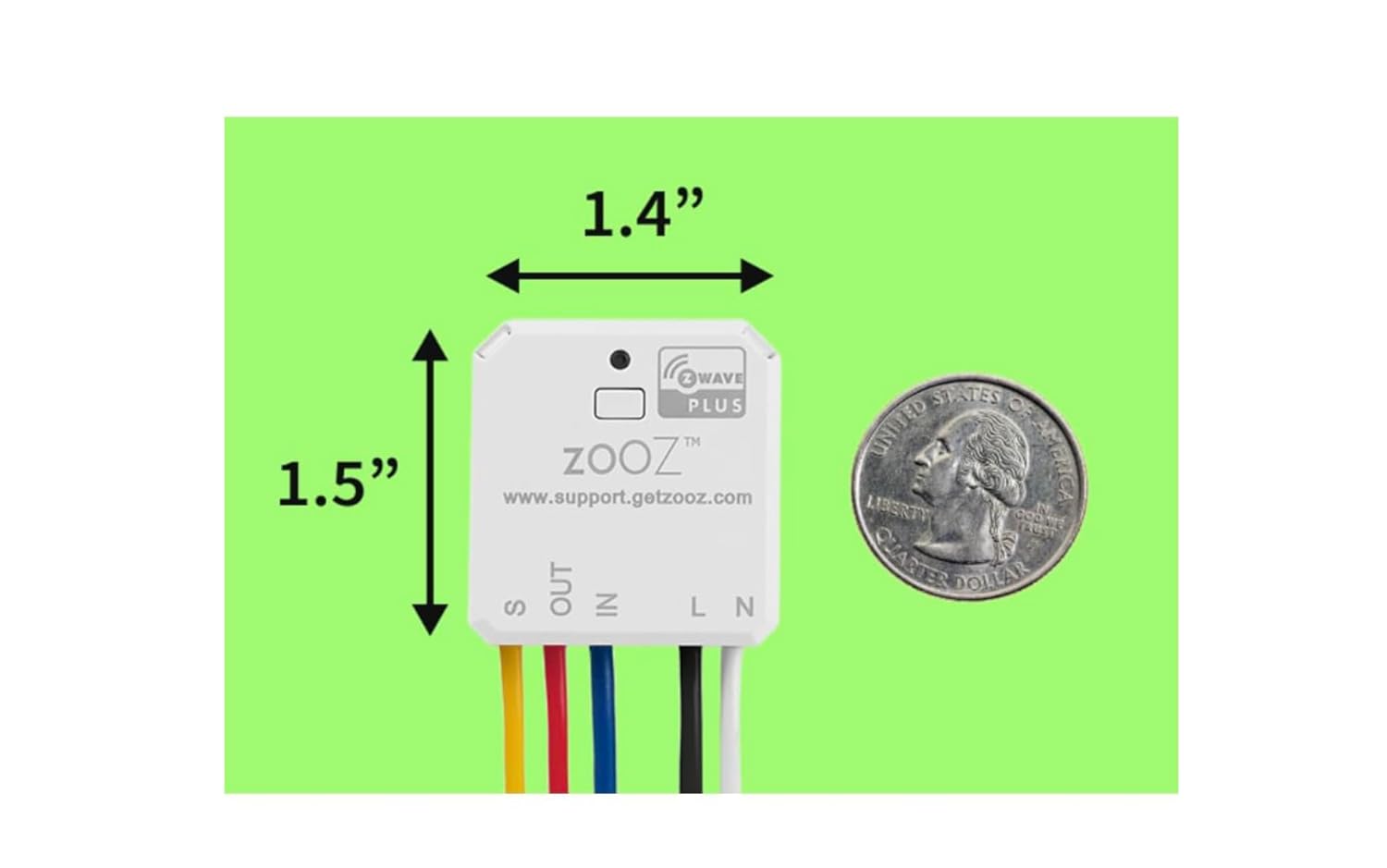
- Dimensions: 1.5″ tall, 1.4″ wide, 0.7″ deep
- Operating Temperature: 32-104° F (0-40° C)
- Installation and Use: Indoor only
Will it work with my smart speaker
Smart speakers are not Z-Wave controllers so you will need a compatible Z-Wave hub to control this device with voice commands.
Smart speaker compatible Z-Wave hubs include:
- Z-Box Hub
- compatible with SmartThings
- Home Assistant (Z-Wave JS)
- HomeSeer
- Hubitat
Product Dimensions : 1.5 x 1.4 x 0.7 inches; 1.76 ounces
Item model number : ZEN51
Date First Available : July 5, 2022
Manufacturer : Zooz
ASIN : B0B5VR87JX
Best Sellers Rank: #46,188 in Tools & Home Improvement (See Top 100 in Tools & Home Improvement) #369 in Electrical Light Switches
Customer Reviews: 4.4 4.4 out of 5 stars 285 ratings var dpAcrHasRegisteredArcLinkClickAction; P.when(‘A’, ‘ready’).execute(function(A) { if (dpAcrHasRegisteredArcLinkClickAction !== true) { dpAcrHasRegisteredArcLinkClickAction = true; A.declarative( ‘acrLink-click-metrics’, ‘click’, { “allowLinkDefault”: true }, function (event) { if (window.ue) { ue.count(“acrLinkClickCount”, (ue.count(“acrLinkClickCount”) || 0) + 1); } } ); } }); P.when(‘A’, ‘cf’).execute(function(A) { A.declarative(‘acrStarsLink-click-metrics’, ‘click’, { “allowLinkDefault” : true }, function(event){ if(window.ue) { ue.count(“acrStarsLinkWithPopoverClickCount”, (ue.count(“acrStarsLinkWithPopoverClickCount”) || 0) + 1); } }); });
SMART RELAY FOR ON/OFF CONTROL: Install this relay to add Z-Wave to the existing wall switch and keep your favorite switch style and color. The relay output is dry contact for your unique applications outside of lighting but note the input (switch) requires 120 V which makes it perfect for 120 V signal monitoring on sump pumps or motion lights. For a dry contact input device, look up ZEN16.
3-WAY COMPATIBLE: Unlike many other smart relays, you can use this device to automate 3-way set-ups as well. Even if you don’t have neutral available at any of the switch boxes, you can always install this relay at the light fixture where you’ll have access to power and neutral. Always follow the wiring diagrams carefully and make any programming changes if needed when installing this relay.
EASY INSTALLATION: Pigtail wires for convenient connections. Connect to mechanical on/off or momentary switches only (NO dimmers or electronic / smart switches). The relay is small enough to fit in the most crowded box, just 1.5″ x 1.4″ and 0.7″ deep. NEUTRAL WIRE REQUIRED (check before buying). The device is ETL certified and conforms with North American safety standards.
SMART BULB MODE AND MORE: Bring back the switch function to your old switches even when using smart bulbs. The smart bulb mode allows you to control smart bulbs via Z-Wave without cutting power to them when off. Enjoy the new 700 series Z-Wave with powerful features like Z-Wave Long Range, SmartStart, and S2 authenticated security. Your hub or home automation softwarre needs to support this functionality as well.
HUB COMPATIBILITY: This is an advanced Z-Wave device and it requires an updated Z-Wave hub to display correctly. All Zooz devices work best with the Z-Box Hub. It was tested to work well with Hubitat, Home Assistant (Z-Wave JS), HomeSeer and is compatible with SmartThings. This product is backed by US based support from Zooz, 7 days a week and a 5-year warranty once registered.


Gru Moses –
It’s great for hubitat
I’ve purchased multiple Zooz 700 Series Z-Wave Long Range Double Relay ZEN52 units for my Hubitat setup over the years, and they’re a cornerstone of my smart home automation. This relay integrates seamlessly with Hubitat, allowing independent control of two 120V loads, making it ideal for automating dual gang box switches or separating fan motor and light control in a single fixture. The installation is a breeze with pigtail wires, fitting easily into tight boxes.The 700 series Z-Wave chip and Long Range support deliver fast, reliable communication with Hubitat, ensuring no lag in my automation routines. I’ve used it for controlling fans, lights, towel warmers and other non-dimmable loads, and it performs flawlessly.For Hubitat users seeking versatile, reliable automation, I highly recommend the ZEN52 for its performance and ease of use!
Victor –
Works well with SmartThings
Works well with Samsung SmartThings as an at-the-light smart relay
Patrick F. Mahoney –
Works great with Z-Wave and Home Assistant
It took me a while to figure out how to pair it with my Home Assistant setup, but I went through their troubleshooting page and got it on the second try. The final solution to pairing it was to follow their instructions on their website – not sure if I can link it in this review, but I used DuckDuckGo to search for Zooz 800 ZEN55 “home assistant” and followed the instructions on that page. The final solution was to click the buttons very quickly – I think I was too slow before – and I did a reset (I think) with five quick clicks, then re-added with 3 quick clicks. The whole thing easily fit back into the smoke detector enclosure, and I tested it and it worked well.It’s nice to have the piece of mind of knowing I’ll get an alert on my phone if there is an issue, but without the privacy implications of using it with Google or another company.
H. Anderson –
Works great
Works as expected. Long range is a nice benefit
Jeff –
Works Great
I am a technical tinker, and wanted to be able to have my interior garage lights turn on when the garage doors are opened while it’s dark outside. I used rules on my Smartthings hub to trigger the lights when it sees my garage door sensors open. You MUST have a good understanding of electrical wiring and 3-way switching to assure this is installed correctly. Important things to know: 1.) the 3-way switches will continue to work regardless of which state this relay is in, which is great! I also have a Zoos relay on my garage doors that monitors door status switches on each door, and momentarily activates the relays independently to open/close each door via commands with an echo Dot I keep in the garage (located far away from windows and doors to prevent a thief from opening the doors from outside the garage). 2.) I needed to take this down near my hub to initially add it to the zwave network. 3.) it’s very small and fit inside of the switch box. 4.) the average person without technical knowledge would probably not be able to install this.
Whitecat –
SmartThings Compatible Zooz Relay: Easy Installation, Silent Operation, Perfect Fit for 1-Gang Box
I installed this Mar/2025 smart home device using the SmartThings hub v2. I have nine smoke detectors in my house.On the first link, I pressed the button three times to connect the device to my hub. However, I encountered an issue because the hub connected but didn’t function correctly. After researching, I discovered that I needed to install the Zooz driver first on my hub.When I attempted to update the driver in the hub, I couldn’t switch to the newly installed Zooz driver. Consequently, I had to put the device in exclusion mode and remove it from the hub. Next, I re-added the Zooz relay, and the device connected immediately with the correct driver.The relay produces no noise and fits perfectly in a 1-gang box, even though the box contains three Romex wires.
Wayne Manion –
It is tiny, but there are flaws
Let’s start with the positives:* This thing is tiny. It packs two switch inputs and two relays where other manufacturers fit one* The price is about 40% less than other Z-Wave double switches* Lots of options for setup in Home Assistant, though this is a double-edged sword. Keep reading.The negatives:* The wimpy 5A relays put some pretty serious restrictions on where you can use this. A ceiling fan comes close to maxing out the relay rating. Definitely do not connect this thing to a switched outlet or anywhere else you can’t guarantee a current draw under 5A. This limitation should be more clearly marked on the packaging. For example, you should definitely not use these to control a switched outlet. Someone might plug in a high current device in that outlet and cause a major problem.* Makes a little bit of a humming/buzzing noise. You won’t hear it once the device is squirreled away inside a wall box, but I could definitely hear all three units I bought when I had them hooked up in the open (with all exposed wiring covered in Wago connectors) for pairing.* The default switch setup is a little confusing out of the box. I suspect the most common use for these, by a wide margin, is connecting them to existing light toggle switches. The switch inputs on all three of my units were not set that way by default. I was initially very confused when I got the switches hooked up, flipped the lights on with the physical switch, flipped them off with Home Assistant, and then had to hit the switch twice to get them to turn on again. I had to go into the device options in Home Assistant to get the switch inputs set as toggles (I don’t remember what the initial setting was). I have lots of Wi-Fi, Zigbee, and Z-Wave smart switches and these are the only ones that weren’t set up for toggle inputs by default. It is a minor issue, but I bet the manufacturer gets a lot of these things returned by confused customers that don’t have patience for tinkering.Update: I have installed three units inside wall boxes in my house and all of them have had incidents where they completely stop working until I turn off the circuit breaker and turn it back on. When this happens the unit is unresponsive in Home Assistant AND the physical switch stops working. This is completely unacceptable.
Lynne J. –
Easy to install and has worked no problem at all.
Luis C. –
Este módulo es más pequeño de lo que imaginaba, así que cupo perfectamente en la caja de conexiones que tengo. Lo uso para controlar dos grupos de lámparas LED de manera independiente mediante el software Home Assistant (home-assistant.io) integrándolo con un módulo Z-Wave Nortek HUSBZB-1 (https://www.amazon.com.mx/GoControl-CECOMINOD016164-Lineal-husbzb-1/dp/B01GJ826F8/.Me) permite controlar las luces tanto con los switches mecánicos que ya tenía instalados como con el Home Assistant.
Reviewer –
Works well with Home Assistant and easy to wire up.Will be buying more!
Jennifer Roche –
I purchased two of these to install directly in my 3d printers so that I could control power on/off through Home Assitant. Worked perfectly, setup with HA was straightforward and worked with the quick start code.
Amazon Customer –
Fonctionnait bien au début ,décroche souvent du hub smartThing doit refaire intégration