


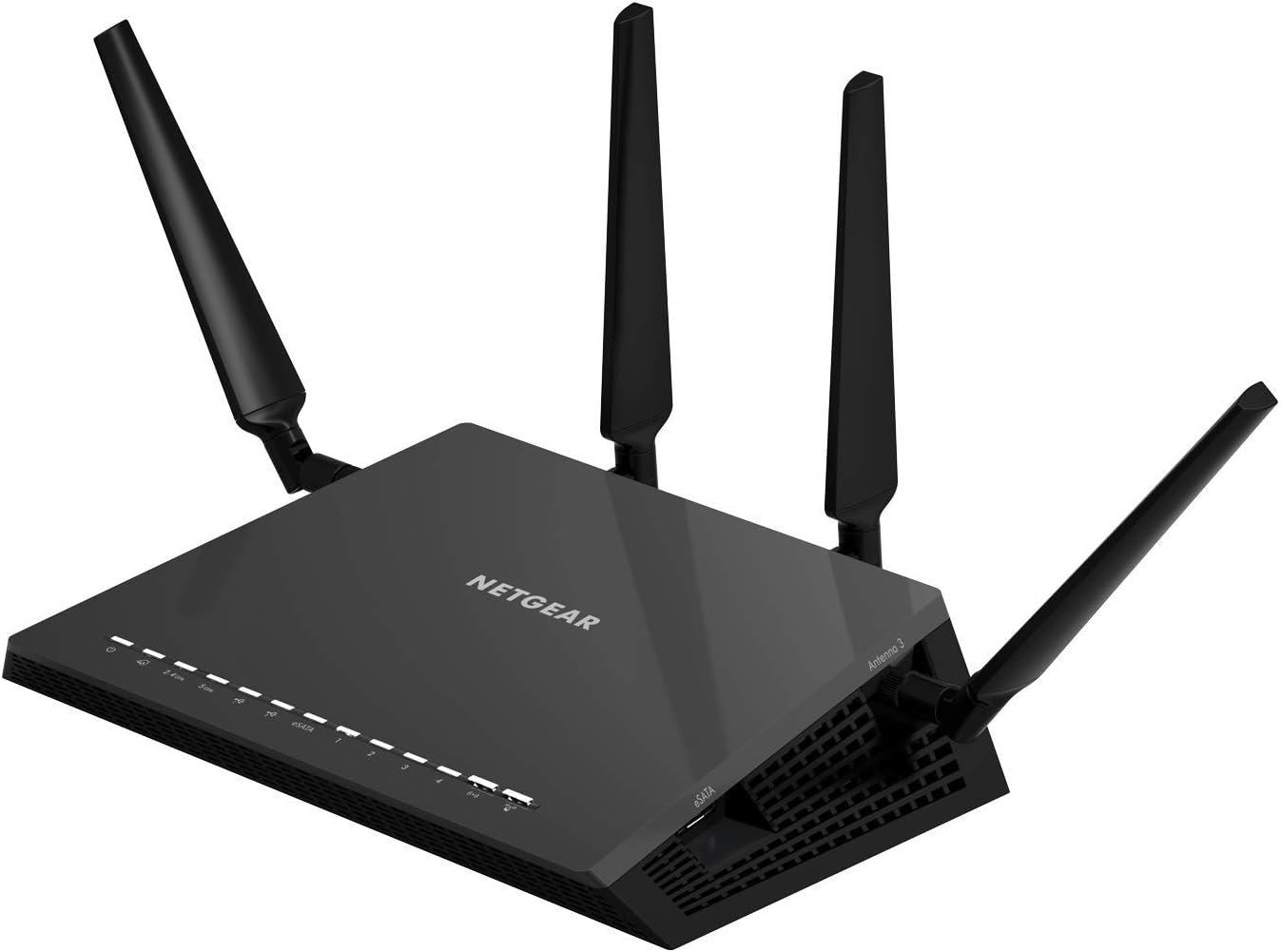
Nighthawk X4S AC2600 Smart WiFi Router with 160MHz, MU-MIMO, and Quad Stream technology delivers WiFi to multiple devices simultaneously for faster speeds. Stream 4K content in pristine quality with 160MHz support while receiving ultimate WiFi speeds of up to 2.53Gbps, with a powerful 1.7GHz dual-core processor. Enjoy smoother streaming and gaming by prioritizing application and device with Dynamic QoS. WiFi Range – Very large homes.
Fast wifi performance: Get up to 2500 square feet wireless coverage with AC2600 speed (Dual band up to 800 + 1733 Mbps). WiFi Band-Simultaneous Dual Band WiFi – Tx/Rx 4×4 (2.4GHz)+ 4×4 (5GHz)
Recommended for up to 45 devices: Reliably stream videos, play games, surf the internet, and connect smart home devices.
Wired ethernet ports: plug in computers, game consoles, streaming players, and other nearby wired devices with 4 x 1 gigabit ethernet ports.
Loaded with advanced technology: Designed with a 1.7GHz dual core processor, 4 amplified antennas, Beamforming, MU-MIMO, Dynamic QoS, Amazon Alexa Voice Controls, and more.
Usb connections: Share a storage drive and printer with any connected device, and create a personal cloud storage to access from anywhere, using the 2 x 3.0 USB and 1 x eSATA ports.
Back to products

UGREEN USB C to USB A Hub with 4 USB 3.0 for Laptop, MacBook Pro/Air, Mac mini M4, iMac, iPad Pro, Chromebook, Dell XPS, Galaxy S23, and More, 0.5FT
Original price was: $14.99.$9.48Current price is: $9.48.
-94%






5.0 Engine –
Best router ever
I couldn’t be happier with Netgear X4S router. Before writing this review I’ve been using it (testing) daily to operate my Amazon Fire TV streaming 4-8 hours of HD a night via 5GHz WiFi, iPad Pro, iPhone 6+ and 6s, Dell XPS 15 9560 and XPS 15 M530, Ooma phone, Apple TV 4, Roku 3, and Belkin WiFi Switches. Oh, and a 2017 Ford Fusion car (it connects to the internet over WiFi probably so spies can hack into and crash my car one day). This router has been running non-stop for 2 months and has not missed a beat. Totally stable, very reliable. WiFi streaming is flawless, and speed tests to the internet have topped out at 136Mb/s over 5GHz AC WiFi verified on my 9.7 ipad pro and Dell XPS 15 9560.When I received it, I immediately updated the firmware, as there was a major security problem with the firmware it shipped with. This was easy, and uneventful. The new firmware appears to be bug free.I’m also using many of it’s advanced features such as NAS using a flash drive. All my devices (including iOS) can see the router’s network drive, and read and write fast without issues. I also use the VPN capability, and managed to get it working on my cell phone and iPad. This great for being able to see the content on your NAS drive, or talk to any computer or printer on your home network. You can even set it up to surf the internet from your home’s internet connection from any location on the internet. Very useful for services like Playstation Vue when you’re on the road and want to watch local channels. I even used it to get around corporate firewalls. A very nice feature that is also stable, and works as advertised. You do have to be fairly technical to make it work..I can tell you from previous experience, getting a reliable router is very difficult, and many routers have bugs and stability issues. So far, no problems here. Netgear, you’re engineers deserve a party and a raise. Keep up the good work.
R Crosier –
Never got setup to work properly.
UPDATE #2: It appears that this review is attached to BOTH the R7800 and the R7000 models. My original review (bottom) was for the R7800, which I had problems with, and did not get to work. The TOP review is for the R7000, which I replaced the R7800 with, and is working great. I’ve set up two R7000 models now, and both work great!UPDATE: I received an email from Netgear support, offering to help get the router going, but have already replaced it with another Netgear model R7000, which is working great. Changing review to 3 stars just because they reached out to me proactively.(R7000 review): This unit seemed to come with newer software, and an app called “Netgear Up”. I was having my son set this one up, for educational puposes, and he installed the app on his Android phone, and set it up very easily. It immediately told him that the unit was doing a “software update” (which is what the R7800 below may have been doing, but no message)… The unit was up and running in 15 minutes or less. We did have to use a browser to connect back into it and change the IP address and other settings, because I was replacing another router, and it configured itself in such a way that I didn’t want to leave it. The R7000 works great now, very fast!(R7800 review): Unit hung up during first setup run, right after I entered a new password and security questions. I was not able to get to that screen again. I tried wired, wireless, factory reset the unit 4 or 5 times, but it never would run the setup genie properly again, would just hang for 5-10 minutes. After 2 1/2 hours of trying to get it working, I gave up and put back my old router and ordered another model, hoping that one works OK.Note: This R7800 is not my first Netgear nighthawk (just first of this model), and I’ve done hundreds of various router setups over 30 years, so it’s not like it’s my first one. 🙂
M. Parnell –
Excellent Router! (upgraded to R7800 from R7000)
I just upgraded to the R7800 from an R7000. I was pretty pleased with the R7000 range and performance, but was having issues with a Dropcam Pro (which is used as a baby monitor) constantly timing out. I have about 20 devices that, depending on the time of day, are competing for bandwidth on a fairly consistent ~115-125Mbps(down)/10Mbps(up) connection (only about 8 devices are wireless, the remaining devices are hardwired and pass through a Netgear ProSAFE GSS116E). Dropcam average bandwidth is only supposed to be between 200kb/s(0.2Mbs) average, 500kb/s(0.5Mbs) max. There was no reason I could find for the Dropcam to be stuttering so frequently, when all of my other devices operated at expected speeds. I had even moved the router’s location so that it was only about 10 feet away from the Dropcam, with only a single interior (drywall only) wall separating the two (tested signal strength was excellent at the Dropcam). The R7000 was not placed anywhere near anything that could interfere with the signal (additionally, my WiFi signal was excellent in all parts of my home). I tried connecting with the 2.4Ghz band as well as 5Ghz. I was utilizing QOS on the most current firmware and had given the Dropcam the highest priority (by the device’s MAC address), but was still having issues constantly.I figured I’d try the R7800 and see if the QOS handling was any better. Although I couldn’t find any clear explanation between the “Advanced” QOS on the R7000 vs the “Dynamic” QOS on the R7800, it seems that the Dynamic QOS seems to have made all the difference in the world for me (or perhaps something else in the R7800), as the upgrade solved all of my Dropcam stuttering issues immediately. I’ve only been running it for about a week so far, but have had no disconnects, or buffering/stuttering with the R7800 so far. I’ve even tried taxing things by simultaneously streaming the Dropcam feed on multiple devices (1 iPad, 3 iPhones, a MacBook, a PC desktop running the feed in both Firefox and Chrome, at the same time), while playing multiplayer Halo 5 on an Xbox One, and streaming 1080p Netflix on a PS3. No lag in my gaming, 1080p Netflix, and no stuttering on any of the simultaneously running Dropcam feeds. In short, it works for me. So I’m happy.Just to be clear, the R7000 gave me excellent signal strength throughout my home and worked fine for me when gaming or streaming Netflix, but anything with the Dropcam was constantly buffering. The R7800 seems to resolve whatever specific issues I was having with the Dropcam.Also, I think it’s worth mentioning that the GUI for the 7800 is similar, yet very much improved over the R7000. Little things like being able to manually assign names/labels for each device on your network and even choose an appropriate icon (game console, switch, TV, PC, iPhone, etc.) for quick and easy viewing of all connected devices is awesome. I no longer need to determine each device on my network based solely off of the MAC address.Thanks Netgear! The R7800 is definitely the best router I’ve ever owned. No issues. Zero complaints.
Gideon –
Just received, it is used. Not new. It’s fraud.
Adolfo Aragoneses –
Este router proporciona una excelente señal inalámbrica en ambas bandas, buena para espacios abiertos y tambien para departamentos o casas con muchas habitaciones
GEBRESO74 –
Muy fácil de instalar y funciona muy bien
Guillermo Juan Garduño Bautista –
Mejoró la velocidad de internet. Más información en español para los puertos usb y tarjetas.
Yash Tibrewal –
let me start by saying that i am a huge fan of netgear and its products. 100% reliable and great quality. i got a great deal for this nighhawk x4s under 10,000 on amazon which was a steal of a deal. as soon as i got the package i was impressed by the packaging, feels very premium. i live in a 3 floor house and i was looking for something to connect same internet on all floors. so this is what i did i am using a nighthawk xr500 as my main router, and using x4s and orbi as my access points. it works amazing, with great features and wonderful range, covers every corner of the three floors. i have a 100mbps broadband plan and this router doesnt fail to deliver speed inspite of having 30+ devices connected to it. i have configured it to best suitable settings for me. i was using a tplink router earlier and faced many issues like constant reconnecting but this router manages to give stable ip for all the devices. active beamforming, mumimo, 5ghz works wonders on my ps4. a router is a good investment for 8years and i would recommend this router as this is future proof and amazing features. my rating would be 8/10. if you can afford nighthawk xr500 then nothing like it. the dumaos beats all routers in the market.