


Fast, Reliable WiFi 7—Performance Meets Value
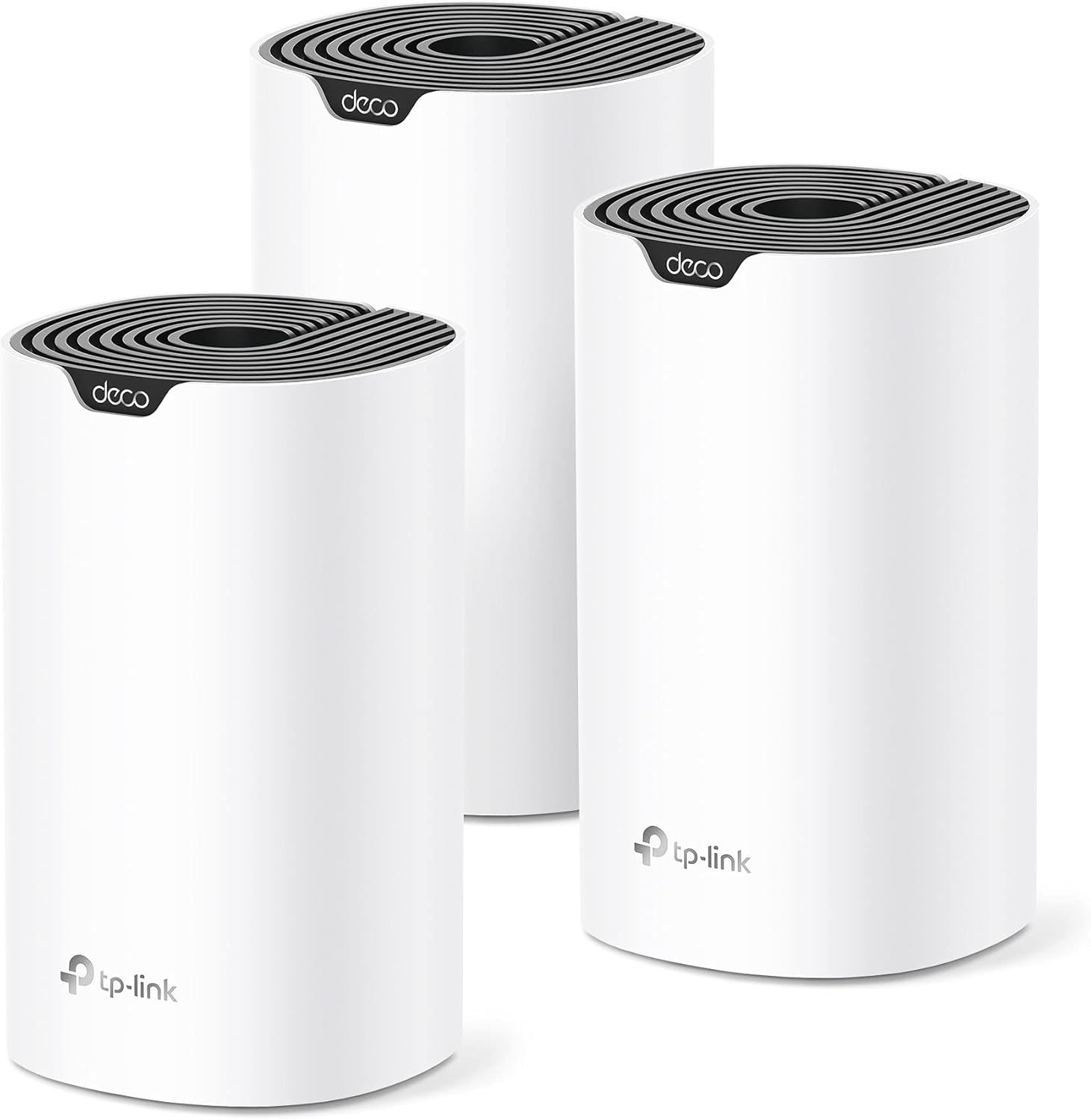
Future-proof your home with the Deco BE23, a Wi-Fi 7 BE3600 mesh system that delivers fast, reliable coverage throughout your entire home—up to 6,500 sq. ft (3-Pack). With cutting-edge Wi-Fi 7 Multi-Link Operation (MLO) technology, 4K-QAM, and support for over 150 connected devices, the Deco BE23 provides exceptional Wi-Fi speeds of up to 3.6 Gbps.*△
Enjoy seamless streaming, lag-free gaming, and smooth connections for all your home devices with this mesh Wi-Fi 7 system. This mesh system delivers exceptional speed and reliability via wired or wireless internet, whether you’re streaming Netflix, Prime Video, or Disney+, or browsing at ultra-fast speeds on your Wi-Fi 7 devices, like the iPhone 16 Pro, the Google Pixel 9, and PS5 Pro.
Deco BE23 is powered by 128MB of flash and 512MB of memory, and includes 12VDC / 1.5A external DC power adapter. The product dimensions are 5.9 x 5.9 x 2.44 inches. It supports a range of advanced features, including smart connect (band steering), beamforming, OFDMA (WiFi 6), TWT (Target Wake Time, WiFi 6), and BSS coloring (Wi-Fi 6). AI mesh-enabled, it also supports AP mode, Quality of Service (QoS), access control, IPTV, IPv6, a guest network, LED control, port forwarding, dynamic DNS, VPN client and server, VPN pass-through, and cloud management. This mesh functions as a Wi-Fi smart hub and is compatible with Alexa and Google Assistant voice commands. The accompanying app is called Deco.
Security features include DoS protection (paid), SPI firewall, IP address and MAC address filtering, domain filtering, IP/MAC address binding. It operates in a temperature ranging from 32°F to 104°F and humidity levels of 10% to 90% non-condensing. This package includes 3 Deco BE23 units, an RJ45 ethernet cable, 3 power adapters, and a quick installation guide. It has regulatory certifications from FCC and CE.
𝐍𝐞𝐱𝐭-𝐆𝐞𝐧 𝐖𝐢-𝐅𝐢 𝟕 𝐰𝐢𝐭𝐡 𝟒-𝐒𝐭𝐫𝐞𝐚𝐦 𝐃𝐮𝐚𝐥-𝐁𝐚𝐧𝐝 𝐮𝐩 𝐭𝐨 𝟑.𝟔 𝐆𝐛𝐩𝐬 – Designed with the latest Wi-Fi 7 technology, featuring Multi-Link Operation (MLO), Multi-RUs, and 4K-QAM, The Deco BE23 delivers full speeds of up to 2882 Mbps on the 5GHz band, 688 Mbps on the 2.4GHz band with 4 streams and achieve optimized performance on latest WiFi 7 laptops and devices, like the iPhone 16 Pro, and Samsung Galaxy S24 Ultra.
𝐖𝐢𝐝𝐞 𝐂𝐨𝐯𝐞𝐫𝐚𝐠𝐞 𝐰𝐢𝐭𝐡 𝐒𝐭𝐫𝐨𝐧𝐠 𝐂𝐨𝐧𝐧𝐞𝐜𝐭𝐢𝐨𝐧 – Enjoy seamless max Wi-Fi coverage up to 6,500 sq. ft (3-Pack) and 150 devices without compromising performance. 4x high-gain antennas per node and 4x high-power FEMs deliver far-reaching, reliable signals for remote workers, gamers, students, and more.
𝐔𝐥𝐭𝐫𝐚-𝐅𝐚𝐬𝐭 𝟐.𝟓 𝐆𝐛𝐩𝐬 𝐖𝐢𝐫𝐞𝐝 𝐏𝐞𝐫𝐟𝐨𝐫𝐦𝐚𝐧𝐜𝐞 – Each Deco unit is equipped with two 2.5 Gbps WAN/LAN ports, offering warp-speed connectivity for high-performance wired devices. Integrate with a multi-gig modem for gigplus internet.
𝐎𝐮𝐫 𝐂𝐲𝐛𝐞𝐫𝐬𝐞𝐜𝐮𝐫𝐢𝐭𝐲 𝐂𝐨𝐦𝐦𝐢𝐭𝐦𝐞𝐧𝐭 – TP-Link is a signatory of the U.S. Cybersecurity and Infrastructure Security Agency’s (CISA) Secure-by-Design pledge. This device is designed, built, and maintained, with advanced security as a core requirement.
𝐒𝐭𝐫𝐨𝐧𝐠𝐞𝐫, 𝐌𝐨𝐫𝐞 𝐑𝐞𝐥𝐢𝐚𝐛𝐥𝐞 𝐁𝐚𝐜𝐤𝐡𝐚𝐮𝐥 – The Deco BE23 enhances stability with simultaneous wireless and wired backhaul, leveraging Wi-Fi 7 MLO for stronger, more stable connections.
𝐀𝐈-𝐃𝐫𝐢𝐯𝐞𝐧 𝐒𝐞𝐚𝐦𝐥𝐞𝐬𝐬 𝐑𝐨𝐚𝐦𝐢𝐧𝐠 – The Deco BE23 creates a unified network with a single network name. Uses AI-Roaming technology for seamless streaming and optimal speeds, adapting through advanced algorithms and self-learning as you move throughout your home.
𝐓𝐏-𝐋𝐢𝐧𝐤 𝐇𝐨𝐦𝐞𝐒𝐡𝐢𝐞𝐥𝐝 – Provides comprehensive home network protection, robust parental controls, and real-time IoT security when you are at home or on the go. A safer internet experience enhances your smart living and adds armor to your network. Visit TP-Link website for more information.
𝐕𝐏𝐍 𝐂𝐥𝐢𝐞𝐧𝐭𝐬 𝐚𝐧𝐝 𝐒𝐞𝐫𝐯𝐞𝐫 𝐒𝐮𝐩𝐩𝐨𝐫𝐭𝐞𝐝 – Enables home devices to access remote VPN servers without installing VPN software on each device. Supports simultaneous VPN and regular internet connections for enhanced security and flexibility.
𝐄𝐱𝐭𝐞𝐧𝐬𝐢𝐯𝐞 𝐂𝐨𝐦𝐩𝐚𝐭𝐢𝐛𝐢𝐥𝐢𝐭𝐲 – TP-Link Deco products are extensively compatible and can work together to form a Mesh Wi-Fi network. It is also backward compatible with all WiFi generations and works with any internet service provider (a modem is required for most internet service providers).
𝐏𝐫𝐢𝐯𝐚𝐭𝐞 𝐈𝐨𝐓 𝐍𝐞𝐭𝐰𝐨𝐫𝐤 𝐟𝐨𝐫 𝐌𝐨𝐫𝐞 𝐒𝐞𝐜𝐮𝐫𝐢𝐭𝐲 – Set up a separate WiFi SSID for IoT devices, using HomeShield and advanced WPA3 encryption to better protect your home network and devices.

TERRAMASTER F2-425 Plus NAS Storage - 2Bay Intel N150 Quad-Core CPU, 8GB RAM DDR5, 5GbE LAN x 2, M.2 Slot x 3, Network Attached Storage for Teamwork, Multimedia Server (Diskless)
Original price was: $239.24.$63.99Current price is: $63.99.

Logitech K400 Plus Wireless Touch TV Keyboard With Easy Media Control and Built-in Touchpad, HTPC Keyboard for PC-connected TV, Windows, Android, ChromeOS, Laptop, Tablet - Black
Original price was: $34.99.$23.99Current price is: $23.99.
-88%





Sean –
Great coverage and fast speeds
The signal in the far bedrooms were weak, and the connection on the back patio was practically non-existent. After struggling with extenders and a supposedly single router, I decided to upgrade to this Deco mesh system with an Archer BE230 router, and the difference is absolutely incredible.The set-up was easy using the Deco app and it walks you through everything step-by-step. I had the entire system up and running in less than 30 minutes. That is with an IoT Network, an MLO Network, and a VPN Setup.The performance is where this system truly shines. The Wi-Fi 7 speed is phenomenal. We are Streaming 4K video, online gaming, and working from home simultaneously, and there’s no lag or buffering whatsoever. Downloads are amazingly fast, and every single one of our smart devices, from cameras, lights, vacuum, security doors, etc. is more responsive and safe.If you’re tired of fighting with your Wi-Fi, this is the solution. It’s a fantastic investment that provides a powerful, reliable, and safe network that covers every square inch of your home. I can’t recommend it enough!
Mark N. –
Like everybody, my needs have changed over time
As an IT professional, I have tried hundreds of combinations of routers and switches and wireless AP’s. Like everybody, my needs have changed over time. The kids are old enough now to be using the internet, the house is getting smarter all the time, and even my television comes in over the web now. After exhaustive research and feature and price comparison, I decided to move on to the Deco m5. I was using a cisco asa firewall and cisco 3900 series switch with a netgear router in AP mode before, but it lacked the ability to easily implement parental controls. I get annoyed with the kids for staying up late playing on the internet after we go to sleep. I un-boxed the deco m5, very nicely packaged by the way, to find everything in order and ready for install. I powered down my firewall, called the ISP to have the IP address released, (I work for the ISP, so that was convenient) and got the router plugged into the internet connection. I am fiber to the house, so I don’t have a modem. I had already installed the TP link app on my galaxy s6, so I was ready to get started. (Everybody else was at work/school so no complaining about the lack of internet while I did all this. YEA!!!!) The app found the deco with no issues and ran through the VERY basic setup process. Everything immediately came up and worked. I have 80 meg service and speedtest.net was reporting 82.7 download consistently over wireless. I started playing with the app, and under the advanced tab is an option to check for updates. I clicked it and it did indeed find one. 5 minutes or so later, the led indicator on the router went green again. This is where things went a little sideways for a few minutes. I spent the next 10 minutes losing and gaining wifi on my phone, and had to force stop the app a couple of times. Everything else in the house seemed fine, it was just my phone. I have six echos/dots in the house, and they all came right back up after the swap out. The echos/dots are usually the problem children to get connected after a power outage, so I was suprised. My wink hub didn’t even seem to be affected. everything was functioning normally except the stupid phone. A quick restart on the phone seems to have fixed it. I did have 2 of my 5 wink relays lose connectivity, but I think they may have already been disconnected. A quick restart fixed them both. I plugged the second port into my cisco switch and all my wired devices reported for duty. Next step was to walk to the far corners of the house and run speed tests with my phone, which was still giving me pause because of its recent bad behavior. My home is 1400 square feet, and about 4 years old, with tech shield in the attic. (the aluminum foil looking coating on the inside of the roof decking to block the heat) wifi seemed to be great everywhere with speeds at maximum in every corner. (I bought the single Deco m5 unit) The router is actually in the garage in the corner for now, so it will probably cover significantly more ground once located in the center of the house. Next step was to setup parental controls. Yeah, this is the good part, talk back to me one more time you obnoxious little turd. Setup the profiles and went hunting MAC addresses. The only downfall to the process was finding all the mac addresses. Nothing has a logical name in the table you are looking at, everything just says “android” or “amazon”. I started with “amazon”, and that is when it hit me. I opened up my alexa app and went to settings, and then to devices. At the bottom of each device’s settings page is the device’s mac address. I found my trusty pencil and an envelope from some junk mail, and my list was soon made. You can change the name of the devices in the table on the Deco to recognizable names. I then went to the android devices and PC’s. That was a little more time consuming, but not too bad. Next, assigning who the device belonged too. You do that at the bottom of the device settings page, just make sure you have already built that person’s profile. When you set up the profile you give them a movie like rating system, and can disable or enable various types of websites or specific websites. Next option is setting time limits for daily usage, and last is setting hours to shut them out completely. Kids got pg-13, adults get “adult”. Now that that’s done, time to explore. I knew it was “alexa” enabled, so that was next. Honestly, don’t waste your time. Alexa can do very little besides run a speed test and change the led’s status. I was hoping to pause the kids internet just by telling alexa, but that is a no go for now anyway. It also cannot control access to wired devices with parental controls, so if you want to disable the kids smart tv’s, make sure they are connected wireless. I probably should have given 4 stars due to the setup issue with the phone app, but everything is just working too good now. the parental controls shine, and the wireless connection seems to be rock solid. Only major negative I will give it, you cannot change it’s lan IP address yet, but I have read that this feature is in the works in a future update. If you have anything set static on your current network like I do, you may have to change some IP’s in a few devices. (Cameras, network servers, stuff like that) I only have a few devices like that, so I can handle it, especially for the price I paid for this. Overall, if you are on the fence, this is a great little mesh system. I wish it was POE powered and wall mountable, that would have made it perfect, but I guess it can sit on top of the fridge and do its thing. I’ll update if anything changes, but I don’t suspect I will have any trouble. Oh, and for anybody who is wondering, it does look like you can manage it remotely, as I can log in and change settings right now while I am at work. That could be handy for pausing the internet to make sure the kids do their homework before I get home from work, or to make sure they are doing their chores on time. I wonder if that will work with the old lady too???
Biodun –
Great mesh product.
This mesh works very well. So easy to setup and the coverage is fantastic. The speed is good.
Lazarus –
Wifi 7 for Cheap
Overall, this might be the best router I’ve ever purchased. I have 1000Mb down and it seems like I’m getting the full speed. I have about 30 devices online throughout the day and I haven’t seen any slow down so far.Almost all the functions I normally use are present. Renaming devices, address reservation, guest network with bandwidth control, detailed list of devices and other features are available to use. I can even set whether a device should use 2.4ghz or 5ghz or both or use the 1st deco or 2nd deco or auto which is pretty amazing.I have an upstairs and downstairs so I have a deco on each floor. It’s works great so far. I have a room that’s separated by 3 walls and the signal is ok.Unfortunately, there is something basic that is missing and it’s per-device bandwidth control. The deco uses QOS (Quality of Service) which is very limited. I can only pick about 4 device to have bandwidth priority. This is ridiculously limited. I’ve had routers that were a quarter of the price and I was able to set a bandwidth limit for 30 devices. Hopefully, this will be added at some point (I’m not holding my breath).I think deco is a good device. Time will tell if it’s great. I recommend this if you want a decent level of control and features.
Chase –
Most affordable mesh system
I love the Deco M5. It is one of the best, most versatile units. For the price, you can’t beat it. I use it to create coverage across my entire property. The app makes it easy to set up a mesh system for your whole property. The good thing is you can buy as many units as you want and keep connecting them. Being mesh technology, the speed does not degrade with added units. The size and footprint make it for almost anywhere and you can’t beat even buy a wall mount that hangs it from the outlet. Also these feature wireless or wired backhaul and have a dedicated wireless backhaul channel. So you can extend your network as far as you want with Ethernet cable from unit to unit or simply connect each one wirelessly. Simply the best, mesh WiFi system you can get at an affordable price.
Angelo D –
Love the product and reliability of TP Link. Have had our other units running for over 2 years without issue.
Paulo –
Excelente roteador. Trabalha perfeitamente, também, como redistribuidor, mas, nos pontos mais distantes, com uma redução de velocidade, mesmo assim é muito estável….
CH –
I already have 3 Deco M5 units and wanted another unit to extend the range.Product delivered quickly and was as described.Having read other reviews regarding the power lead I was expecting there to be an issue with this.The unit was supplied with a 2 pin power adapter, but the vendor had included a 2 pin to 3 pin plug in the box. Therefore no need to purchase a new power lead. Very impressed with this.Connected without a problem and works well. Would recommend.
SDC –
My son suggested this device to help my current system which is housed in the basement of a 2-story house. It has helped my internet capacity in the upper level.
Jacobson –
Produto muito bom. Fácil de instalar. É só seguir o passo a passo no aplicativo. Chegou antes do prazo. Resolveu meu problema. Superior ao do Google.